BIOS Setup 3-15
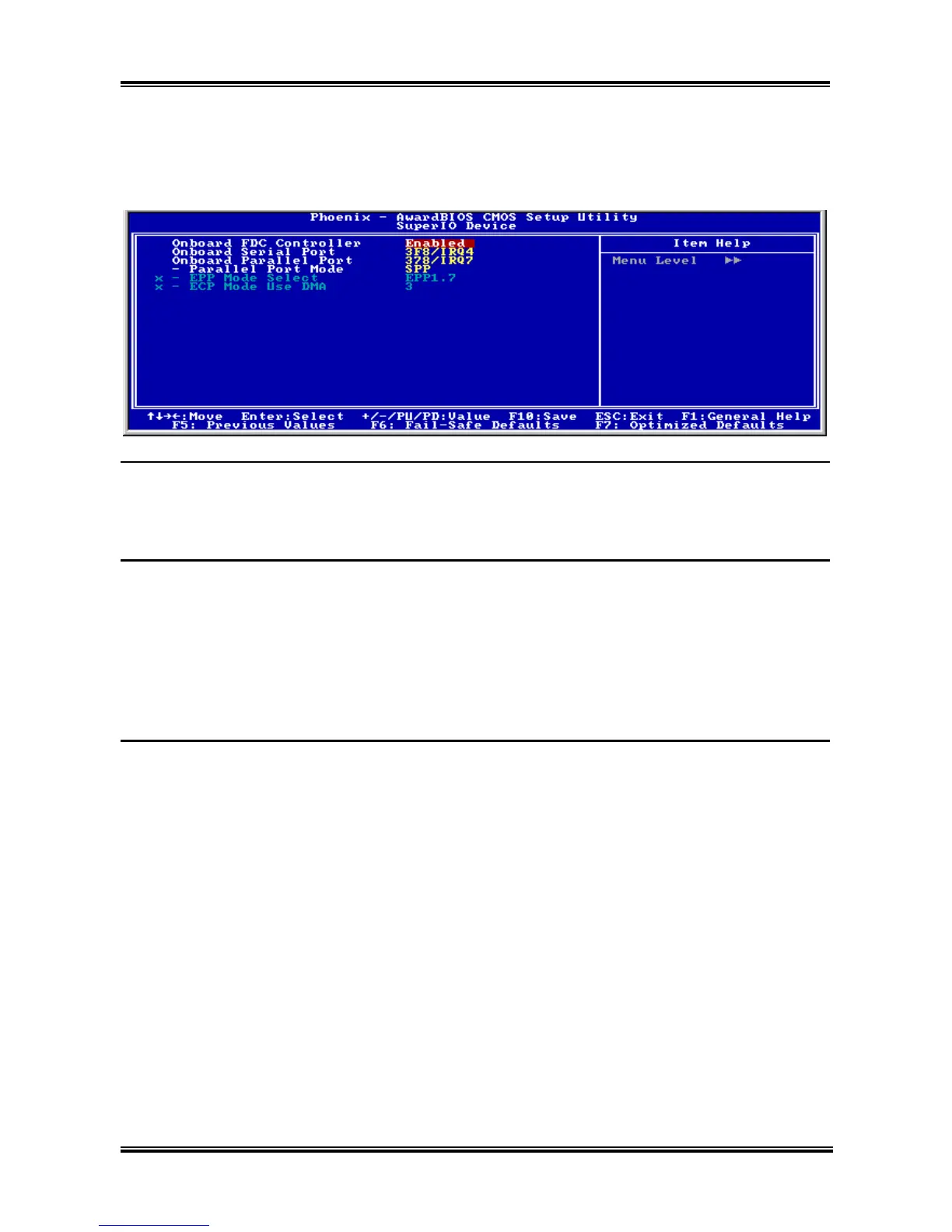
SuperIO Device:
Click <Enter> key to enter its submenu:
Onboard FDC Controller:
[Enabled]: Enables the onboard floppy disk controller.
[Disabled]: Disables the onboard floppy disk controller.
Onboard Serial Port:
This item determines which I/O addresses the onboard Serial Port controller will access.
[Auto]: The system automatically select an I/O address for the onboard Serial Port.
[3F8/IRQ4, 2F8/IRQ3, 3E8/IRQ4, 2E8/IRQ3]: Allows you to manually select an I/O address for the
onboard Serial Port.
[Disabled]: Disables the onboard Serial Port.
Onboard Parallel Port:
This item specifies the I/O address used by the parallel port.
[Disabled]: This option prevents the parallel port from accessing any system resources. When the value
of this option is set to [Disabled], the printer port becomes unavailable.
[378/IRQ7]: This option allows the parallel port to use [378/IRQ7] as its I/O port address. The majority
of parallel ports on computer systems use IRQ7 and I/O Port 378H as the standard setting.
[278/IRQ5]: This option allows the parallel port to use [278/IRQ5] as its I/O port address.
[3BC/IRQ7]: This option allows the parallel port to use [3BC/IRQ7] as its I/O port address.
Parallel Port Mode:
This item specifies the parallel port mode.
[Normal]: Allows the standard parallel port mode to be used.
[SPP]: (Standard Parallel Port) Allows bi-directional parallel port operation at normal speed.
[EPP]: (Enhanced Parallel Port) Allows bi-directional parallel port operation at maximum speed.
User’s Manual



 To Next Page