2-4 Chapter 2
2-3. Install System Memory
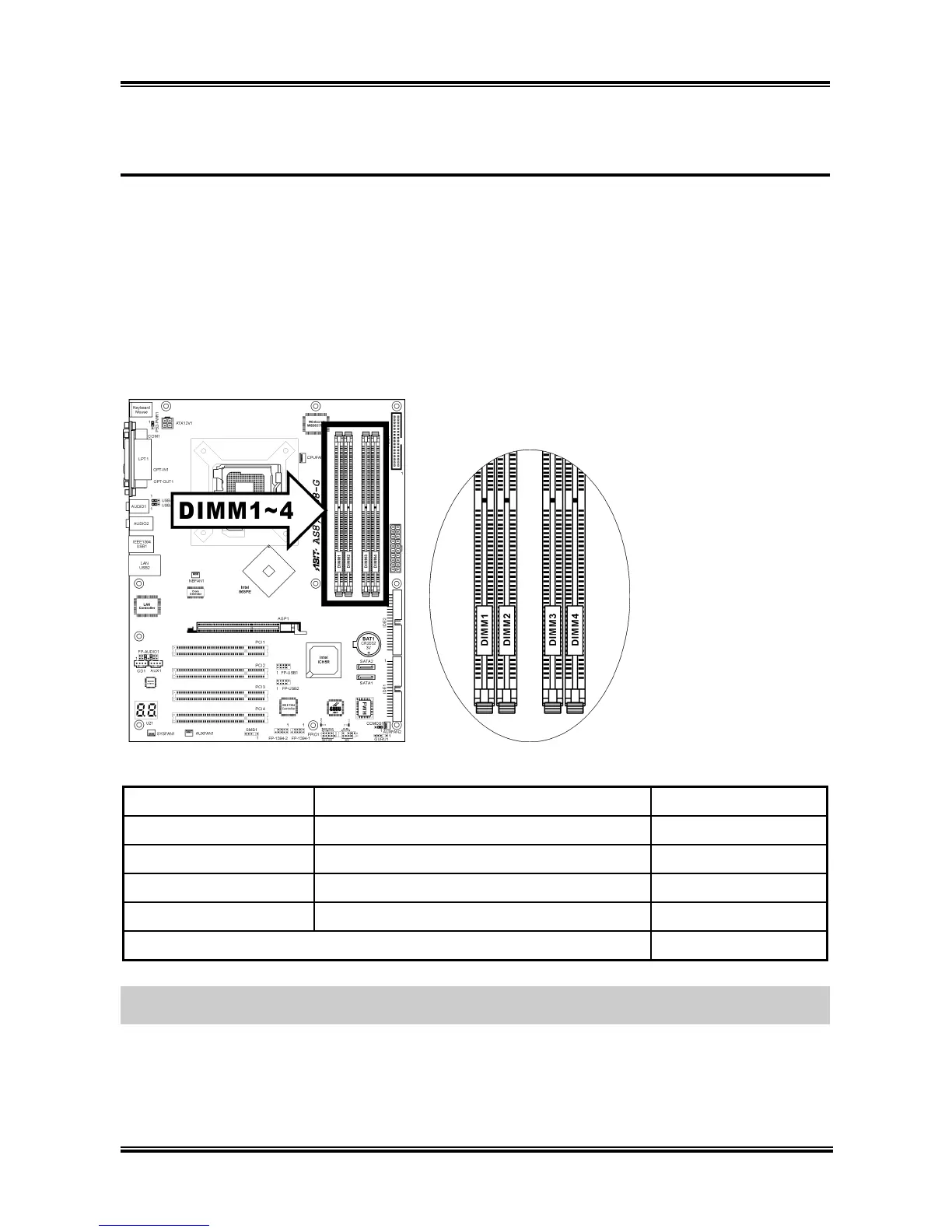
This motherboard provides four 184-pin DDR DIMM slots for Single/Dual Channel DDR 400/333/266
memory modules with memory expansion size up to 4GB.
To reach the performance of Dual Channel DDR, the following rules must be obeyed:
• When installing TWO DIMM modules: Install DIMM modules of the same type and size for
slots [DIMM1]+[DIMM3] or slots [DIMM2]+[DIMM4].
• When installing FOUR DIMM modules: Install DIMM modules of the same type and size for
slots [DIMM1]+[DIMM3], and slots [DIMM2]+[DIMM4].
Bank Memory Module Total Memory
Bank 0, 1 (DIMM1) 128, 256, 512MB, 1GB 128MB ~ 1GB
Bank 2, 3 (DIMM2) 128, 256, 512MB, 1GB 128MB ~ 1GB
Bank 4, 5 (DIMM3) 128, 256, 512MB, 1GB 128MB ~ 1GB
Bank 6, 7 (DIMM4) 128, 256, 512MB, 1GB 128MB ~ 1GB
Total System Memory 128MB ~ 4GB
NOTE: Usually there is no hardware or BIOS setup requires after adding or removing memory modules,
but you will have to clear the CMOS memory if the compatibility problem occurs.
AS8 Series



 To Next Page