– 28 –
Settings
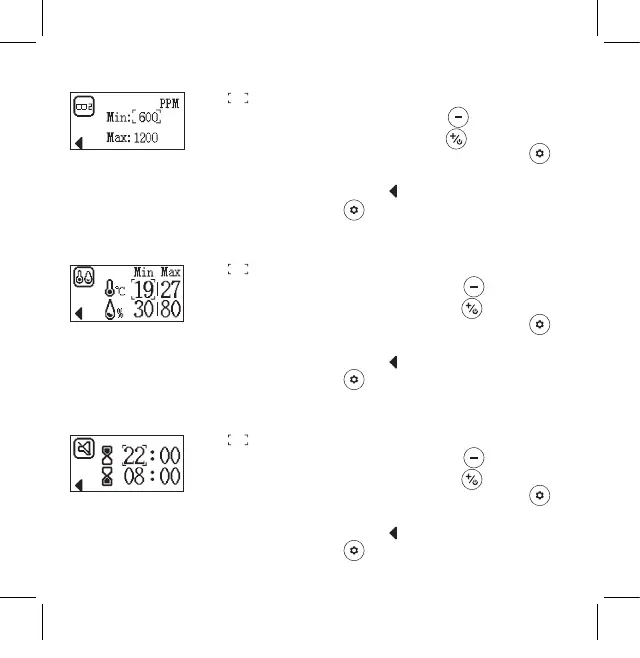
Set max. and min. value for CO
2
alarm
1. ashes during setting
2. Decrease the value by pressing the button and
increase the value by pressing the button
3. To exit and save the selected settings, press the
button
4. When the "Back" symbol ashes, briey press the
"Settings" button to return to the main settings
page
Set value for temperature and humidity alarm
1. ashes during setting
2. Decrease the number by pressing the button and
increase the number by pressing the button
3. To exit and save the selected settings, press the
button
4. When the "Back" symbol ashes, briey press the
"Settings" button to return to the main settings
page
Set "Do not disturb" time
1. ashes during setting
2. Decrease the number by pressing the button and
increase the number by pressing the button
3. To exit and save the selected settings, press the
button
4. When the "Back" symbol ashes, briey press the
"Settings" button to return to the main settings
page
Kohlendioxidmelder_CO2WM110_Manual_3.indd 28Kohlendioxidmelder_CO2WM110_Manual_3.indd 28 04.03.2021 16:46:4604.03.2021 16:46:46


 To Next Page