Configuration
56
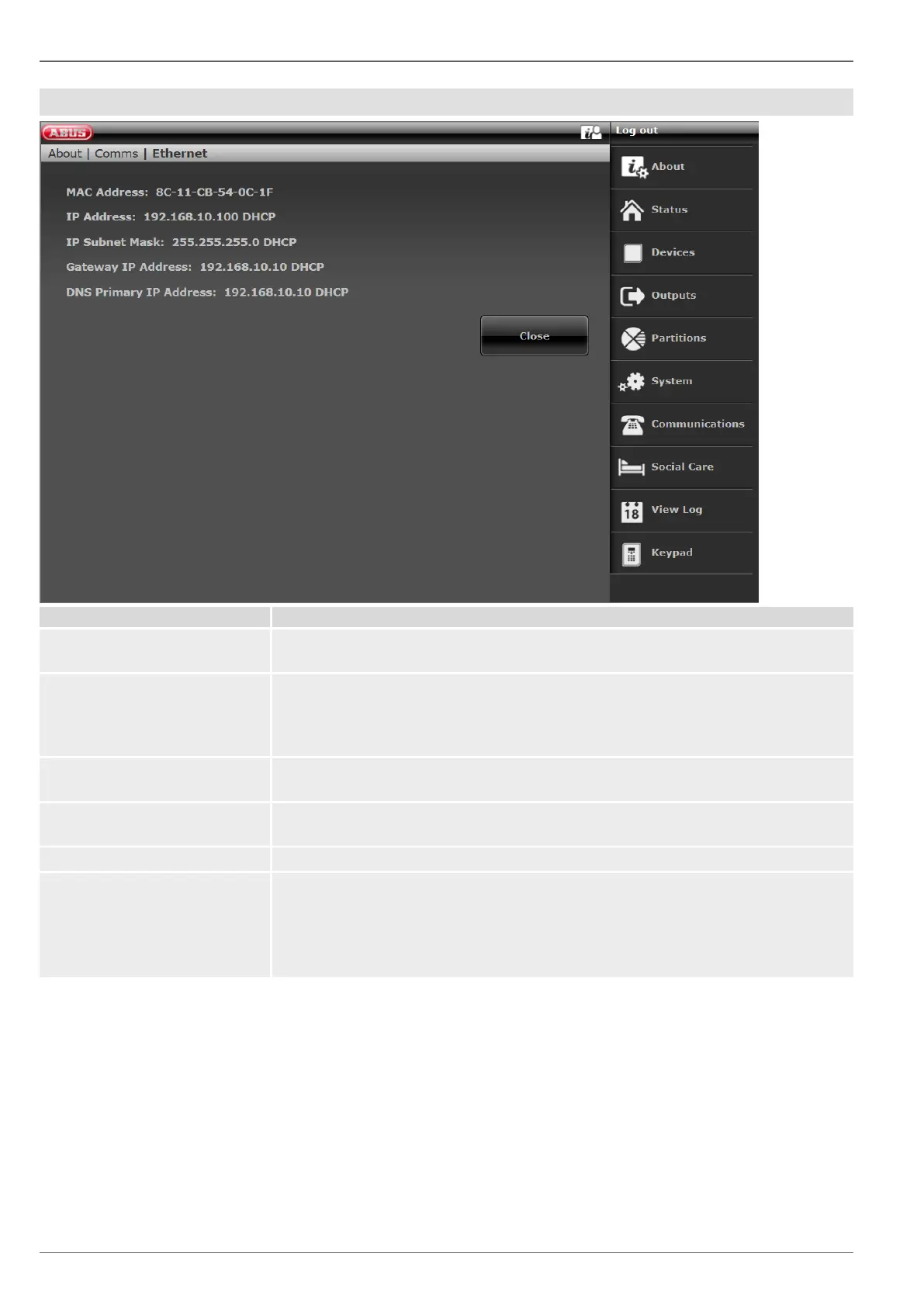
Ethernet
The hardware address of the network adapter for the Secvest is given here. A MAC
address is globally unique.
If the Secvest is located on a network the IP address is shown here, e.g.
192.168.178.23. If (DCHP) is shown after this in brackets, the Secvest automatically
obtains its IP address from a DHCP server, for example, in a router. If the Secvest
is not networked, "0.0.0.0" is displayed here.
The subnet mask is displayed here. In a private network this is normally
255.255.255.0.
If the Secvest is located on a network the IP address of the gateway is shown here.
An example of a gateway in a private network is the router, e.g. the Fritz!Box.
This is the IP address of the Domain Name System (DNS).
IP Link Status (GUI only)
Ethernet status query. The Secvest checks the connected LAN cable and its own
Ethernet connection.
The message "OK" appears.
If something is not connected, not enabled or is disrupted, the error message
"Fault" appears.



 To Next Page