76
CONTROLLER 69
PROGRAMMING
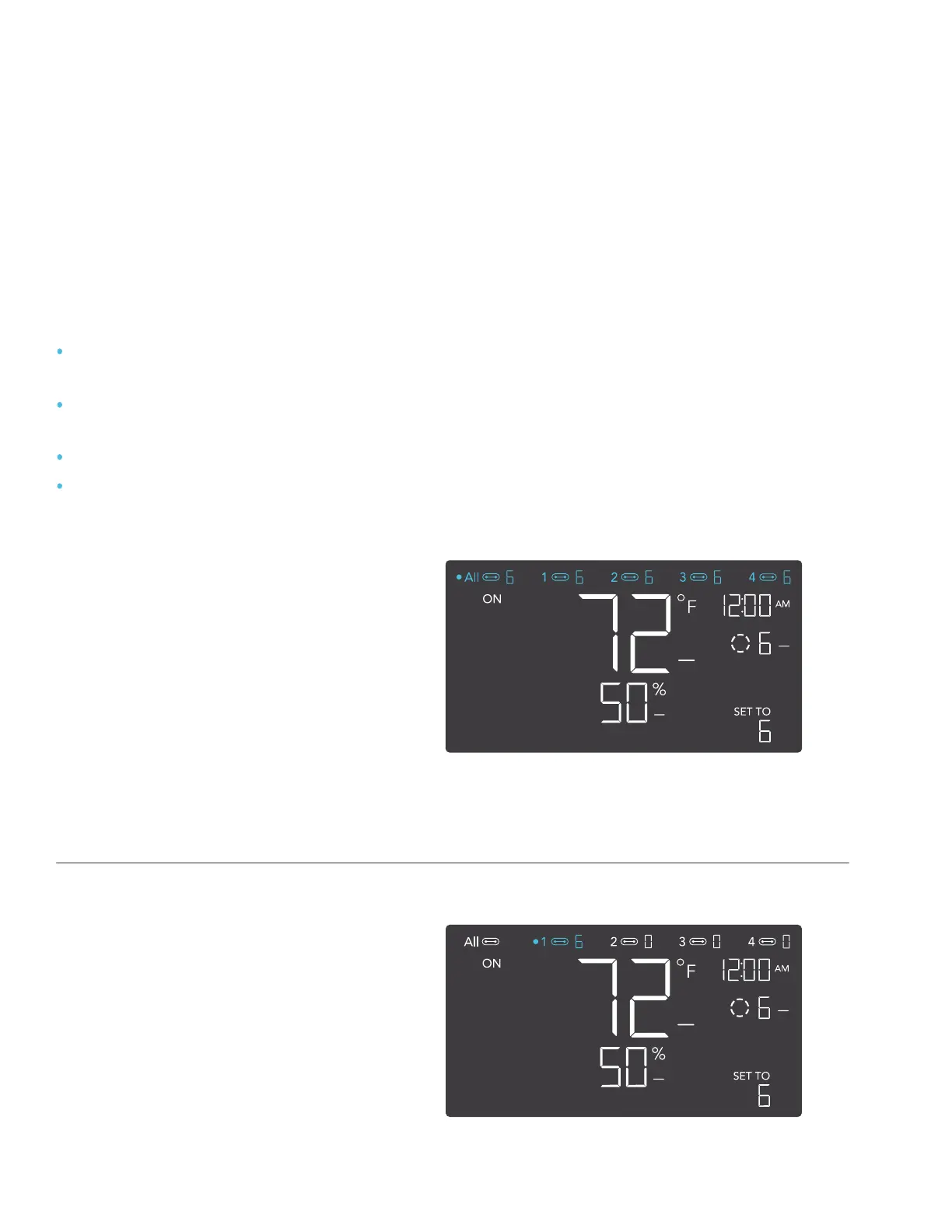
ALL PORTS
Navigate to the ALL port to set
simultaneous programming for all
connected devices.
Programming set in this port mode
applies to all connected devices, but will
not be active if you navigate to other
ports. Re-entering the ALL port will
resume its programming.
INDIVIDUAL PORT
Navigate to a numbered port with
a connected device to set
individual programming.
Programming will run in the background
even while you navigate to other
numbered ports.
PORTS
Pressing the port button will cycle through the controller’s available ports: ALL, 1, 2, 3, and 4.
Dot indicates the current device. No digit is displayed if a device is not plugged into the
corresponding port.
The controller is pre-programmed with the following settings:
Port 1 – Inline Fan set to Fan Speed Level 5 scheduled between 6:00pm and 12:00pm,
and to Level 2 scheduled between 12:00pm and 6:00pm.
Port 2 – Grow Light set to Brightness Intensity Level 10 scheduled between 6:00pm
and 12:00pm and to Level 0 scheduled between 12:00pm and 6:00pm.
Port 3 – Circulating Fan set to Level 5.
Port 4 – Circulating Fan set to Level 5 (if applicable).


 To Next Page