20
5.5 Printer Controls
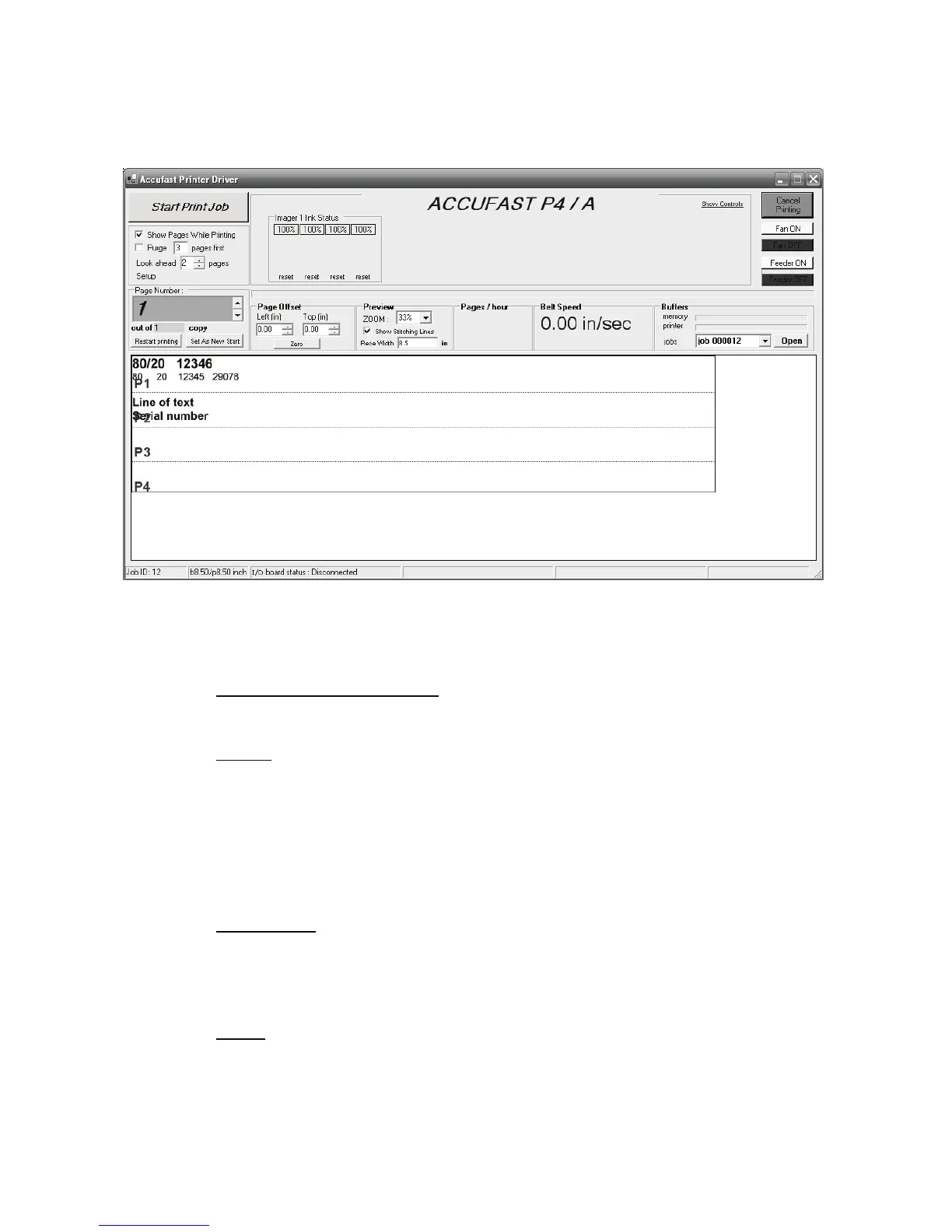
Start with the “Start Print Job” (Green) button in the upper left corner of
the control panel screen. The box just under the start/stop button con-
tains 2 check boxes.
Show pages while printing when checked the control panel scrolls
through the pages of a variable data list. Not useful with fixed data.
Purge X pages first. Checking this box and entering a number will cause
all of the pens to fire a solid black purge pattern to un-clog jets and to
warm up cold pens. This is used with old cartridges and with those left
un attended for long periods of time. Experience dictates that a safe pol-
icy is to purge at least 1 piece before every start up of longer than a cou-
ple of hours depending on the ink being used. Individual experience will
vary.
Look Ahead
is used when the printer is used to control a feeder of pro-
grammable conveyor and the job is made up of consecutive batches
separated by a control character in the data base. Not use with small
tags and envelopes.
Setup is clicked to expose a series of menus used to configure the
printer. This warrants a section of its own later in the manual.


 To Next Page