Installation & Operation Manual - Model AVC5000
Contents of this Manual are Subject to Change Without Notification Page 16
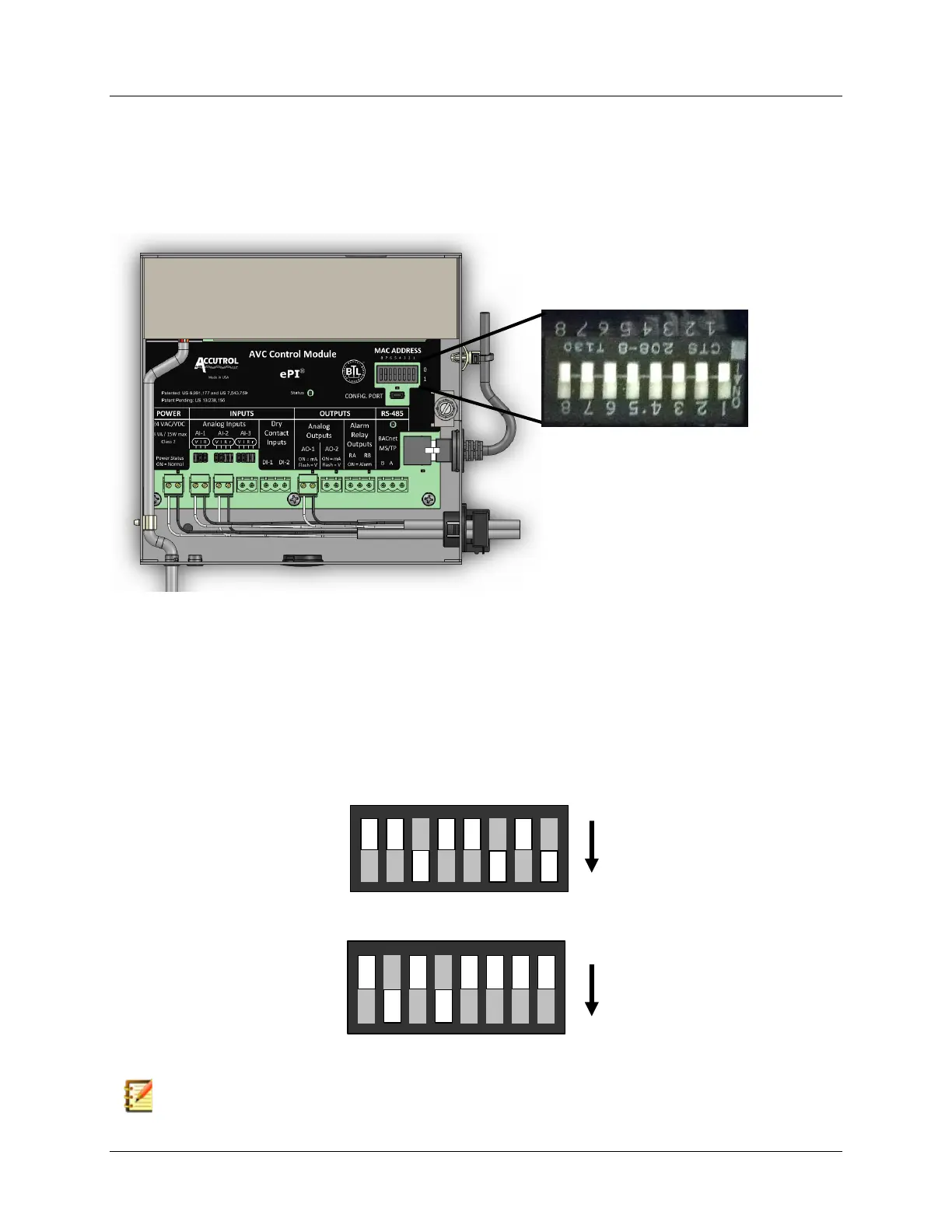
5.4 Address DIP Switch Settings
The AVC5000 AccuValve is a BACnet Master Node State machine which operates on a MS/TP
bus. Prior to operating on the bus, a valid and unique device address between 0 and 127,
referred to as the MAC address, must be set using the ADDRESS DIP Switch located on the
AVC5000 Control Module shown below.
Switch positions 1 through 7 are used to set up to 128 different MAC addresses (0-127). Switch
position 8 is not used and should remain in the 0 position. Each switch carries a weighted
decimal value. The values of each switch in the 1 position are summed to equal the MAC
address as shown in the examples below. To set the MAC address, set the highest value switch
that is less than or equal to the intended MAC address to the 1 position, then continue setting
the lower numbered switches until the sum of the ON switches equals the intended MAC
address.
NOTE: It is the responsibility of the BACnet Network Administrator to assign the MAC
address to each AVC AccuValve operating on the bus. Duplicate address on a bus
segment will result in communication errors.



 To Next Page