Installation & Operation Manual - Model AVC5000
Contents of this Manual are Subject to Change Without Notification Page 17
SECTION 6 – INSIGHT USER INTERFACE SOFTWARE & CONFIGURATION
Using a PC you can communicate directly with the AVC AccuValve to configure the controller
parameters or locally monitor the AVC performance. All that’s required is a Windows PC or
Tablet with a USB Port, a USB Cable and the AVC Insight Software.
6.1 Minimum Requirements for PC
• PC with Windows Version 7 or 10 or Tablet with Windows 10
• USB 2.0 Port
• Screen Resolution 1280 x 768 or greater suggested
• USB Cable Type A/MINI B
6.2 Installing the AVC Insight Software
Before starting the install process, close any programs running on the computer.
1. Download the AVC Insight Software from http://www.accutrolllc.com.
Note: If installing the AVC Insight Program for the first time on the computer, the USB
communications drivers will need to be installed per the following section.
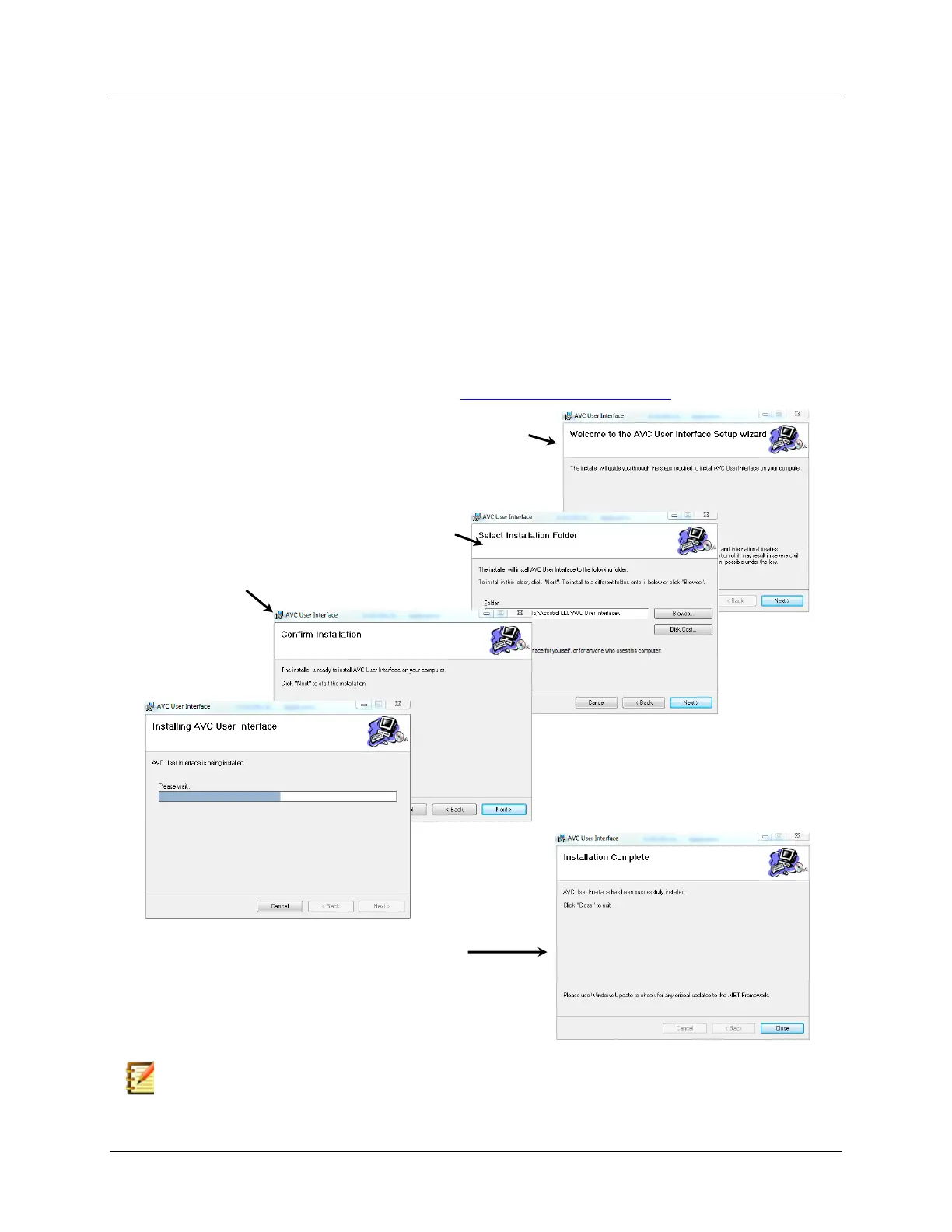
2. The setup wizard will guide you through installation.
Follow screen prompts and select the appropriate
responses to proceed with installation.



 To Next Page