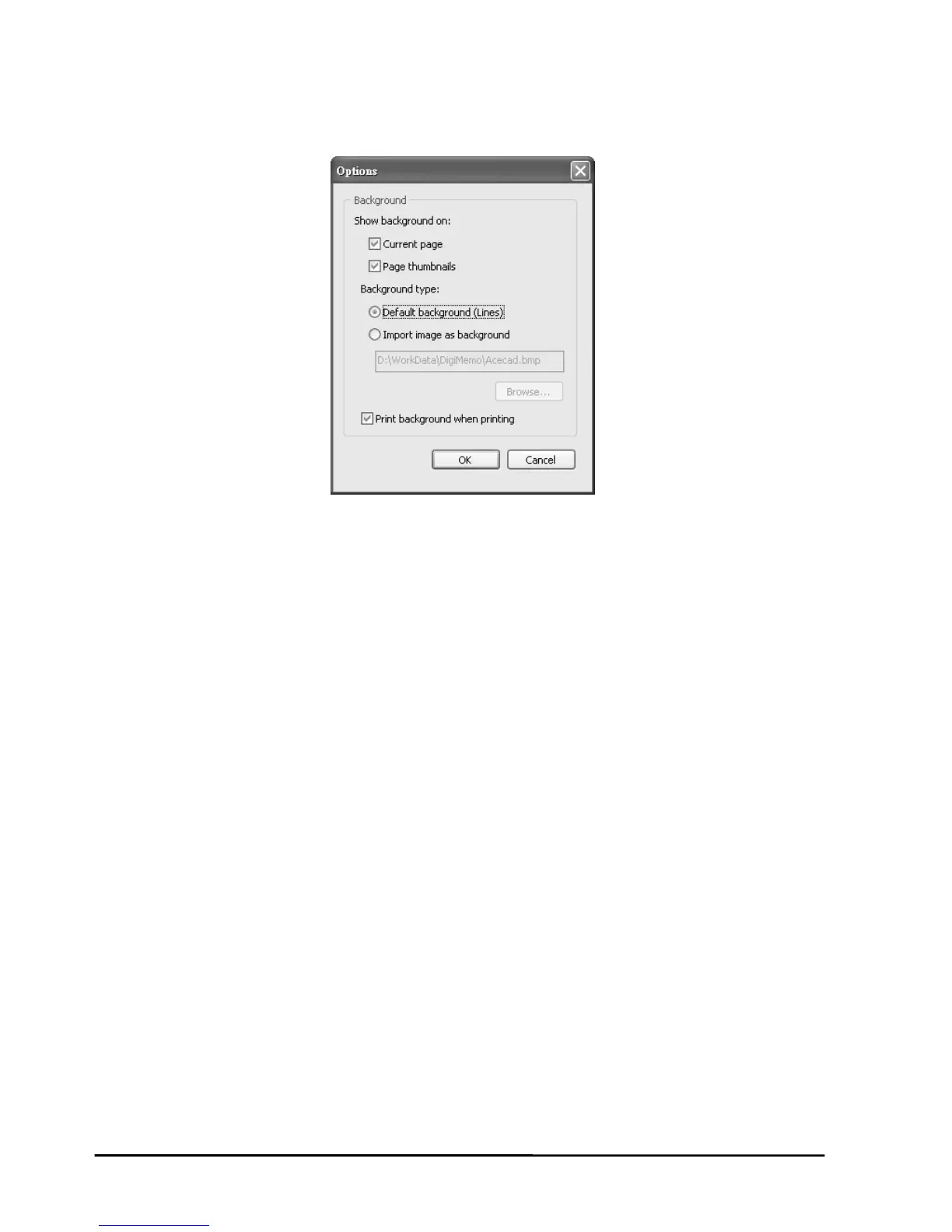
Showing
1. On the
2. Choose or clear the follo e background on:
z Current page
z Page thumbna
3. If necessary, sele
z Default backgr
z Import image
Click the Brow as BMP, JPG, GIF
or PNG file which you
4. Choose or clear the check box.
5. Click OK.
Las
Next Page
e file types can be
JPG, GIF or PNG.
the Background of Pages
Edit menu, click Option. A dialog box will appear.
wing check boxes to show th
ils
ct the following one option button:
ound (Lines)
as background
se button to find the image file such
want to be the background.
Print background when printing
Switching the Current Page by Keyboard Shortcuts
First Page CTRL+HOME
t Page CTRL+END
Previous Page PAGE UP
PAGE DOWN
Saving the Current Page as an Image File
You can save the current page as an image file whos BMP,
22


 To Next Page