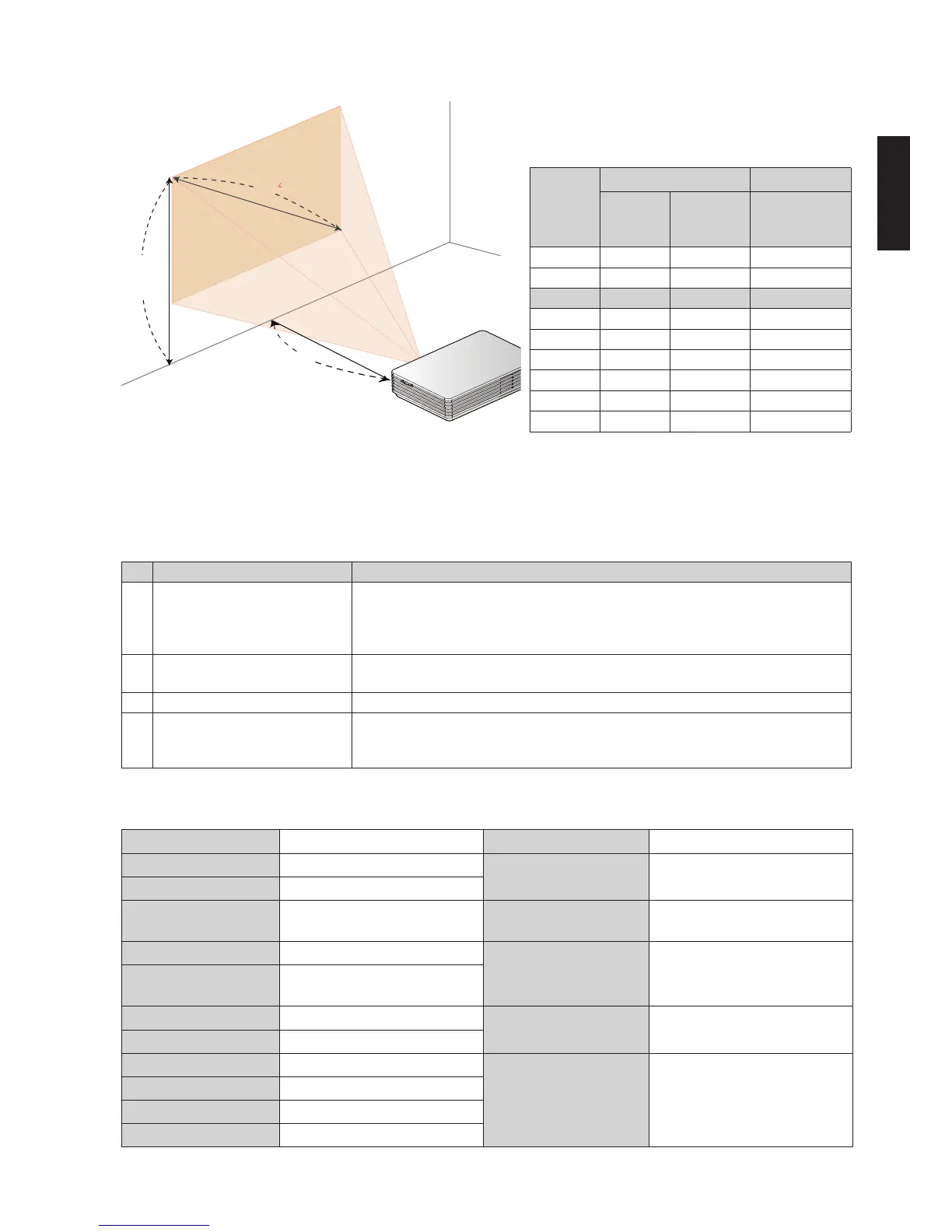
Desired
Distance
(m)
<A>
Screen Size Top <C>
Diagonal
(inch)
<B>
W x H
(cm)
From base to
top of image
(cm)
0.37 10 22 x 12 12
0.5 14 30 x 17 17
1.0 27 61 x 34 34
1.5 41 91 x 51 51
2.0 55 121 x 68 68
2.5 68 152 x 85 85
3.0 82 182 x 102 102
3.5 96 212 x 119 119
3.65 100 221 x 124 124
Choose the appropriate distance for your
need. After installation, you can now enjoy
your USB projection.
Troubleshooting
Appendices
Some solutions to problems that you may encounter:
Speci cations
Projection System DLP
®
Weight 176 g
Resolution Native WVGA (854 x 480)
Dimensions
110 x 85 x 25 mm
(4.3" x 3.3" x 0.98")
Displayable Colors 16.7 Million Colors
Vertical Refresh Scan
Rate
25 Hz to 86 Hz Input Interface
DC IN x 1
USB 3.0 Micro B type x 1
Horizontal Scan Rate 30 KHz to 100 KHz
Power Supply
40W AC adapter
(19V/2.54A, 100V ~ 240V AC)
USB Power (type A) from NB
Projection Lens
F = 1.87, f = 11.00mm
Manual Focus
Projection Screen Size 10" (25 cm) ~ 100" (365 cm)
Power Consumption
23 W (maximum) by AC
adapter
Aspect Ratio 16:9 (Native), 4:3
Throw Ratio 55"@2 m (1.65:1)
Standard Accessories
AC adapter with AC plug x 1
USB Y-cable x 1
Pouch x 1
User's Guide (CD-ROM) x1
Quick start guide x1
Operating Temperature 5ºC ~ 35ºC / 41ºF ~ 95ºF
Operating Humidity 35 ~ 80%RH
Computer Compatibility Windows XP/Vista/Win7
# Problem Solution
1 No image apprears on-screen • Make sure the USB cables are correctly and securely connected.
• Make sure that your computer is turned on.
• Please check to plug Master USB connector.
• Recommend to use power adapter if not acer notebook.
2 Image is out of focus • Adjust the focus dial.
• Adjust the distance from the screen to suit your viewing needs.
3 Image is too small or too large • Move the projector closer or further away from the screen.
4 Image is ickering • Adjust power mode because USB power is not enough. Follow on-screen
intruction to adjust.
• USB power adapter in the market is for reference.



 To Next Page