11
WW remote control
1
2
3
5
4
6
7
11
14
8
10
9
12
13
1
2
3
5
4
6
7
11
14
8
10
9
12
13
WW remote control
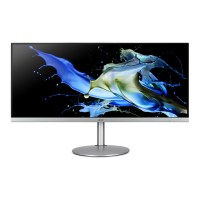
Japan remote control
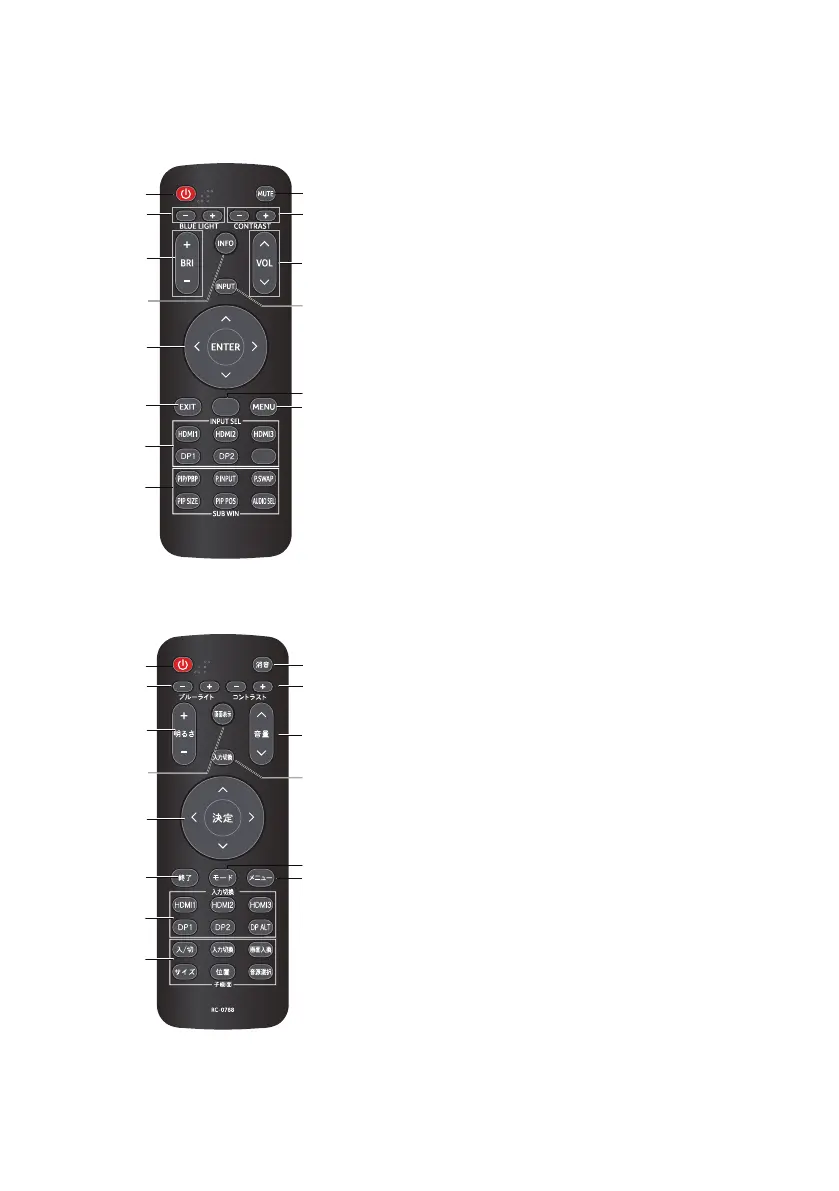
1. POWER (power standby / turn on)
Turn on and turn off the power
2.BLUE LIGHT+/-
Adjusting the Blue light setting
3.BRI +/-
Adjusting the Brightness setting
4.INFO
Show up the basic information for current input.
5.ENTER
Select an item on the settings screen.
ENTER (Confirm)
Execute a command.
6.EXIT
Return to the default screen.
7.INPUT SEL
Select HDMI1(2.0) / HDMI2(2.0) / DP / DP Alt
input source.(HDMI3 and DP2 no function)
8.SUB WIN
Select PIP/PBP,P.INPUT,P.SWAP,PIP SIZE,PIP POS
AUDIO SEL
9.MUTE
Turn off the volume
10.CONTRAST
Adjusting the Contrast setting
11.VOL^/v
Adjusting the Volume setting
12.INPUT
Select input source
13.MODES
Modes menu function select
14.MENU
Press the MENU key to open the OSD
MODES
DP ALT
RC-00772
1. POWER (power standby/turn on)
Turn on and turn off the power
2. BLUE LIGHT+/-
Adjusting the Blue light setting
3. BRI +/-
Adjusting the Brightness setting
4. INFO
Show up the basic information for current input.
5. ENTER
Select an item on the settings screen.
ENTER (Conrm)
Execute a command.
6. EXIT
Return to the default screen.
7. INPUT SEL
Select HDMI1(2.0)/HDMI2(2.0)/DP1/DP2 input source.
(HDMI3 and DP Alt no function)
8. SUB WIN
No function
9. MUTE
Turn off the volume
10. CONTRAST
Adjusting the Contrast setting
11. VOL^/v
Adjusting the Volume setting
12. INPUT
Select input source
13. MODES
Modes menu function select
14. MENU
Press the MENU key to open the OSD
Japan remote control
1
2
3
5
4
6
7
11
14
8
10
9
12
13
WW remote control
Japan remote control
1. POWER (power standby / turn on)
Turn on and turn off the power
2.BLUE LIGHT+/-
Adjusting the Blue light setting
3.BRI +/-
Adjusting the Brightness setting
4.INFO
Show up the basic information for current input.
5.ENTER
Select an item on the settings screen.
ENTER (Confirm)
Execute a command.
6.EXIT
Return to the default screen.
7.INPUT SEL
Select HDMI1(2.0) / HDMI2(2.0) / DP / DP Alt
input source.(HDMI3 and DP2 no function)
8.SUB WIN
Select PIP/PBP,P.INPUT,P.SWAP,PIP SIZE,PIP POS
AUDIO SEL
9.MUTE
Turn off the volume
10.CONTRAST
Adjusting the Contrast setting
11.VOL^/v
Adjusting the Volume setting
12.INPUT
Select input source
13.MODES
Modes menu function select
14.MENU
Press the MENU key to open the OSD
MODES
DP ALT
RC-00772



 To Next Page