18
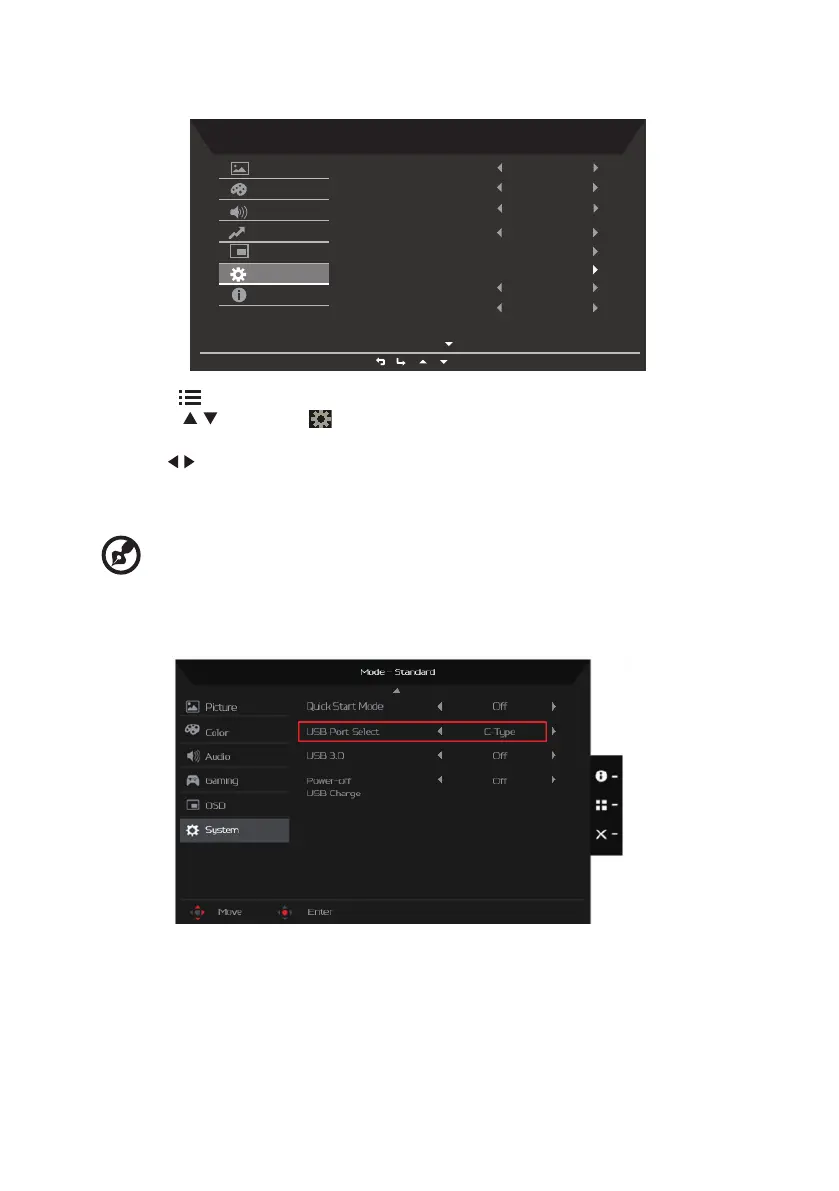
Product the System setting
Mode - Standard
On
HDMI 2(2.0)
DP1.2
Full
On
Normal
Picture
Color
Audio
Performance
OSD
System
Information
Input
DP Format
Auto Source
Wide Mode
Hot Key Assignment
DDC/CI
HDMI Black Level
PIP/PBP
1. Press the key to bring up the OSD.
2. Using the / keys, select System from the OSD. Then navigate to the feature you
wish to adjust.
3. Use the / keys to adjust the sliding scales.
4. The Performance menu can be used to adjust the Input, Auto Source, DP Format, Wide
Mode, PIP/PBP, Hot Key Assignment and other important settings.
5. DDC/CI: Allows the monitor settings to be set through the software on the PC.
---------------------------------------------------------------------------------------------------------------
Note: DDC/CI, short for Display Data Channel/Command Interface, which allows
monitor controls to be sent via software.
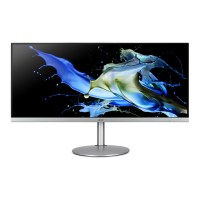
6. Setting the KVM
You can follow below instruction to set up KVM for your monitor:
• Connect Type-C/USB-B to your computer
• Select Type-C/USB-B of USB Port Select in the OSD
• Suggest setup:



 To Next Page