English
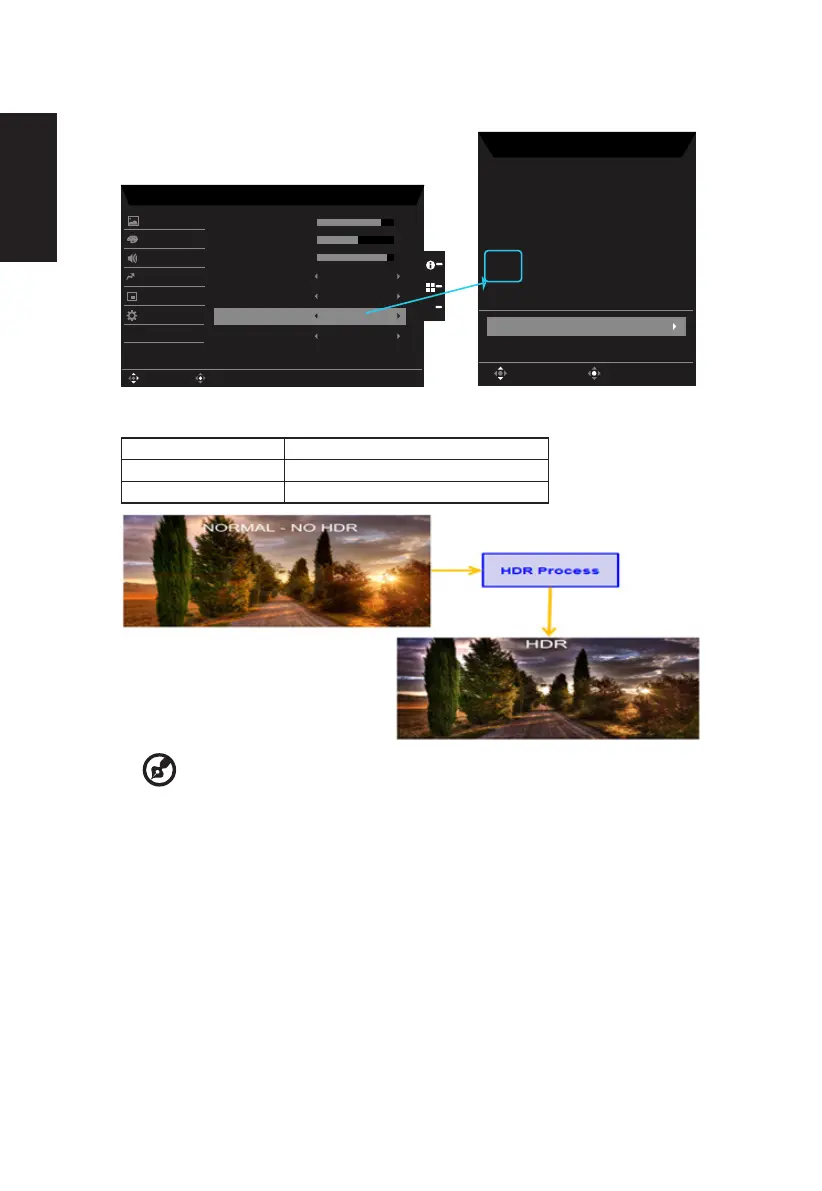
• HDR Status:
X
Mode - HDR
75
50
Off
Off
Color
Audio
OSD
System
Brightness
Contrast
Blue Light
ACM
Super Sharpness
Picture
9
Black Boost
Enter
Move
Pertormance
AutoHDR
Off
Save Sengs to...
Informaon
Main Source
DP
Exit
H/V Frequency
H:166KHz V:144Hz
Mode
HDR
MN53035032682018TPV888
Series Numer
Resoluon
1920x1080
Move
Exit
Information Page
Reset ALL Sengs
HDR = (Auto or HDR-400)
• HDRfunctionandEect:
Optional Behavior
Auto Auto checked input source status
O (Default) No support HDR eect
--------------------------------------------------------------------------------------------------------
Note:
1. HDR = (Auto), The source signal content is SDR, the brightness can to
adjustment, but content is HDR the brightness is xed at 100 and gray out.
2. HDR = (Auto), features: (ACM/Gamma/Contrast/Blue Light/Color Temp/Black
Boost/6-axis Hue & Saturate) is gray out and unavailable, default parameter please
refer to "Modes".
3. HDR = (Auto), Color Page only shows the adjustable function, other functions
(Gamma and Color Temp are hidden).



 To Next Page