English
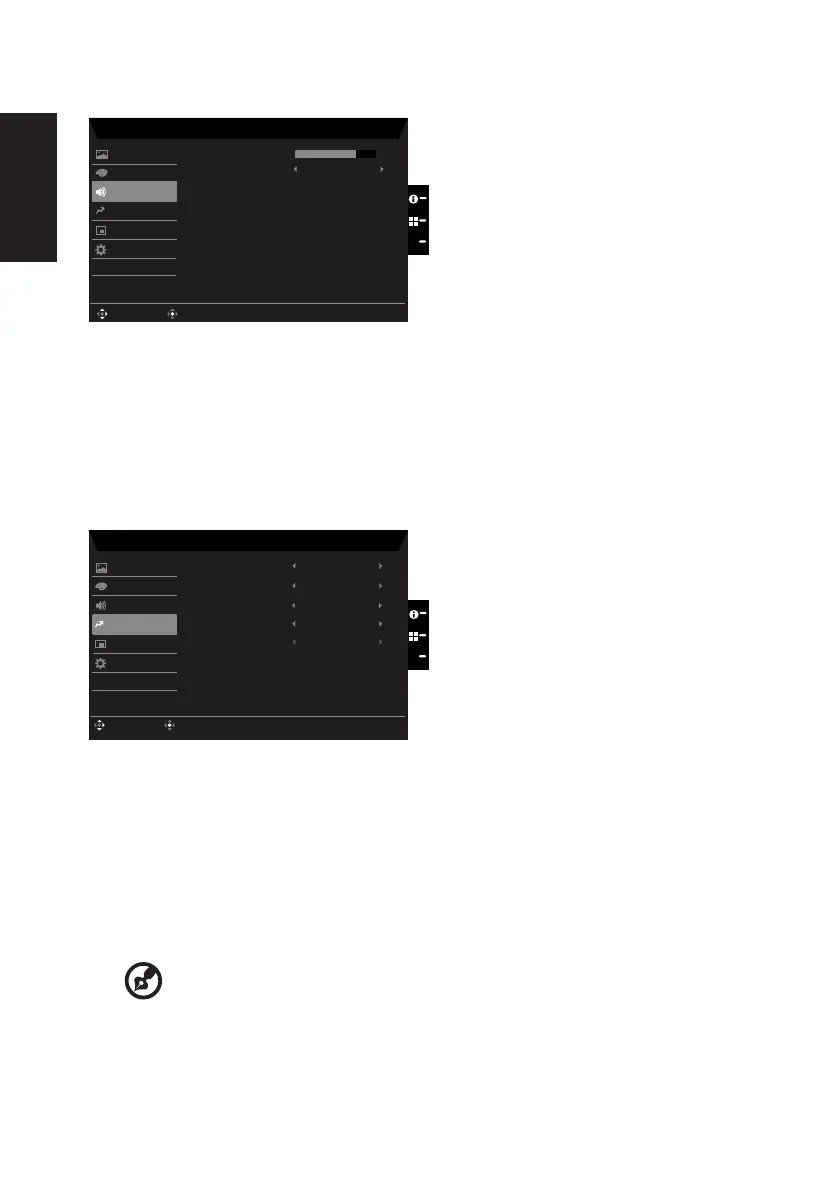
Audio
X
Mode - Standard
70Volume
Audio
Off
Mute
Enter
Move
OSD
System
Picture
Color
Pertormance
Save Sengs to...
1. Press the MENU key to open the OSD.
2. Toggle the joystick to the up or down to select Audio from the OSD.Then toggle to the
right to
navigate to the element you wish to adjust and press the joystick to enter it.
3. Toggle to the left or right to adjust the sliding scales.
4. Volume: Adjust the volume
5. Mute:To choose mute on/o .
Performance
X
Mode - Standard
Over Drive Normal
OffRefresh Rate Num
OnAdapveSync
Enter
Move
Pertormance
Audio
OSD
System
Picture
Color
OnUltra-Low Latency
OffVRB
Save Sengs to...
1. Press the MENU key to open the OSD.
2. Toggle the joystick to the up or down to select Performance from the OSD.Then toggle
to the right to
navigate to the element you wish to adjust and press the joystick to enter
it.
3. Toggle to the left or right to adjust the sliding scales.
4. Over Drive: Select O, Normal, or Extreme.
5. AdaptiveSync: To control support AdaptiveSync or not, default is On.
1
---------------------------------------------------------------------------------------------------------
Note:
1.If AdaptiveSync is “ON”, then the Over Drive selection is set to “Normal”
automatically.
2. If AdaptiveSync is “OFF”, then the user can set Over Drive to either one of the
three settings including: (a) Extreme (b) Normal (c) O.



 To Next Page