10 - Your Predator notebook tour
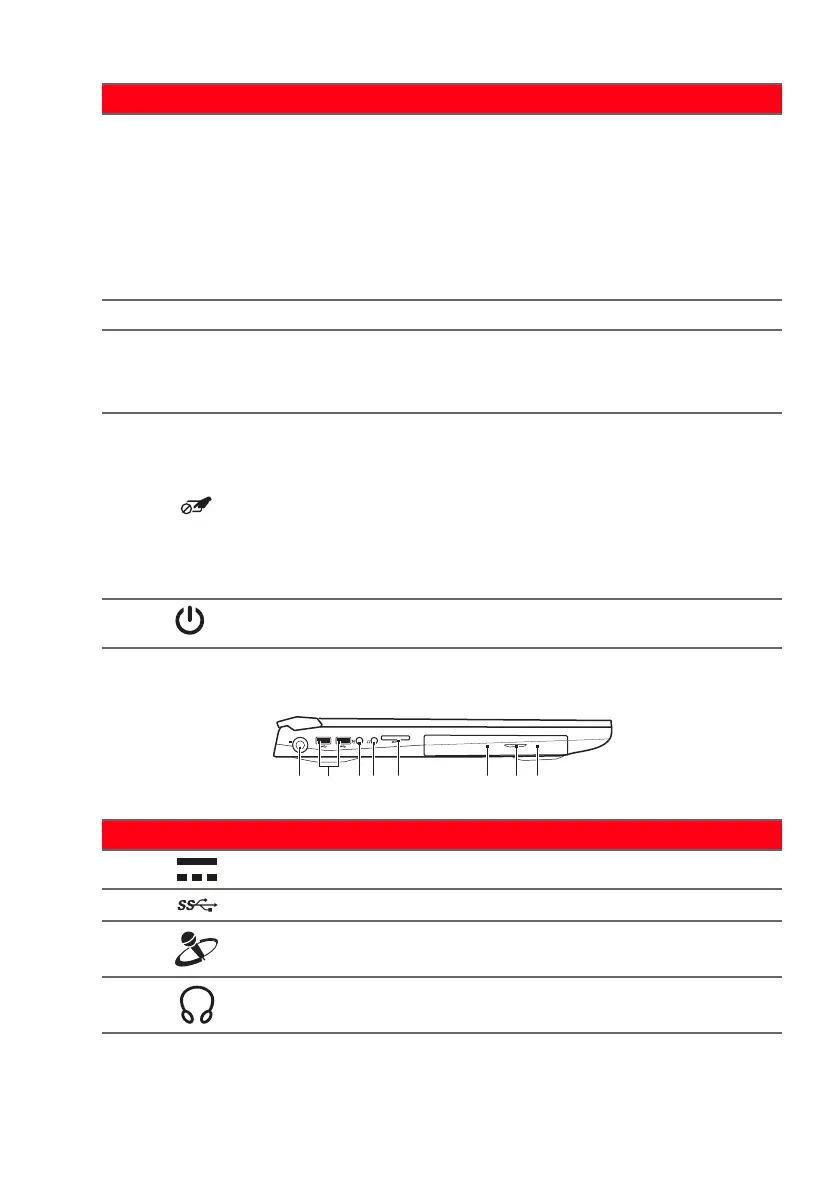
Left view
3
Programmable
ke
ys
Keys that allow you to change
comput
er settings to suit your
current game.
You can define settings for each
ke
y from PredatorSense; please
refer to PredatorSense on
page 36.
4 Touchpad Touch-sensitive pointing device.
5
Click buttons
(left and right)
The left and right buttons
fu
nction like the left and right
mouse buttons.
6
Touchpad /
Windows key
toggle button
Turns the built-in touchpad and
Windows
key on and off.
To turn both the touchpad and
Windows ke
y on again, you need
to press this button. The <Fn> +
<F7> hotkey does not work for
the Windows key.
7
Power button Turns the computer on and off.
# Icon Item Description
1
DC-in jack Connects to an AC adapter.
2
USB ports Connect to USB devices.
3
Mic-in jack
Connects to an external
micr
ophone for recording audio.
4
Headset/
speaker jack
Connects to audio devices (e.g.,
speakers, headphones)
# Icon Item Description







 To Next Page