13
Main Menu
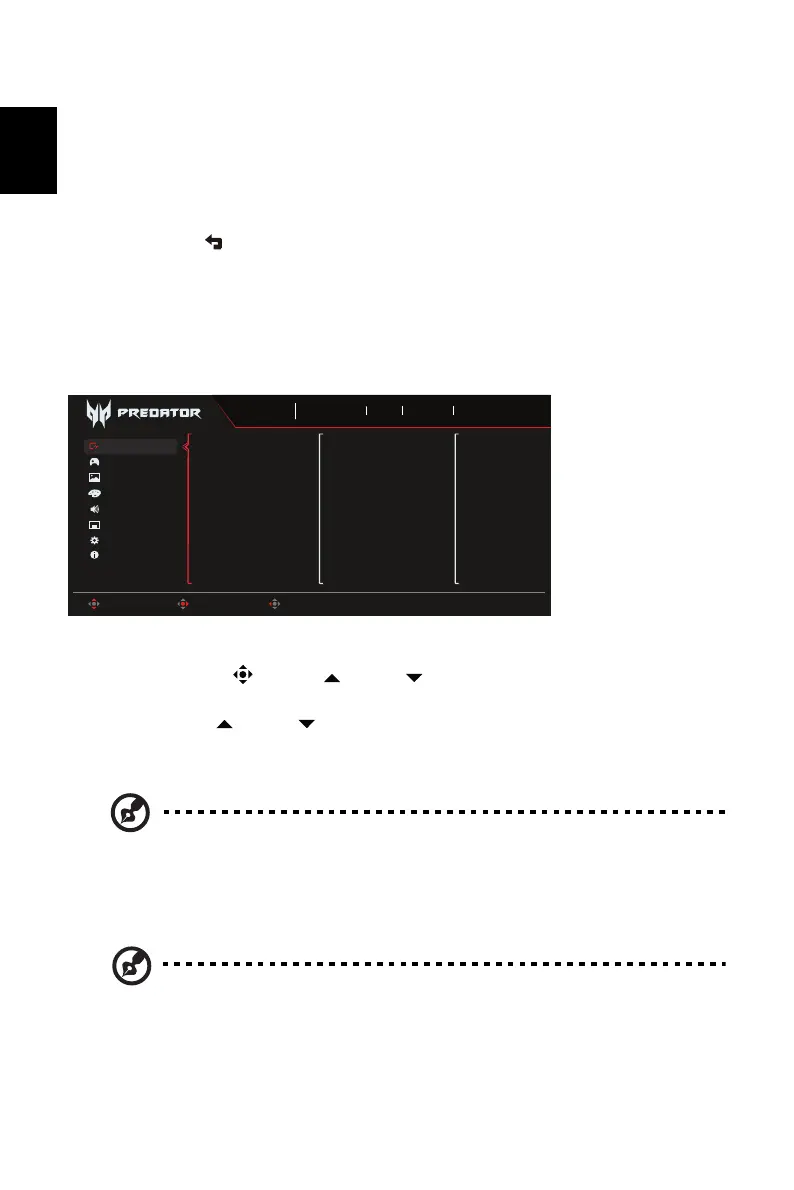
The Function page
Open the Function page to select a menu function, and adjust the settings which you want
using the arrows. You can also view your monitor’s system information from this page. When
you are done, use to go back one level.
1. Press the Main Menu key to open the OSD.
2. Use direction key to the up or down to select Picture from the OSD. Then press Enter to
go into the element you wish to adjust.
3. Use direction key to the left or right to adjust the sliding scales.
Game Assistant
1. Press the MENU key to open the OSD.
2. Toggle the joystick to the up or down to select Game Assistant from the OSD.
Then toggle to the right to the function you wish to adjust and press the joystick to enter it.
3. Toggle to the up or down to control functions.
4. The Game Assistant menu can be used to adjust the Timer, Aim Point.
5. Timer: OSD Shows the timer on monitor top-left side.
6. Aim point: Show an Aim point on the screen for shooting games.
Note: If hot key menu or main menu is trigger the "Aim point" temporarily
closed.
Note: 1. If user select 30mins, OSD will countdown the timer from 30:00 to
00:00.
2. When the Timer Set On, the Aim Point and Refresh Rate Num is gray
out.
OSD
Information
Audio
Color
Picture
Gaming
System
Timer
Aim Point
Sports
Mode
3840X2160
Resolution
240
Hz
DP ALT
Input
On
FreeSync Premium
Move Enter Exit
Game Assistant
Sniper Mode



 To Next Page