14
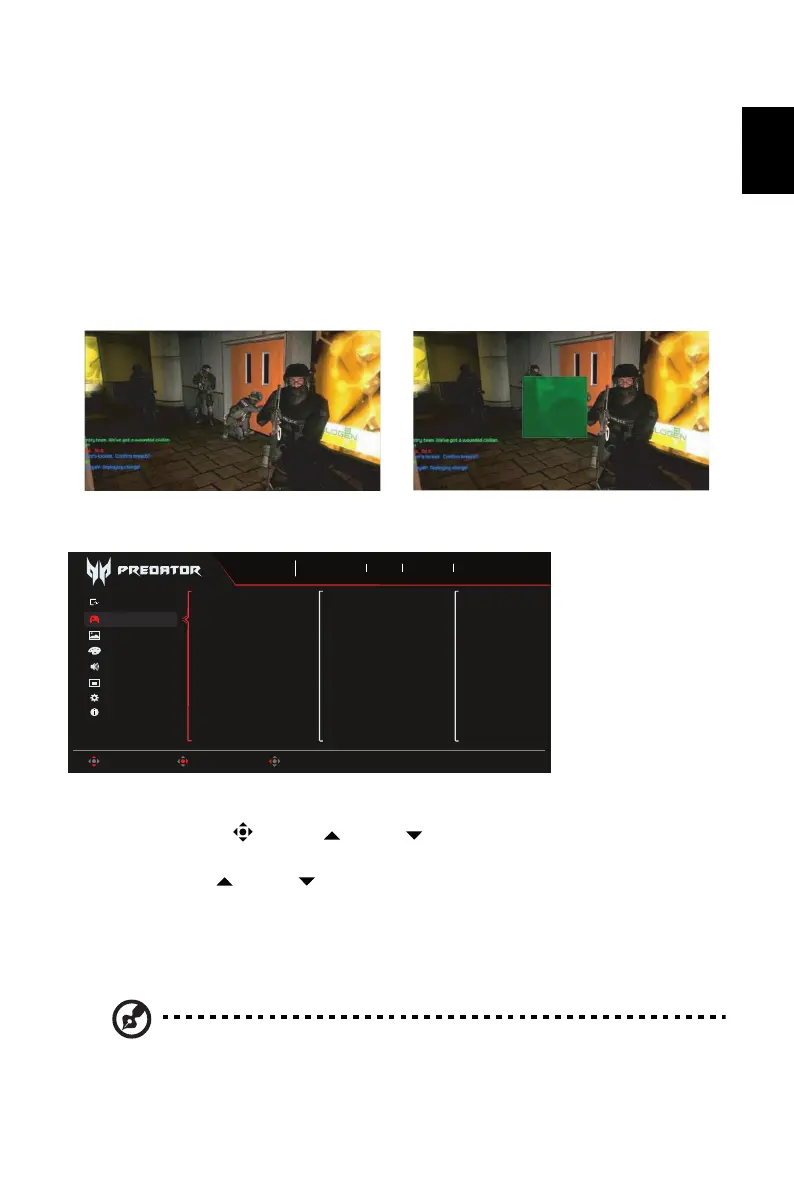
7. Sniper Mode: Accessibility for games.
• Scope Mode
• Scope Ratio: To control the content magnification ratio.
• Scope Size: To control the scope window size.
• Scope with Night Vision: To control the night view effect.
• Scope Ratio: Choose scope ratio (1.5x, 2x, 4x), default is 2x.
• Scope Size: Choose scope size (Small, Middle, Large), default is Middle.
• Scope with Night Vision: To filter R&B channel.
Gaming
1. Press the MENU key to open the OSD.
2. Toggle the joystick to the up or down to select Gaming from the OSD. Then
toggle to the right to the function you wish to adjust and press the joystick to enter it.
3. Toggle to the up or down to control functions.
4. The Gaming menu can be used to adjust the FreeSync Premium, Refresh Rate Num,
Black Boost Pro, UltraWide Game Mode, Screen Position.
5. FreeSync Premium: To control support FreeSync Premium or not, default is On.
6. Refresh Rate Num: Display the panel’s current refresh rate on the screen.
Note: If FreeSync Premium set "On" you can see the V Frequency to changes
in the OSD.
Scope with Night Vision: Off Scope with Night Vision: On
OSD
Information
Audio
Color
Picture
System
FreeSync Premium
UltraWide Game Mode
Screen Position
Sports
Mode
3840X2160
Resolution
240
Hz
DP ALT
Input
On
FreeSync Premium
Move Enter Exit
Gaming
Game Assistant
Refresh Rate Num
Black Boost Pro



 To Next Page