15
7. Black Boost Pro: The Black Boost Pro is on, it will compensate for the brightness of the
dark level, so that the objects under the dark level can be clearly seen.
8. UltraWide Game Mode: Default is "Off". Can select "21:9" or "32:9".
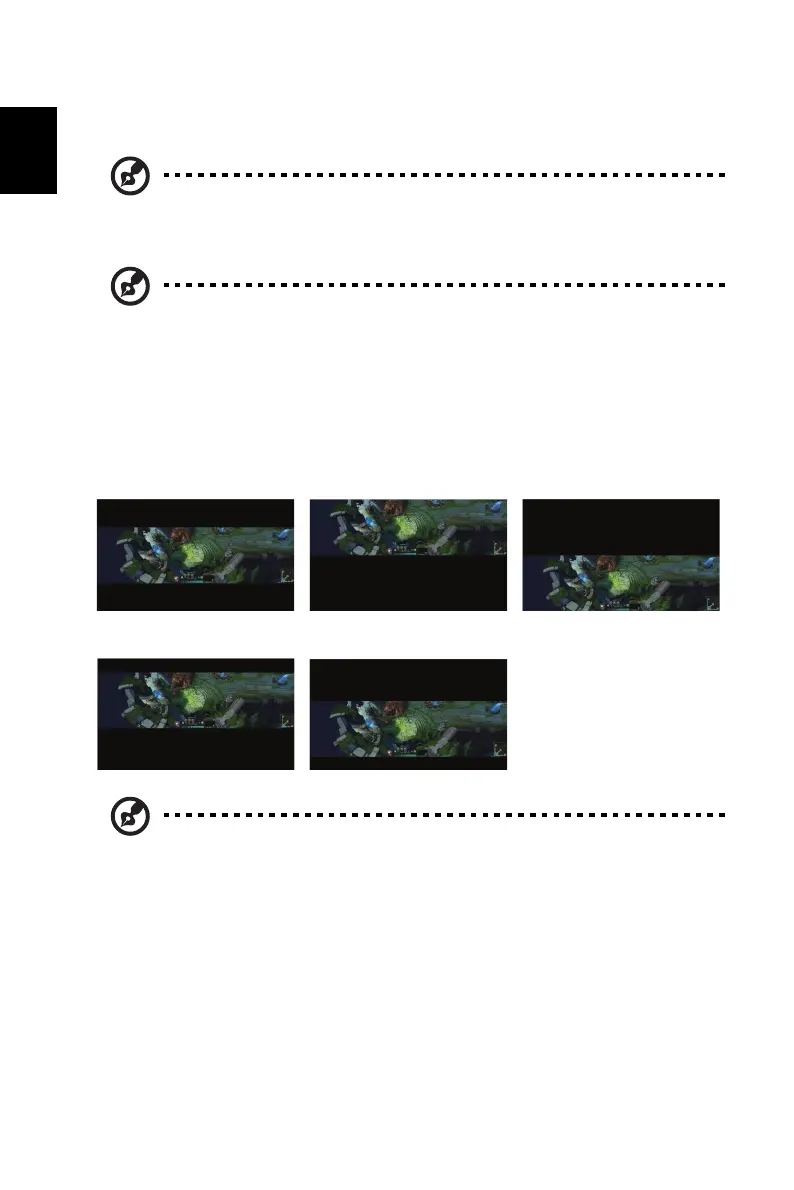
9. Screen Position: Default is "0". User can select "2", "1", "0", "-1", or "-2".
Note: • Black Boost Pro default is "Off".
• Black Boost Pro is "On", the HDR is auto be set Off.
Note: • When User selects 21:9" or 32:9", Wide mode will be switched to 1:1
automatically and grayed out.
• When User selects "Off", UltraWide Game Mode will go back to
original setting.
• Ultrawide Game mode only supports HDMI, DP and Type-C sources
and would be grayed out for function of PIP/PBP and 1:1 in wide
mode.
Screen Position = 0, Center Screen Position = 2, Top Screen Position = -2, Bottom
Screen Position = 1,
Between Center and Top
Screen Position = -1,
Between Center and Bottom
Note: • This function is only enabled if UltraWide Game Mode is set to "21:9"
or "32:9".
• This function is grayed out when UltraWide Game Mode is set to "Off".



 To Next Page