17
8. Super Sharpness: technology can simulate high-resolution images by boosting the pixel
density of the original source. It can make images sharper and clear.
9. Max Brightness: Default is off.
Color
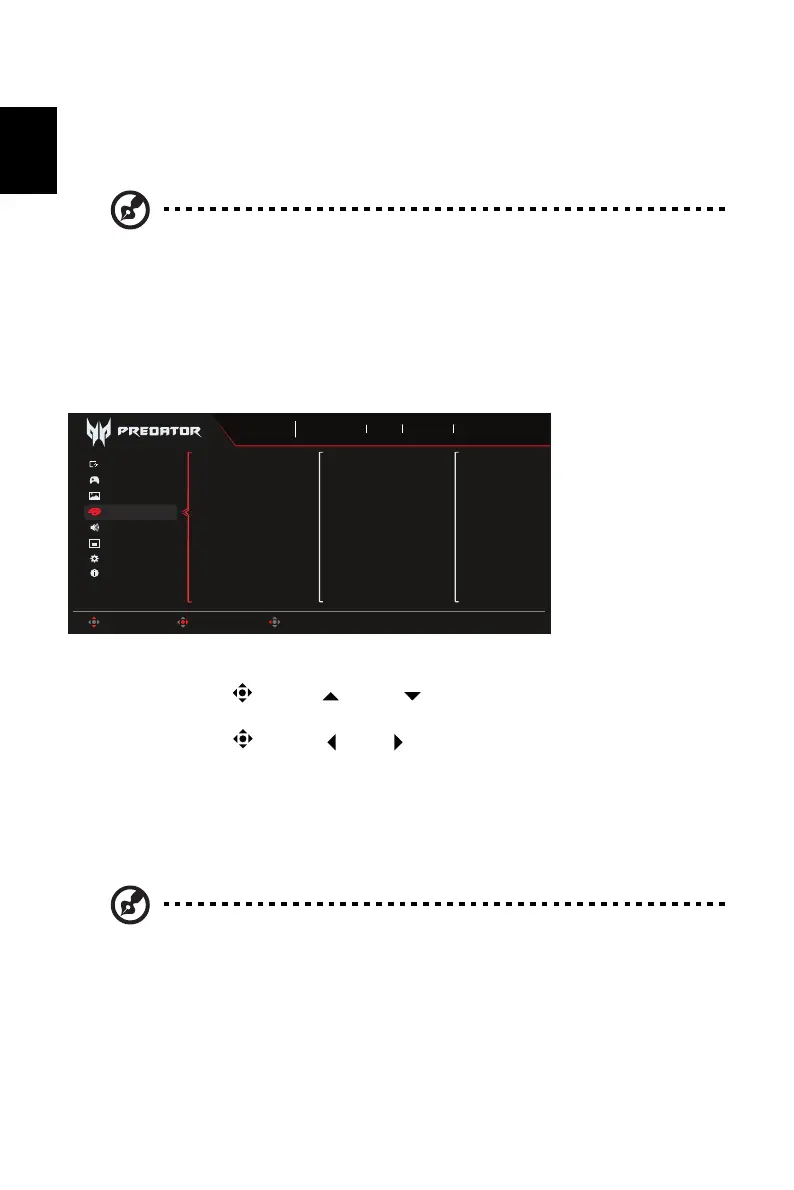
1. Press the MENU key to open the OSD.
2. Toggle the joystick to the up or down to select Color from the OSD. Then toggle
to the right to navigate to the element you wish to adjust and press the joystick to enter it.
3. Toggle the joystick to the left or right to adjust the sliding scales.
4. The Color menu can be used to adjust the Modes, Color Space, GrayScale Mode,
Gamma, Color Temp, 6-axis Hue, 6-axis Saturate.
5. Modes: Select your preferred mode from Action, Racing, Sports, User, Standard, ECO,
Graphics and HDR.
6. Color Space: You can choose Standard, SMPTE-C, DCI, EBU, HDR, Rec.709 or sRGB.
7. Grayscale Mode: Turn grayscale mode On or Off. The default is off.
8. Gamma mode allows you to adjust the luminance tone. The default value is 2.2 (standard
value for Windows).
9. Color Temp.: Default is warm. You can choose Normal, User, Cool and Warm.
10. 6-axis Hue: Adjust the red, green, blue, yellow, magenta and cyan hue.
11. 6-axis Saturate: Adjust the red, green, blue, yellow, magenta and cyan saturation.
Note: Due to environmental considerations, the default brightness of the
display will be low. It can be adjusted to your preferences with the
following steps:
step1: Go to OSD menu > picture > Max Brightness, and turn Off to On to
increase the brightness.
step2: Once Max Brightness is turned on, adjust Brightness value
between 0-100 to your preference.
Note: 1. If Color Space is "HDR", then Modes is set to "HDR" automatically.
2. If Color Space not "HDR", then Modes is set to "Standard".
Game Assistant
OSD
Information
Audio
Gaming
System
Modes
Color Space
Grayscale Mode
Gamma
Color Temp
6-axis Hue
6-axis Saturate
Sports
Mode
3840X2160
Resolution
240
Hz
DP ALT
Input
On
FreeSync Premium
Move Enter Exit
Picture
Color



 To Next Page