18
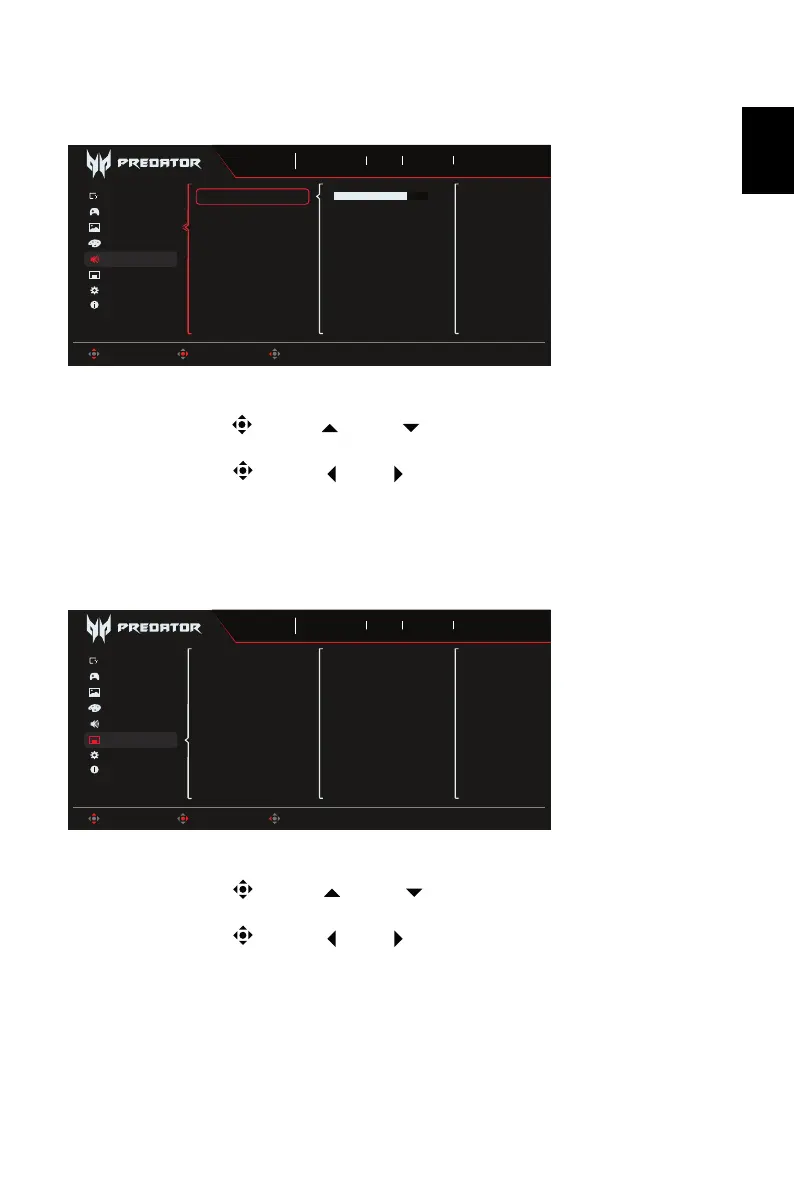
Audio
1. Press the MENU key to open the OSD.
2. Toggle the joystick to the up or down to select Audio from the OSD. Then toggle
to the right to navigate to the element you wish to adjust and press the joystick to enter it.
3. Toggle the joystick to the left or right to adjust the sliding scales.
4. The Audio menu can be used to adjust the Volume, Mute.
5. Volume: Adjust the volume.
6. Mute: To choose mute on/off .
OSD
1. Press the MENU key to open the OSD.
2. Toggle the joystick to the up or down to select OSD from the OSD. Then toggle
to the right to navigate to the element you wish to adjust and press the joystick to enter it.
3. Toggle the joystick to the left or right to adjust the sliding scales.
4. The OSD menu can be used to adjust the Language, OSD Timeout, Transparency, OSD
Lock.
5. Language: Set the OSD menu language.
6. OSD Timeout: Adjust the delay before turning the off the OSD menu.
7. Transparency: Select the transparency when using gaming mode. The transparency can
be 20%, 40%, 60%, 80%, or Off.
Game Assistant
OSD
Information
Color
Gaming
System
Volume
Mute
Sports
Mode
3840X2160
Resolution
240
Hz
DP ALT
Input
On
FreeSync Premium
Move Enter Back
Picture
70
Audio
Game Assistant
Information
Audio
Gaming
System
Language
OSD Timeout
Transparency
OSD Lock
Sports
Mode
3840X2160
Resolution
240
Hz
DP ALT
Input
On
FreeSync Premium
Move Enter Exit
Picture
Color
OSD



 To Next Page