- 22 -
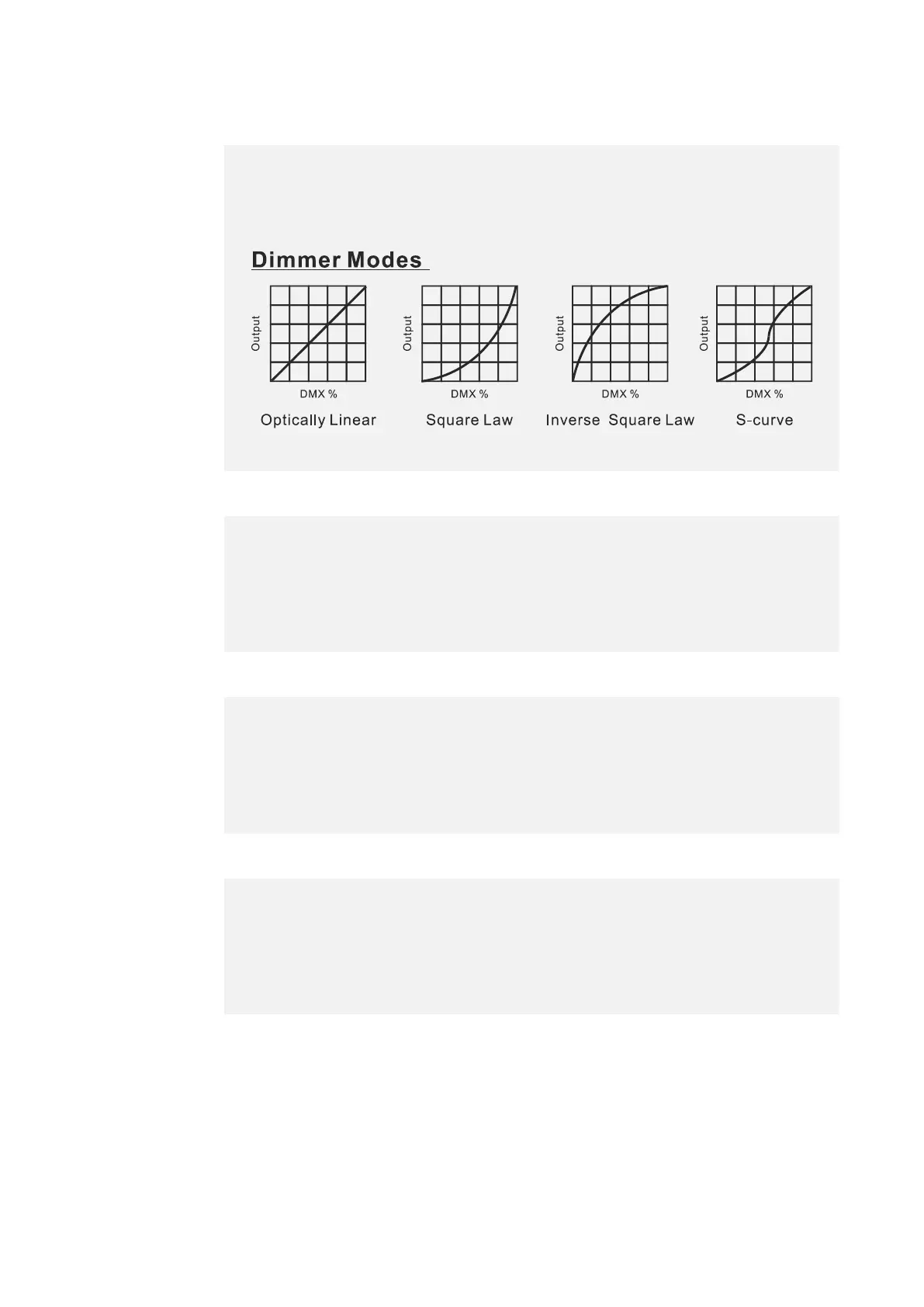
Dimmer Curve
Cooling Mode
Bright Calibration
Blade Mode
Select Blade Mode, press ENTER.
Use UP/DOWN button to select Mode 1 or Mode 2, confirm your
selection with ENTER.
To exit the menu, press MENU, or wait 30 seconds.
Select Bright Calibration, press ENTER.
Use UP/DOWN button to select a value between 50 and 100, confirm
your selection with ENTER.
To exit the menu, press MENU, or wait 30 seconds.
Select Cooling Mode, press ENTER.
Use UP/DOWN button to select Standard, Quiet or Theatre, confirm
your selection with ENTER.
To exit the menu, press MENU, or wait 30 seconds.
Select Dimmer Curve, press ENTER.
Use UP/DOWN button to select Linear, Square Law, Inv SQ Law or S
Curve, confirm your selection with ENTER.
To exit the menu, press MENU, or wait 30 seconds.










 To Next Page