5
5. Tap “Connect the smartwatch” in the settings section, follow on-screen instructions
and select the name of the smartwatch in the list of found devices. Now your data
andnoticationscanbesynced.In casethesmartwatchisnotfound– restartthe
application and the smartwatch by turning it o and on.
6. An IPhone user has to open the Bluetooth menu of the phone and perform pairing
with the smartwatch to enable full functionality of the smartwatch.
Some functionality may not work properly or work dierently depending on the
smartphone model and software. Such issues not necessarily mean the
malfunctioning of the smartwatch.
Time in the smartwatch will be set automatically after synchronisation with a
smartphone.
Device controls
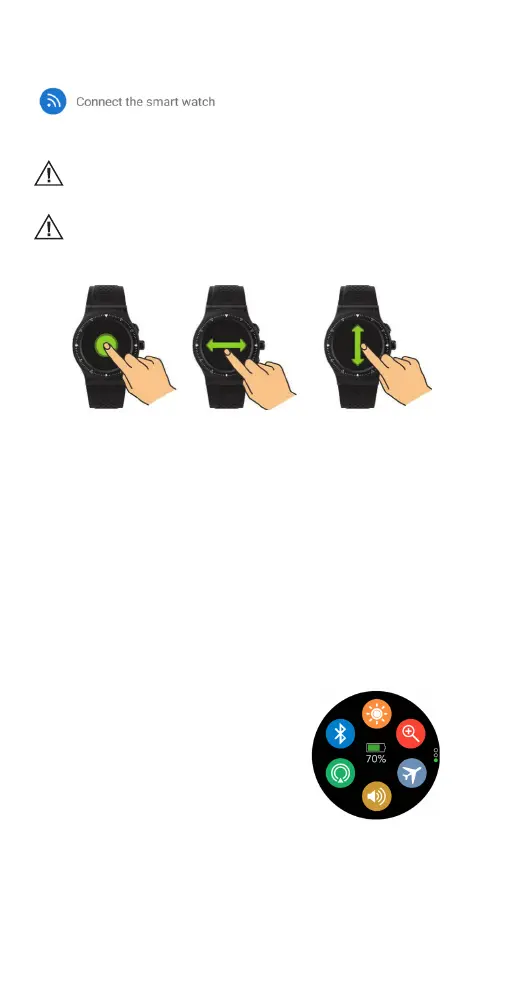
Turn on/o: Hold and press the power (6) button for 3 seconds.
Enter main menu: Swipe from right to left when on the watch interface.
Switch the submenus: Swipe up/down or turn the watch crown (5).
View smartphone notications: Swipe from left to right when on the watch interface.
(Devices must be connected.)
View quick settings menu, weather information and calendar: Swipe down or turn
the crown (5) down when on the watch interface.
View statistics, sports data, personal sleep information, heart rate mode, reminder
alerts, atmospheric pressure, temperature, altitude, GPS status page: Swipe up
when on the watch interface or turn the crown (5) up.
Select menu function: Tap the icon or press the watch crown (5).
Exit menu function: Swipe from left to right.
Return to watch interface: Press the power/back button (6).
Sport mode: Press the sport mode button (4).
Change watch interface: long press the watch display, then swipe left or right to choose
thewatchinterfaceyoulike–conrmitbytappingthescreen.
Overview of functions
Functions in the quick settings menu
• Brightnessadjusting
• Bluetoothoptions
• GPSserviceON/OFF
• MuteON/OFF
• Changethesmartwatchprole
• Findphone



 To Next Page