11
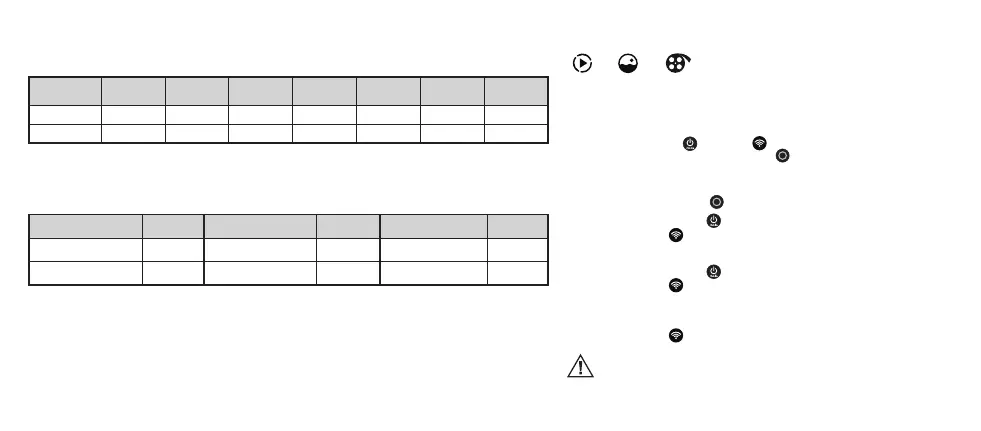
Video recordings storage capacity and duration in minutes
Resolution and frame rate
Micro-SD
card capacity
4K/30 2.7K/60 2.7K/30
(EIS)
1080p/100 1080p/60
(EIS)
720p/200
FPS
720p/200
FPS
32 GB 120 105 160 105 150 120 120
64 GB 240 210 320 210 300 240 240
Acme camera battery-life
This table indicates the approximate continuous recording time in various modes.
Actual performance depends on settings, environmental conditions and other factors. The maximum battery
capacity will normally decrease with time and usage.
Camera mode Time Camera mode Time Camera mode Time
1080p/60 FPS (EIS) 80 min 2.7K/60 FPS 70 min Time lapse video 70 min
4K/30 FPS 70 min 720p/ 200 FPS 70 min
Transferring les to a computer
• Connectthecameratoyourcomputerusingthemicro-USBdatacable.Yourcomputerwillshowthecameraasa
portable storage device. No installation of additional drivers is required.
• Youcanalsotransferlesusingacardreader(internalorexternal)withamicro-SDcardslot.
Remove the micro-SD card from the camera and insert it into the card reader.
• Nowyoucantransferlestoyourcomputerordeleteselectedlesonyourcard.
Playing back videos and photos on your TV
Video Photo Preview
1. Connect the camera to a TV with a micro-HDMI cable (not included).
2. Select the correct HDMI input on your TV.
3. Power on the camera.
4. Press the power/mode
or the Wi-Fi button to navigate the camera menu
and then press the shutter/select button
to select one of the following
modes: VIDEO, PHOTO, PREVIEW.
VIDEO MODE:
Press the shutter/select button to play/pause the video les.
Press the power/mode button
to change the video le.
Press the Wi-Fi button
to exit the video mode.
PHOTO MODE:
Press the power/mode button to change the photos.
Press the Wi-Fi button
to exit the photo mode.
PREVIEW MODE:
In this mode a TV screen will show a live video view from the camera lens.
Press the Wi-Fi button
to exit the preview mode.
When the HDMI cable is plugged in, the camera screen will be turned
o.



 To Next Page