7
0000 | 9999
12MP
00:00:00 | 01:20:20
720p 200
TOUCH DISPLAY
The integrated touch display lets you control your camera and its settings, play back videos and view photos.
Youcanalsouseitasaviewndersoyoucanseewhatyourcameraseesforshot-framing.
Turning the touch display on/o
The touch display automatically turns on/o when you power the camera on/o.
Touch display gestures
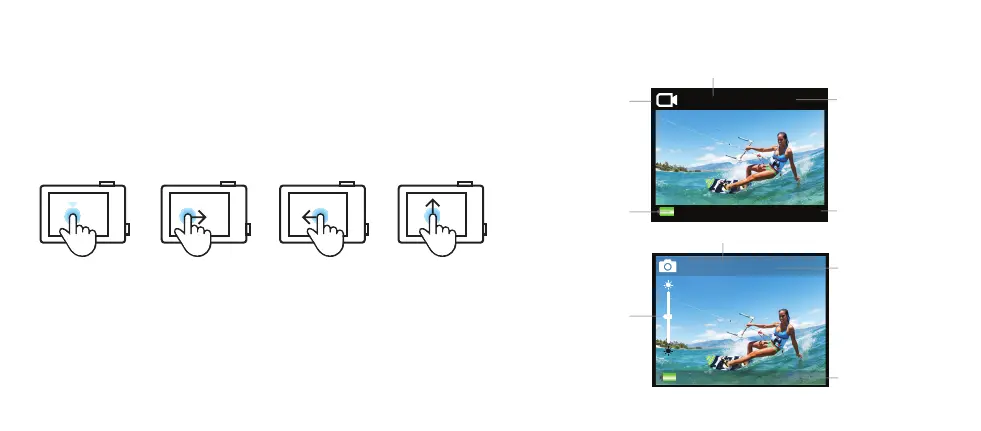
Use these gestures to navigate the touch display. When swiping, swipe from the edge of the screen.
Tap:
Select an item and
turn a setting on/o.
Swipe right:
Switch between video
and photo modes
when used from
the main screen.
Swipe left:
Access the other modes
window when used
from the main screen.
Swipe up:
Access advanced
settings when used
from the screens of the
following modes: video,
burst, time lapse video,
time lapse photo.
Camera display overview
Camera mode icon
Duration of the current video le
Number of photos saved into the micro-SD card
Maximum video
duration of the
video that can be
recorded into the
micro-SD card
Battery status icon
Photo brightness
slider: slide it
with your nger
to adjust
Video resolution
and frames
per second
Maximum number
of photos that can
be captured into
the micro-SD card
Photo resolution



 To Next Page