6
BATTERY CHARGING
• Charge the battery by connecting the camera to
the USB charging adapter or another powered
USB port (power bank, computer, etc.) using the
included or another good quality micro-USB cable.
• During charging the status light on the camera
will be RED. The status light will turn o when the
battery is fully charged.
• Chargingtakesupto2hours.
• You can record videos and take photos while
charging the battery.
Camera usage in cold conditions
Cold temperature can decrease the battery life. For
better using experience in cold conditions, keep the
camera in a warm place prior to use. If the camera is
turned o and kept in cold temperature for too long,
battery voltage and charge state may decrease to a
critical level and the camera may not turn on –please
recharge the battery.
Waterproof camera housing
• The waterproof housing helps to protect
the camera from water, dirt, sand and other
environmental hazards.
• Rubber sealsinthecamera housing protectyour
camera in wet or underwater conditions. Keep the
housing’s rubber seal clean. A small particle of dirt
or foreign material can cause a leak and damage
your camera.
• After use in salty water, rinse the outside of the
waterproof housing with non-salty water and dry it.
• Warrantydoesnotcoverwaterdamageresultedfrom
user’s errors.
• Touchscreencontrolswillnotworkwhenthecamera
is placed into the waterproof housing. Please use
physical buttons.
• Usingthecamerainthewaterproofhousingwillcause
lower audio recording quality.
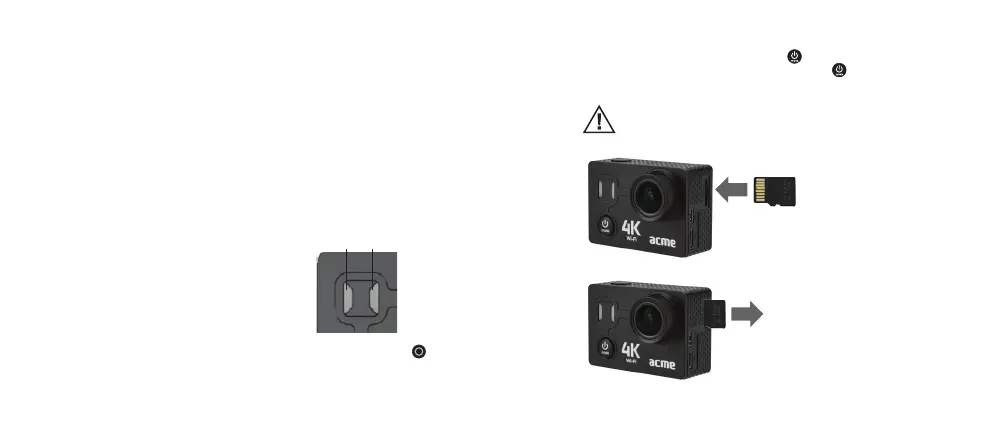
STATUS LIGHTS
A B
Red status light A
It shows battery charging
status: During charging, it
glows RED, when the battery
is full, the LED light will be OFF.
Blue status light B
In a video mode: When a
video is being recorded, it will
constantly blink.
In a photo mode: When you
press the shutter/select button
, the status light will blink
once after a photo is taken.
Powering ON/OFF
To power on: Press the power/mode button once.
To power o: press and hold the power/mode button
for 3 seconds.
Inserting and removing the micro-SD card
The camera must be powered o before inserting or removing the card.
Please format the card in the settings menu when using it with the camera
for the rst time.
Slide the memory card with
your ngernail into the
card slot as shown in the
illustration.
When fully inserted, the card
clicks into the place.
Place your ngernail against
the edge of the memory card
and lightly press it further
into the camera.
The card springs out to be
removed.



 To Next Page