13
TROUBLESHOOTING
Problem description
Possible causes and solutions
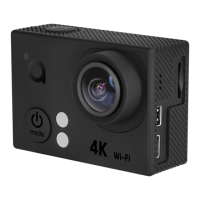
The camera does not turn on.
• Makesurethebatteryischarged.
• Makesurethecamerawasnotkeptincoldconditionsfortoolong–rechargethebattery.
The camera gets stuck during operation and controls are
unresponsive.
• The micro-SD card is defective or too slow for proper operation. Please use another card that meets required
specications for video recording.
• Thecameramaybeoverheated–letitcooldownandtrytouseitagain.
• Pressandholdthepresspower/modebutton until the camera turns o or open the battery compartment cover
and remove the battery.
The battery cannot be recharged.
• TryanotherUSBchargerorcable.
• Trytouseanothercompatiblebattery.
The camera is not working via Wi-Fi connection.
• Makesurethatallsecurityrequestsoftheapplicationwereacceptedduringtheinstallationandtherstlaunch.
• Checkforthelatestupdatesoftheapplication.
• MakesuretheWi-Ficonnectionofthesmartphoneorthetabletisworkingproperly.
Waste Electrical and Electronic Equipment (WEEE) Symbol
The use of the WEEE symbol indicates that this product may not be treated as household waste. By ensuring this product is disposed of correctly, you will help protect the environment. For
more detailed information about the recycling of this product, please contact your local authority, your household waste disposal service provider or the shop where you purchased the
product.



 To Next Page