23
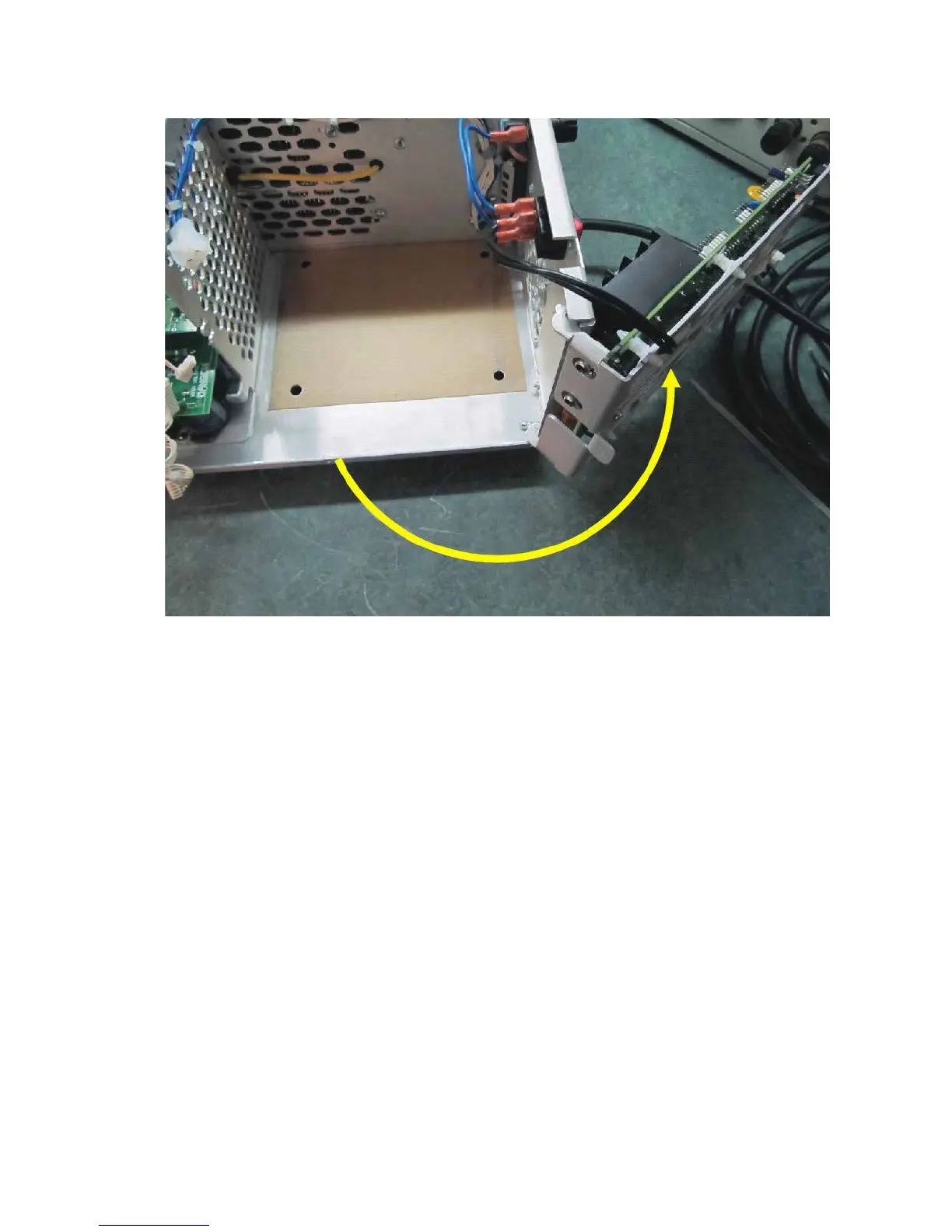
Turn the Mains board right.
Take the transformer out of the carton and remove the shipping board. Keep the board together
with the four long screws and all packing for possible future transportation. For transformer
mounting, four shorter screws (metric M6x12) are provided in a polyethylene envelope inside
the same carton.
Move the transformer, using its band handle, into the compartment. Take care not to damage
the wiring or components and position the transformer so that the captive nuts are aligned with
the corresponding chassis holes. Make sure that the transformer is centered. The transformer
screws must be installed NOW for safe operation.
Put a lock washer and a at washer on each screw.
Holding its two sides (front and back) simultaneously, pull the amplier towards you just far
enough that the two outside transformer captive nuts appear off the table edge. Support the
amplier until your assistant loosely screws in the two outside transformer-mounting screws.
Pull the amplier a further 12-13cm (about 5 inches) until the other two captive nuts appear off
the table edge. Keep supporting the amplier until your assistant loosely screws them in. After
checking that the transformer is centered, tighten all 4 screws. Now move the amplier back
over the table.



 To Next Page