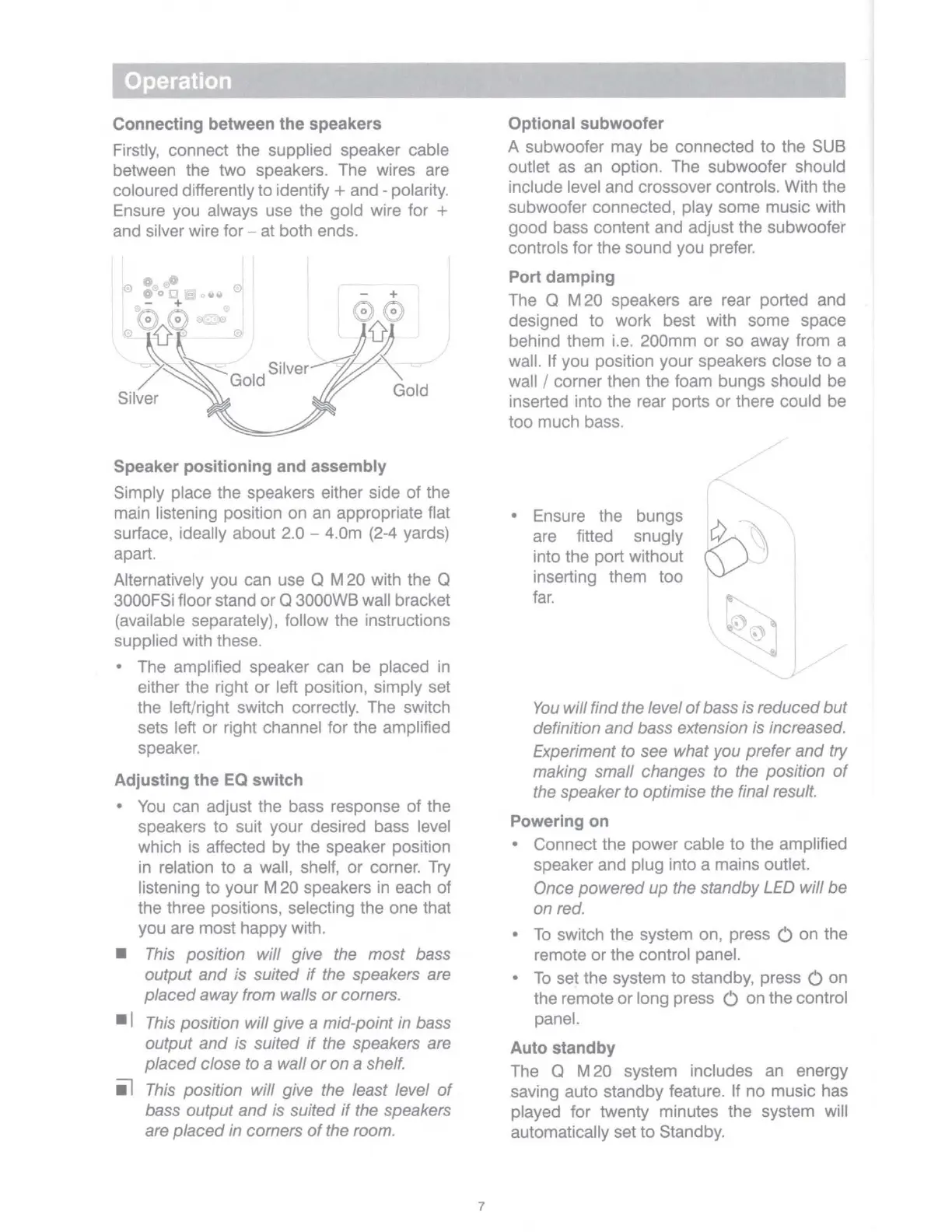
Connecting between the speakers
Firstly,
connect the supplied speaker cable
between the two speakers. The wires are
coloured differently to identify + and - polarity.
Ensure you always use the gold wire for +
and silver wire for - at both ends.
Speaker positioning and assembly
Simply place the speakers either side of the
main listening position on an appropriate flat
surface, ideally about 2.0 - 4.0m
(2-4
yards)
apart.
Alternatively you
can
use Q M 20 with the Q
3000FSi floor stand or Q 3000WB wall bracket
(available separately), follow the instructions
supplied with these.
• The amplified speaker can be placed
in
either the right or left position, simply set
the left/right switch correctly. The switch
sets left or right channel for the amplified
speaker.
Adjusting the EQ switch
•
You
can adjust the bass response of the
speakers
to
suit your desired bass level
which
is
affected by the speaker position
in
relation
to
a wall, shelf, or corner.
Try
listening
to
your M 20 speakers
in
each of
the three positions, selecting the one that
you are most happy with.
■
This position will give the most bass
output
and
is suited
if
the speakers are
placed
away from walls
or
corners.
■
I
This
position will give a mid-point in bass
output
and
is suited
if
the speakers are
placed
close to a wall
or
on a shelf.
il
This
position will give the least level
of
bass output
and
is suited
if
the speakers
are placed in corners
of
the room.
7
Optional subwoofer
A subwoofer may be connected to the
SUB
outlet as an option. The subwoofer should
include level and crossover controls. With the
subwoofer connected, play some music with
good bass content and adjust the subwoofei'
controls for the sound you prefer.
Port damping
The Q M 20 speakers are rear ported and
designed to work best with some space
behind them i.e. 200mm or so away from a
wall. If you position your speakers close to a
wall / corner then the foam bungs should be
inserted into the rear ports or there could be
too much bass.
• Ensure the bungs
are fitted snugly
into the port without
inserting them too
far.
You
will find the level
of
bass is reduced
but
definition
and
bass extension is increased.
Experiment to see what you prefer
and
try
making small changes to the position
of
the speaker to optimise the final result.
Powering on
• Connect the power cable to the amplified
speaker and plug into a mains outlet.
Once powered up the standby LED will be
on red.
•
To
switch the system on, press C on the
remote or the control panel.
•
To
set the system
to
standby, press
Con
the remote or long press C on the control
panel.
Auto standby
The Q M 20 system includes
an
energy
saving auto standby feature. If no music has
played for twenty minutes the system will
automatically set
to
Standby.



 To Next Page