.
'./
~
:,
~~
:r:~:i
. '
,
.1
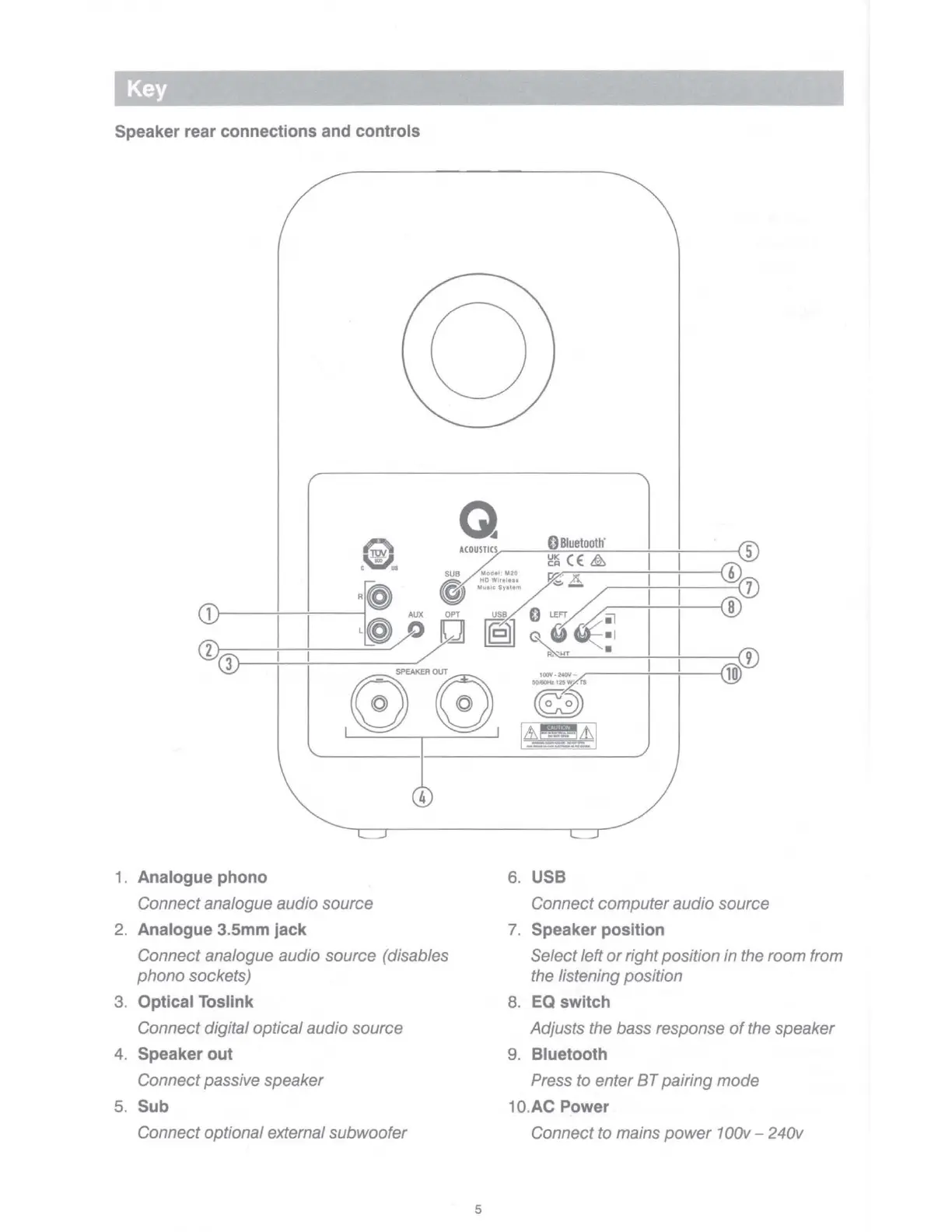
Speaker rear connections and controls
0
Bluetooth
"
5
Q
ACOUST
I
CS
g~(E & I I
SUB
Modol
,
M20
~
..!, I I 6
7
R@ @
:~,~•;;~~::.
i---
;---
1
.,----I
-------1
AUX
OP
T
use
O L
EFT
~ I
'1
B
Q)
I ,
@,,,o
□
ff€fill
'\!~:
I ®
3
00
_ SPEAKERO
0
UT
(Q)
,
00
..,..,,
_ I I
,0
4
1 . Analogue phono
Connect analogue audio source
2. Analogue 3.5mm jack
Connect analogue audio source (disables
phono
sockets)
3. Optical Tosllnk
Connect digital optical audio source
4. Speaker out
Connect passive speaker
5. Sub
Connect optional external subwoofer
5
50/80Hz
12SW',
rs
~
1~-~?I
6. USB
Connect
computer
audio source
7. Speaker position
Select left
or
right position in the room from
the listening position
8.
EQ
switch
Adjusts the bass response
of
the speaker
9. Bluetooth
Press to enter
BT
pairing
mode
10.AC Power
Connect to mains
power
1 00v - 240v



 To Next Page