Speaker
controls
Remote
control
CD-+-@]
cf0~
©-H - ) ( +
}--+--0)
:t,
◄◄
l
[··~
©-H
BLU
)
E)--+----;
9
~
ANA
) (
USB
H-@
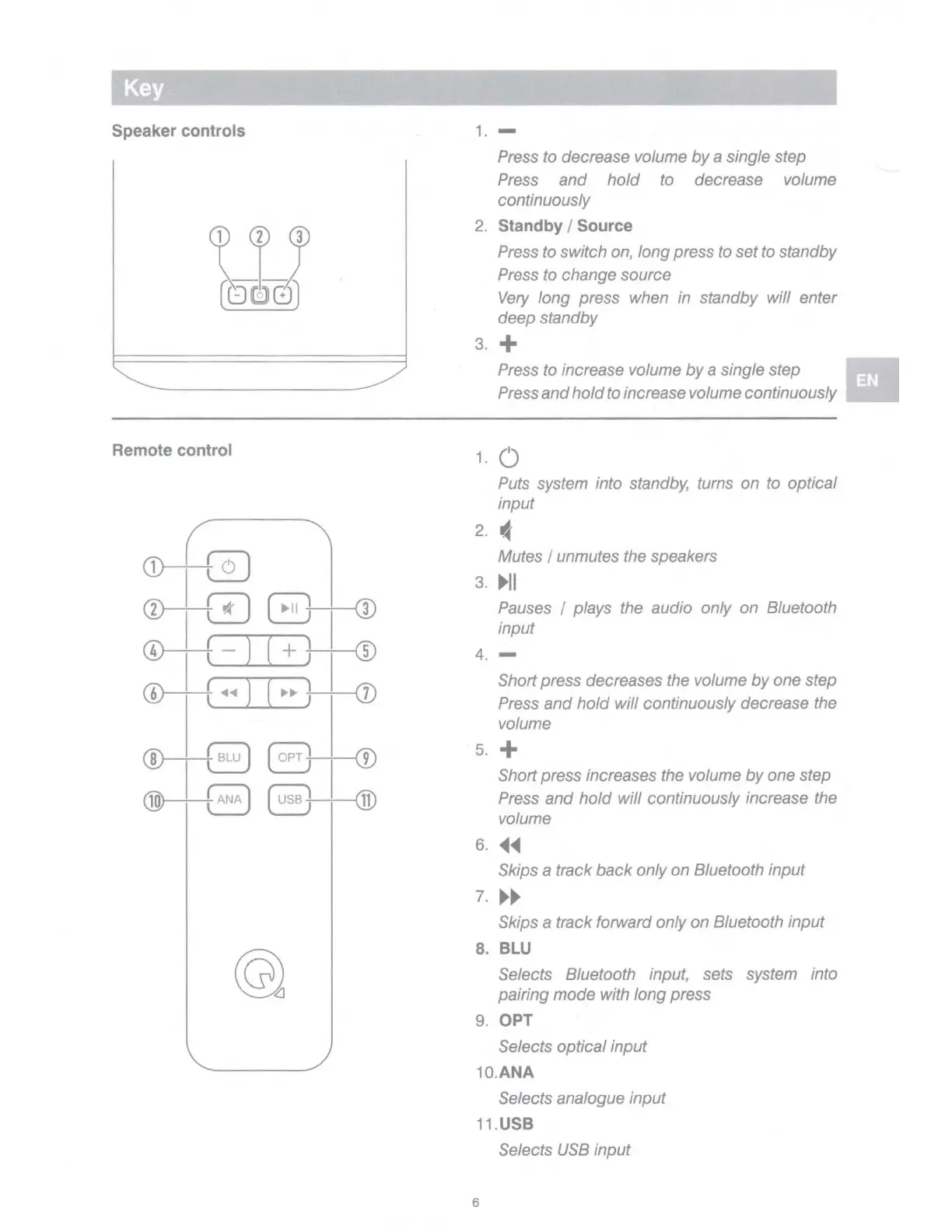
1. -
Press to decrease volume
by
a single step
Press
and
hold
to decrease volume
continuously
2.
Standby
/ Source
Press to switch on, long press to set
to
standby
Press to change source
Very
long press when in standby will enter
deep standby
3. +
1.
Press to increase volume
by
a single step
Press
and
hold
to increase volume continuously
0
Puts system into standby, turns on to optical
input
2. "
Mutes I unmutes the speakers
3.
►
II
Pauses I plays the audio only on Bluetooth
input
4. -
Short press decreases the volume
by
one step
Press
and
hold
will continuously decrease the
volume
5. +
Short press increases the volume
by
one step
Press
and
hold
will continuously increase the
volume
6.
◄◄
Skips a track
back
only
on
Bluetooth input
7.
►►
Skips a track forward only on Bluetooth input
8.
BLU
Selects Bluetooth input, sets system into
pairing mode with long press
9.
OPT
Selects optical input
10.ANA
Selects analogue input
11.USB
Selects
USB
input
6



 To Next Page