9
Indicate the percentage of the current load current relative to the rated current,
90% to 110%, the histogram shows 100%, and so on.
1、2、3:Values of ABC three-phase, 1-2,2-3,3-1: Value of the AB, BC, CA
three-line
Communication
status symbol
Lights up to indicate that the current communication is being sent and
received normally
Absorption total active energy / release total active energy / inductive reactive
energy / capacitive reactive energy
Current: A, kA; Voltage: V, kV; Active power: kW, MW; Reactive power:
kVar, MVar; Apparent power: kVA, MVA; Percentage: %; Frequency: Hz
Display area of
measurement data
Current, voltage, power, power factor, time, parameter settings, etc.
Active energy: kWh, MWh; Reactive energy: kVarh, Mvarh
The status of DO1-DO4. The remaining DO can be viewed under the main
loop IO
The status of DI1-DI8. The remaining DI can be viewed under the main loop
IO
Left and right navigation bar, corresponding to the left and right buttons
menu;
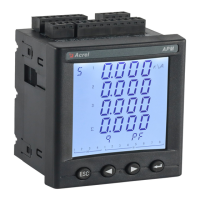
Electrical measurement display and parameter setting
The meter will display the model number and version information, and then the current interface will be displayed.
The measurement type
of the current interface
Unit
Phase sequence
Bar graph of load
Communication status
DO status
Value
Return key, return to
previous menu
DI status
Enter key , enter lower menu
Navigation interface. Press left key/right key to
indicate the navigation interface that will be entered.
SET


 To Next Page
 Loading...