Need help?
Do you have a question about the ACTi KCM-5511 and is the answer not in the manual?
Read all safety and operating instructions before using the product to avoid hazards.
Do not service yourself; refer all servicing to qualified personnel to avoid hazards.
Information on registered trademarks and disclaimer of liability for errors.
Details compliance with FCC/CE regulations for commercial environments.
Lists all items included in the product package, such as the camera and accessories.
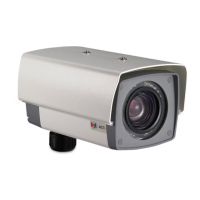
Details the camera's advanced features like 26x zoom, H.264, Advanced WDR, and DC Iris.
Lists critical safety precautions for device usage, including power, housing, water, and accessories.
Covers servicing procedures and specific conditions requiring service for the video product.
Details physical layout, identifies external ports, indicators, and buttons like Reset.
Covers preparation steps, cover removal, and the waterproof installation procedure for outdoor use.
Explains how to connect the camera using PoE or a power adapter and to the network.
Provides comprehensive technical specifications for the camera, including device, lens, video, audio, network, and integration details.
Instructions for accessing the camera on a network with DHCP enabled, using the IP Utility program.
Instructions for accessing the camera on a network without DHCP, including PC IP configuration and default camera IP.
Steps to change IP to static for multiple camera setups, save settings, and reconnect.
 General
| Lens Focal Length | 3.6 mm |
|---|---|
| Focal Length | 3.6 mm |
| Video Compression | H.264, MJPEG |
| Connectivity Technology | Wired |
| Lens Type | Fixed |
| Power Supply | 12 V DC, PoE |
| Power Device | PoE / DC 12V |
| Features | Day/Night |
| Frame Rate | 30 fps |
| Protocols | DHCP, DNS, DDNS, RTP, RTSP, RTCP, PPPoE, SMTP, NTP, UPnP |
| Compliant Standards | CE, FCC |

 To Next Page