Quick Start
Quick reference continued inside
back cover
www.acticare.com
Before first use please read the
warnings and contraindications
contained in section 2.
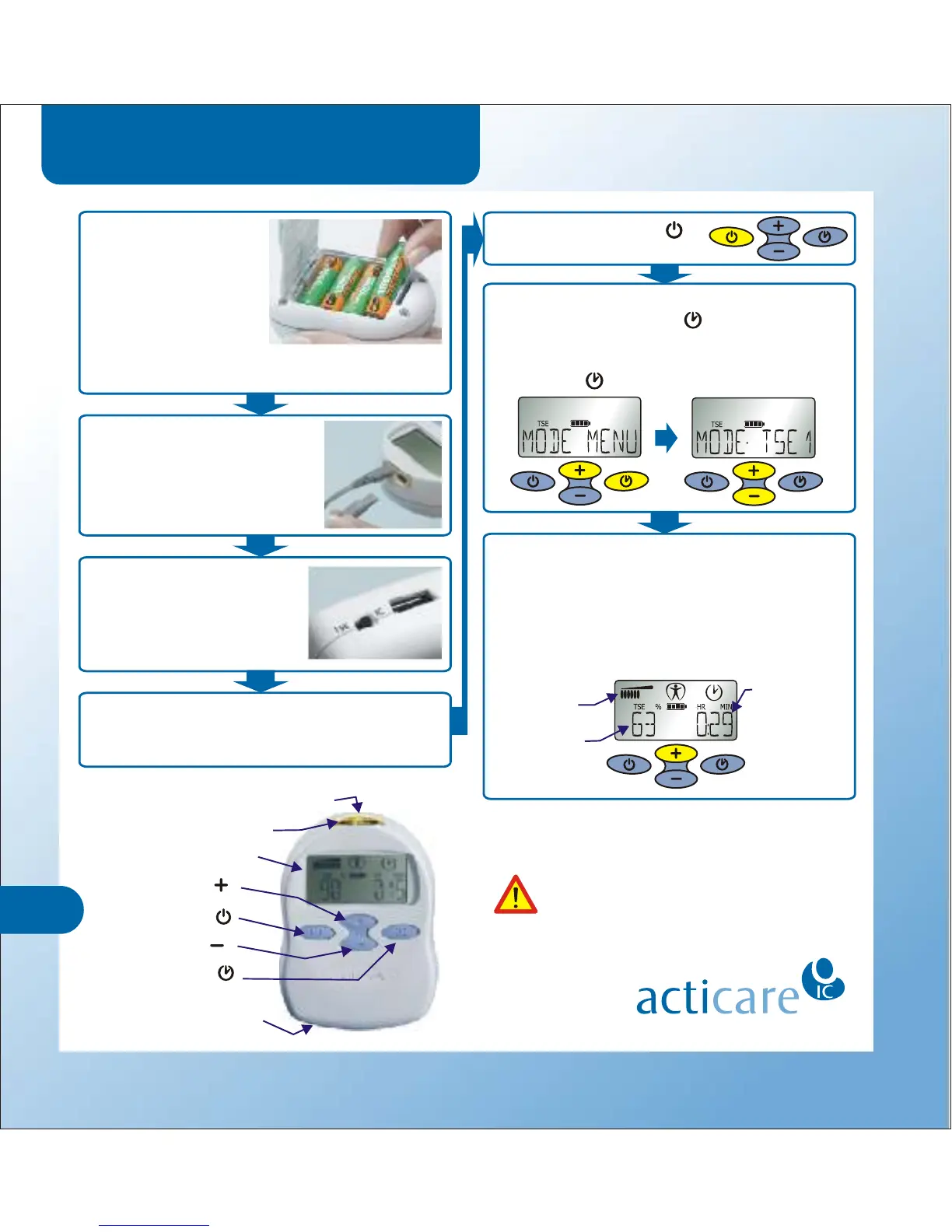
Commence treatment by pressing and
holding down the + button to increase the
treatment intensity. Holding + causes the
intensity to increase rapidly. The display
shows either % in TENS and TSE modes (as
illustrated) or milliamps (mA) in IC modes.
Plug the lead wires into
the top of the device and
connect to two or four
electrodes (page 11 or 17.)
Insert the four AA
batteries and plug
the device into the
supplied cradle. A
full charge takes 2½
hours. You can also
Site the electrodes on the patient’s skin as
required (IC mode page 12, TSE page 18,
TENS pages 22-24).
13
Set the therapy mode using the Mode
Menu by pressing + and together then
using + and to scroll through available
preset modes (IC mode p9, TSE p15, TENS
p21). Press to save and exit.
–
Switch on by holding .
Electrode connectors
Operating light
User display
On/Off button
Timer button
Interferential or
TENS/TSE switch
Plus button
Minus button
Set the switch on the
underside of the device
to either TENS/TSE or
Interferential Current (IC)
operation (page 11 or 19).
Intensity Level
Bar Graph
Intensity
Level %
Treatment
Timer
operate on mains power when in the cradle
(pages 7-8).



 To Previous Page