14
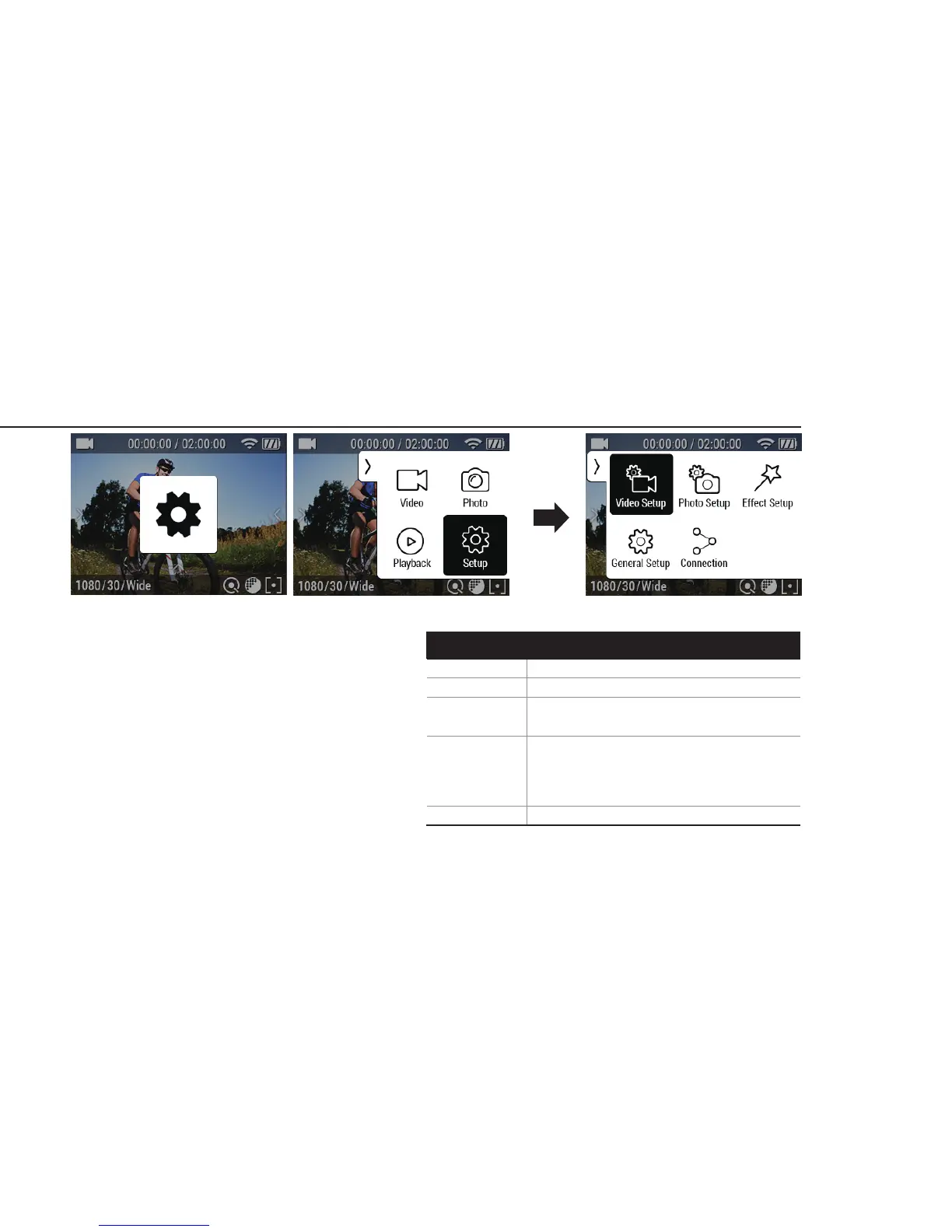
Please change the mode into Setup mode.
●
Able to choose more options with Setup mode.
●
Video Setup : Provides detailed video recording
options
●
Photo Setup : Provides photo shooting options.
●
Eect Setup : Provides eect setup options for
shooting.
●
General Setup : Provides general camera setup
options.
●
Connection : Provides WiFi function.
10. Setup mode
Screen shots of using button & Touch screen
Video Setup Mode/Pixel/FPS/FOV/Interval
Mode/Pixel/FOV/Interval
WiFi/WiFi Info
Control/Beep/LED indicator/Quick REC
/Auto LCD OFF/Auto Power OFF
/ Screen Lock/ TV Out/ Time Setup
/Memory Format/ Default
Zoom/Filter/AE Meter/White Balance
/EV/ISO/Upside Down/ Time Stamp
Photo Setup
Eect Setup
General Setup
Connection
Setup Option


 To Next Page