The main unit is capable of displaying some values in an alternate scale mode.
To switch between modes, press the “SCALE” button.
NOTE: The “WIND SPEED” history mode chart will not change to “kph” scale, it will
remain displaying “mph” data.
Main Unit : Scale Selection
The wireless sensor will soon send a signal to the main unit and the two units will be
synchronized. It may take a few minutes for synchronization to be complete. If both
or one of the units appear to be functioning improperly, refer to the troubleshooting
section in this manual.
Setup is Now Complete
After installing batteries, it is recommended that you set the clock and calendar
initially. After the atomic clock signal is acquired, which may take up to 24 hours, the
clock accuracy and daylight saving time changes will be automatically maintained.
To set the clock and other preferences, press AND HOLD the “SET” button for 5
seconds to enter into SET MODE. Once in set mode, the preference you are currently
setting will blink on the display.
To adjust the currently selected (ashing) preference item, press the “+” button (press
and HOLD to fast adjust).
To save your adjustments, press the “SET” button again to move on to adjusting the
next preference. The preference set order is as follows:
TIME ZONE (PST MST CST EST)
DST (Daylight Saving Time ON OR OFF)
CLOCK HOUR
CLOCK MINUTE
YEAR
CALENDAR MONTH
CALENDAR YEAR
You will automatically exit SET MODE if no buttons are depressed for 30 seconds. You
may enter basic setup mode again at any time by pressing AND HOLDING the “SET”
button.
Main Unit : Basic Setup
- 7 -- 6 -
SCALE MODE 1 - U.S. Standard
Temperature - ºF (fahrenheit)
Barometric Pressure- inHg (inches of mercury)
Wind Speed/Peak/Average- mph (miles per hour)
SCALE MODE 2 - Imperial Standard
Temperature - ºC (Celsius)
Barometric Pressure- hPa (Hectopascal)
Wind Speed/Peak/Average- kph (kilometers per hour)
SECTION 3 • OPERATION
B
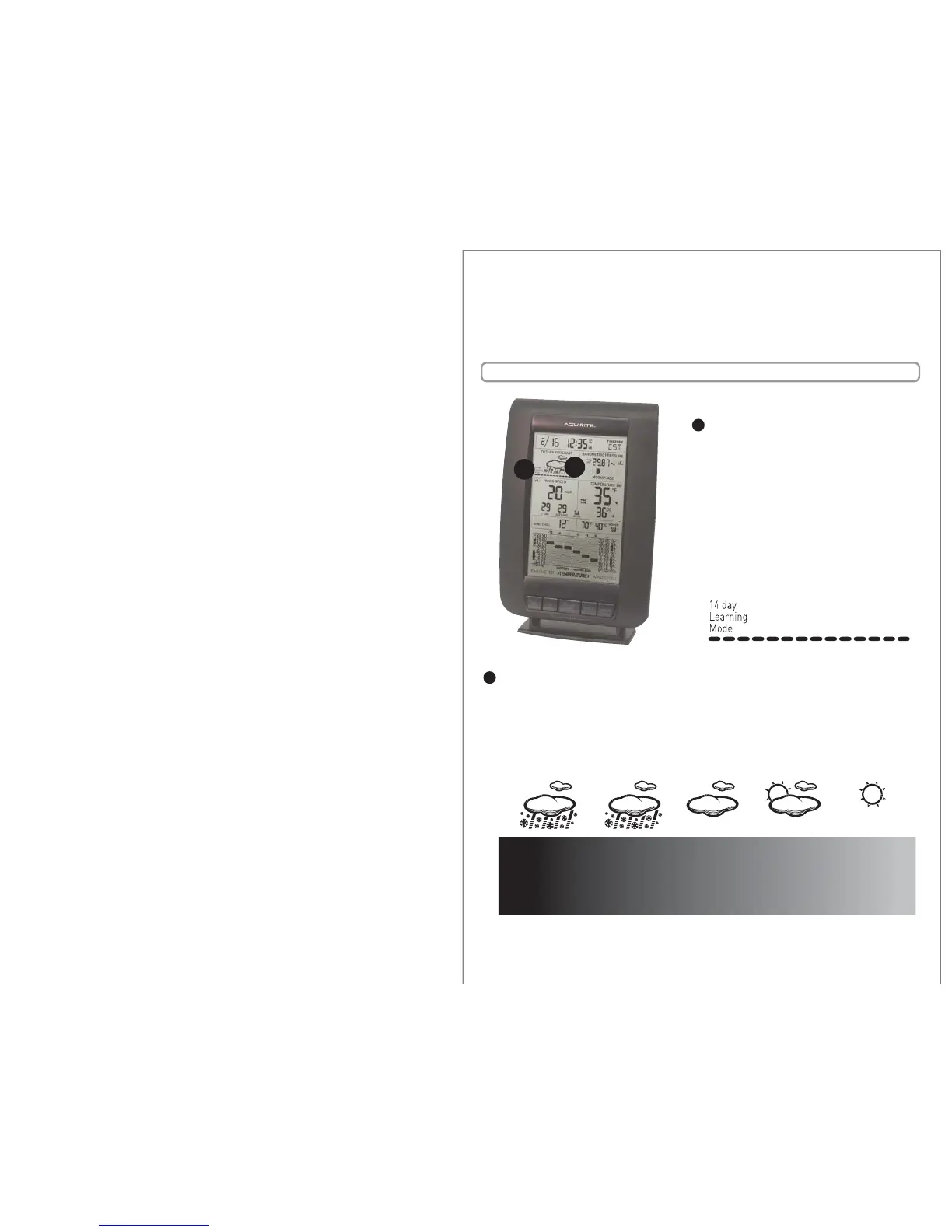
14 Day Learning Mode
This weather station has a patented
“fourteen day learning mode” calibration
process. During this learning mode the
weather station will make altitude
calculations that may aect the accuracy
of the forecast. Once the 14 day learning
mode process is complete, the learning
mode icon will disappear and the
weather forecast should be ready for
superior operation.
A
A
B
Future Forecast Icon
The future forecast feature automatically gives you the predicted weather forecast
icon for the next 12 to 24 hours based on an advanced algorithm that analyzes
barometric pressure changes and temperature. This weather forecaster will provide
the most accurate forecast that a single station instrument can provide.
HEAVY STORM
heavy stormy
weather
conditions are
forecasted
when ashing
stormy conditions
are forecasted
next 12-24 hours
mostly cloudy
conditions
are forecasted
next 12-24 hours
partly cloudy
conditions
are forecasted
next 12-24 hours
mostly sunny
conditions
are forecasted
next 12-24 hours
STORMY MOSTLY CLOUDY PARTLY CLOUDY MOSTLY SUNNY
rain or snow rain or snow


 To Next Page