- 9 -- 8 -
SECTION 3 • OPERATION SECTION 3 • OPERATION
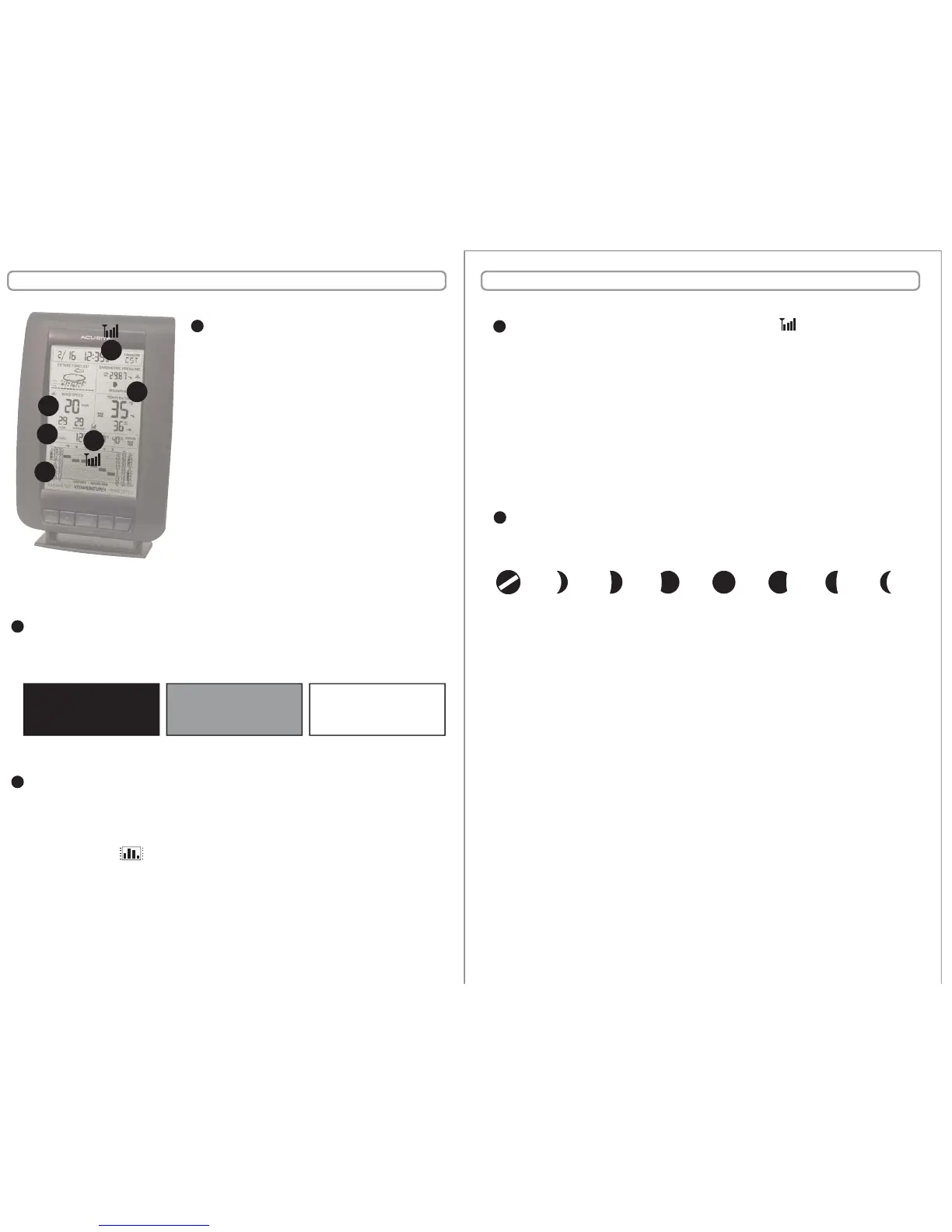
History Mode Graphing
This weather station features a selectable history mode which will graph and
display the changes for the last 12 hours (-12,-6,-3,-2,-1, 0). There are 3 selectable
weather categories; Barometer (barometric pressure), Temperature or Wind
Speed. Press the “HISTORY MODE” button to alternate through the 3 options. Note
the graphing icon “ “ next to the currently selected data window.
BAROMETER: hourly reading on the hour.
TEMPERATURE: hourly (outdoor) temperature reading on the hour.
WIND SPEED: hourly wind speed AVERAGE reading.
E
Wireless Signal Reception Icons
The main unit has a signal reception icon in the outdoor wind speed/ temperature
display area. If most or all four of the bars are present, wireless reception is good
and no action is required. If there are a low number of “bars” present, you may
experience wind speed/temperature inaccuracy. In either case, you may need to
relocate the main unit or the wireless sensor.
The main unit has a signal reception icon near the atomic clock display. If the atomic
clock signal bars are low, the clock may be inaccurate or may not automatically
adjust for daylight saving time (DST). Refer to the troubleshooting section in this
manual if you are having reception issues.
F
Seasonal Window (wind chill/dew point/heat index)
This weather station features a “Seasonal” window which will automatically display
the wind chill, the dew point or the heat index information when it is relevant.
D
Moonphase
This weather station features a moonphase window which will automatically display
the current moonphase, provided the calendar is set properly.
G
Wind Speed Data Window
This weather station features an advanced
wind speed data window that provides the
wind speed, the peak value and the average
value.
WIND SPEED: most current wind speed reading,
this value is updated every 18 seconds.
PEAK: the highest wind speed reading
recorded in the last hour.
AVERAGE: the combined averaged wind speed
readings from the last 2 minutes.
NOTE: The wireless sensor must be placed
outdoors to observe outdoor wind speed.
C
C
D
E
F
F
G
WIND CHILL DEW POINT HEAT INDEX
less than 40ºF (4ºC)
between 41ºF - 79ºF above 80ºF (27ºC)
(5ºC - 26ºC)
This wireless weather station features a MIN/MAX memory feature which records the
MINIMUM and MAXIMUM indoor & outdoor temperature and humidity readings.
To view the MINIMUM temperature and humidity readings, press and release the
“MIN/MAX” button. Note the “MIN” icon on the display.
To clear the MIN recorded values, press and hold the “+” and “SCALE” buttons
simultaneously for 3 seconds while in the MIN view mode. Dashes will display in the
display to conrm you have cleared the MIN values for outdoor temperature and
indoor temperature/humidity.
To view the MAXIMUM temperature and humidity readings, press and release the
“MIN/MAX” button. Note the “MAX” icon on the display.
To clear the MAX recorded values, press and hold the “+” and “SCALE” buttons
simultaneously for 3 seconds while in the MAX view mode. Dashes will display in the
display to conrm you have cleared the MAX values for outdoor temperature and
indoor temperature/humidity.
Main Unit : MIN/MAX Memory
NEW WAXING
CRESCENT
WANING
CRESCENT
WAXING
GIBBOUS
WANING
GIBBOUS
1ST
QUARTER
3RD
QUARTER
FULL


 To Next Page