4
Features & Benets
DISPLAY
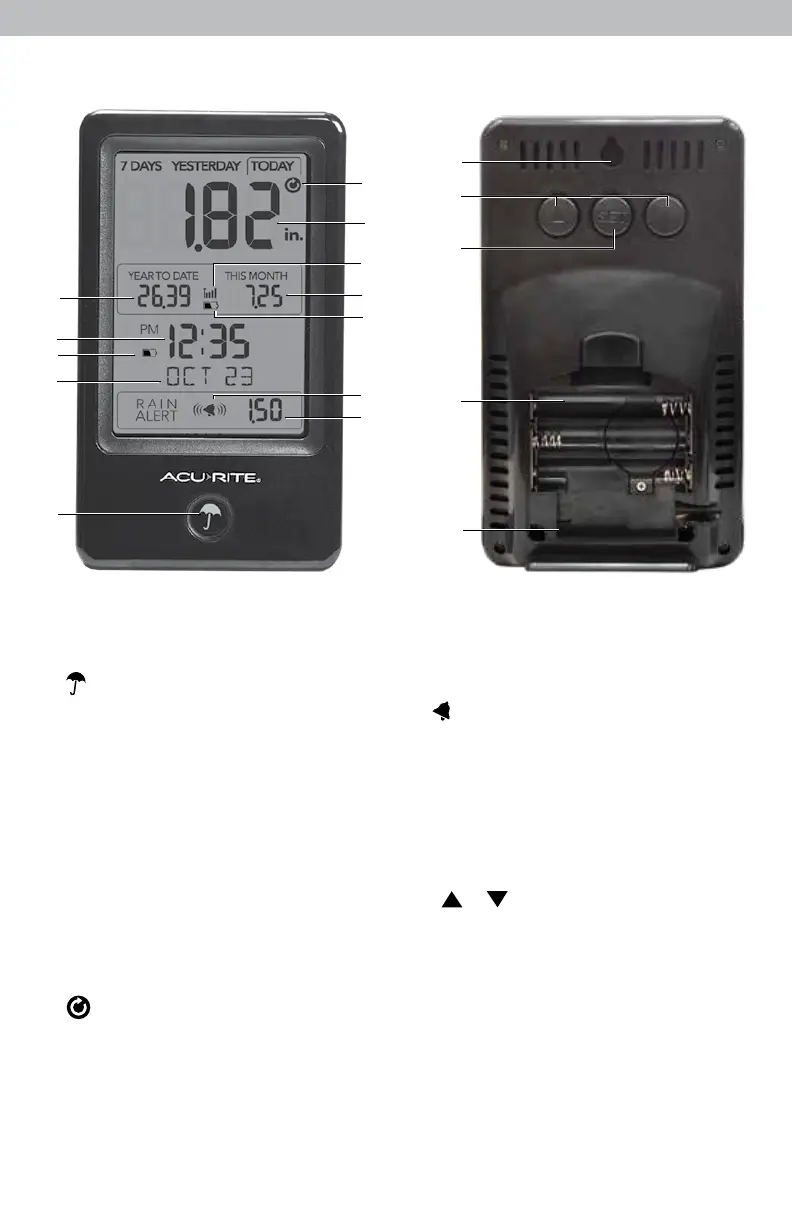
1. Button
Press to manually toggle between
rainfall readings for TODAY
YESTERDAY, 7 DAYS, or by
MONTH. Press and hold to
automatically toggle between
readings for TODAY, YESTERDAY
and 7 DAYS.
2 . Date
3. Display Low Battery Indicator
4. Clock
5. Year-To-Date Rainfall Total
6. Icon
Indicates rainfall readings are
in auto-cycle mode.
7. Rainfall Total
For time range indicated
above.
8. Rain Gauge Signal Strength
9. Month-To-Date Rainfall Total
10. Rain Gauge Low Battery Indicator
11. Icon
Indicates a rain alert has been set.
12. Rain Alert Value
Alarm will sound if value is exceeded
for today’s rainfall.
13. Integrated Hang Hole
For easy wall mounting.
14. & Buttons
For setup preferences and to adjust
rain alert value.
15. SET Button
For setup preferences.
16. Battery Compartment
17. A-B-C Switch
For setup preferences.
18. Battery Compartment Cover
(not shown)
1
2
3
4
6
7
8
9
12
11
10
5
17
16
15
14
13



 To Next Page