EasyManua.ls Logo

Acura ILX 2021 - Page 101

Acura ILX 2021
628 pages
Print Icon
To Next Page IconTo Next Page
To Previous Page IconTo Previous Page
Loading...
Continued
99
uuGauges and Multi-Information DisplayuMulti-Information Display
Instrument Panel
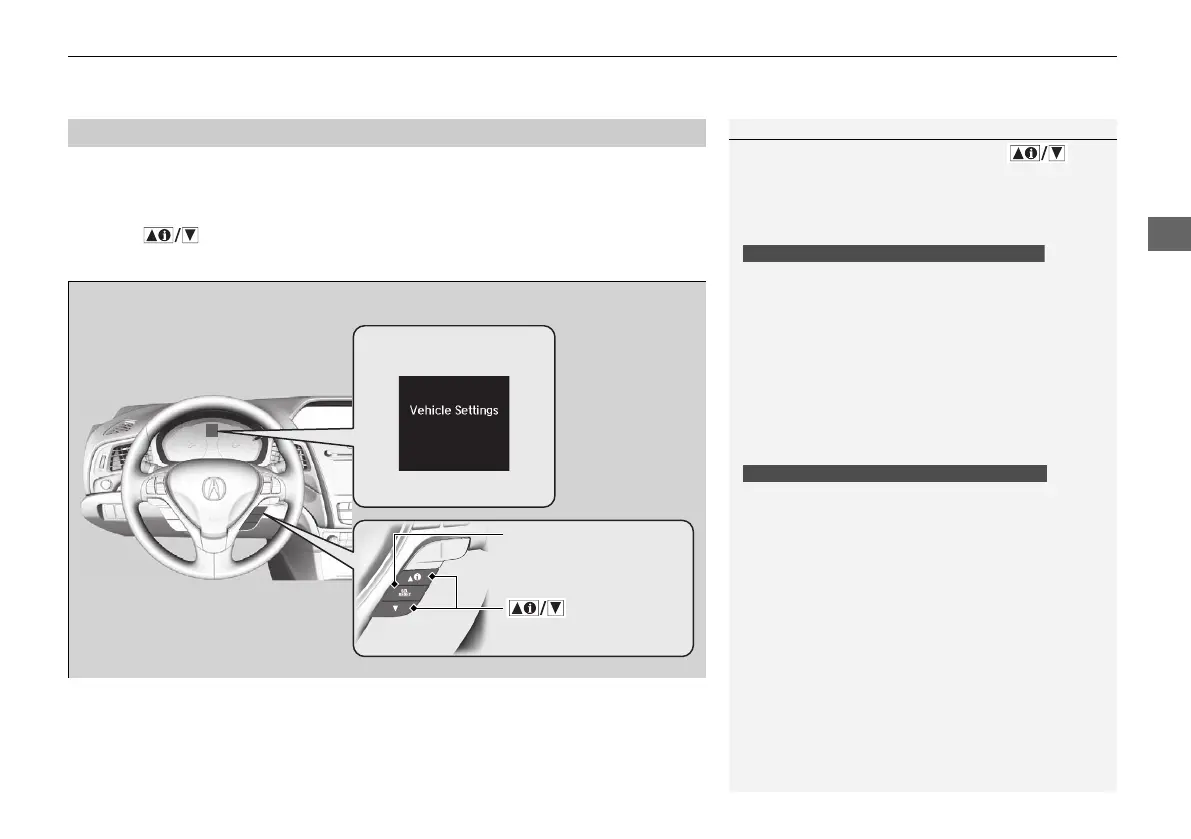
Use the multi-information display to customize certain features.
■
How to customize
Press the button to select Vehicle Settings and press the SEL/RESET
button.
■
Customized Features
1Customized Features
To customize other features, press the
button.
2 List of customizable options P. 102
2 Example of customization settings P. 106
Customization is possible when you see the driver’s
ID (Driver 1 or Driver 2) on the screen.
The driver’s ID indicates which remote transmitter
you have used to unlock the driver’s door. The
customized settings are recalled every time you
unlock the driver’s door with that remote.
Put the transmission into
(P before you attempt to
change any customized setting.
Customizing is also available from the information
screen.
You cannot have Vehicle Settings displayed on the
multi-information display while the information
screen shows the same menu.
2 Customized Features P. 315
Models with driving position memory system
Models with On Demand Multi-Use Display
TM
Multi-information Display: Goes to Vehicle Settings.
SEL/RESET Button:
Enters the selected item
Button:
Changes the customize
menus and items
21 ACURA ILX-31TX66800.book 99 ページ 2020年8月4日 火曜日 午後7時33分

Table of Contents