82
uuIndicatorsu
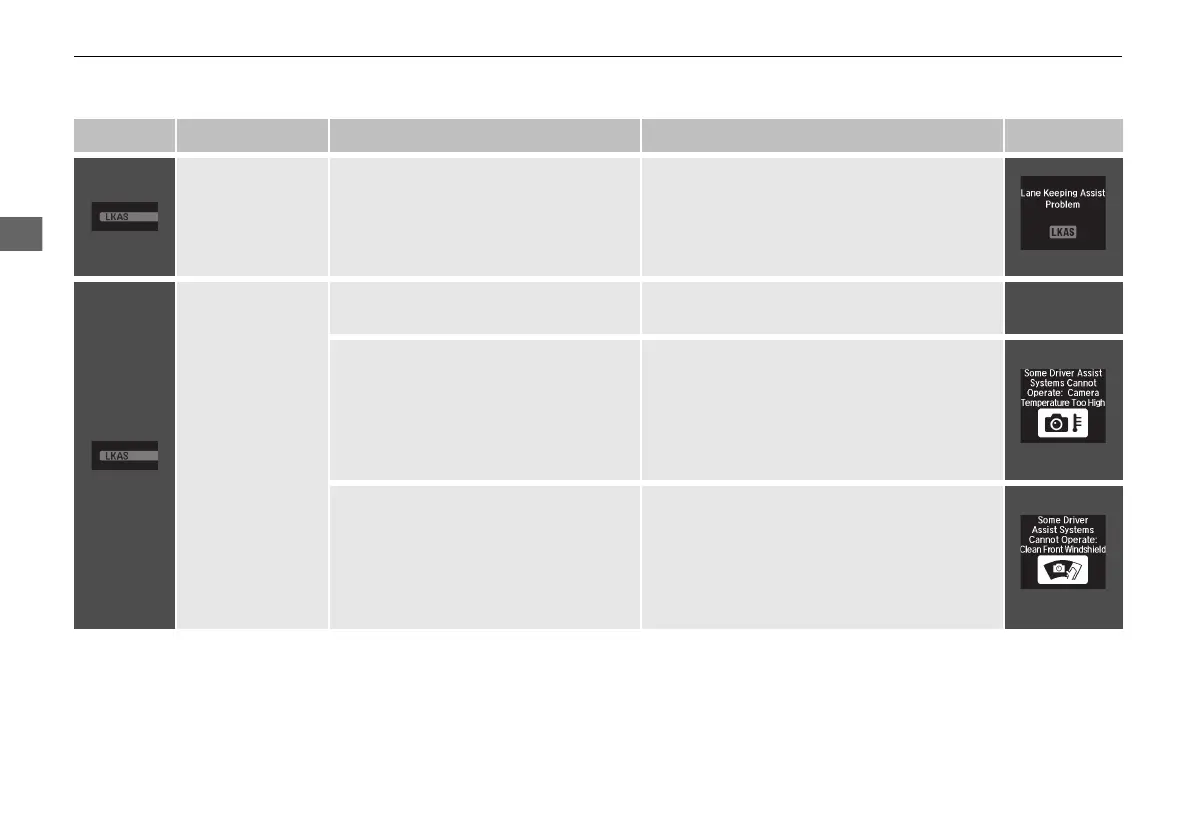
Indicator Name On/Blinking Explanation Message
Lane Keeping
Assist System
(LKAS) Indicator
(Amber)
●
Comes on for a few seconds when
you set the power mode to ON, then
goes off.
●
Comes on if there is a problem with
the LKAS.
●
Stays on constantly - Have your vehicle
checked by a dealer.
Lane Keeping
Assist System
(LKAS) Indicator
(Green)
●
Comes on when you press the MAIN
button.
2 Lane Keeping Assist System (LKAS)
P. 478
—
●
Comes on when the LKAS is in
operation, or the LKAS button is
pressed, but the temperature inside
the front sensor camera is too high.
The LKAS cancels automatically. The
beeper sounds simultaneously.
●
Use the climate control system to cool down
the camera.
●
Goes off - The camera has been cooled
down and the system activates normally.
2 Front Sensor Camera P. 493
●
Comes on when the area around the
camera is blocked by dirt, mud, etc.
Stop your vehicle in a safe place, and
wipe it off with a soft cloth.
●
May come on when driving in bad
weather (rain, snow, fog, etc.)
●
Have your vehicle checked by a dealer if the
indicator and message come back on after
you cleaned the area around the camera.
21 ACURA ILX-31TX66800.book 82 ページ 2020年8月4日 火曜日 午後7時33分



 To Next Page