298
uuAudio System Basic OperationuPlaying Pandora®
*1
Playing Pandora®
*1
Your audio system allows you to listen to music from the Pandora® app on a
compatible smartphone.
This function is available when the phone is paired and connected to the vehicle’s
Bluetooth® HandsFreeLink® (HFL) system, or with an iPhone, you can connect using
your USB cable to the USB port (2.5A).
2 Phone Setup P. 405
2 USB Ports P. 237
*1:Available only on U.S. models.
1Playing Pandora®
*1
Pandora®, the Pandora logo, and the Pandora trade
dress are trademarks or registered trademarks of
Pandora Media, Inc., used with permission. Pandora
is currently available exclusively in the United States.
To find out if your phone is compatible with this
feature, visit www.handsfreelink.com/Acura, or call
1-888-528-7876.
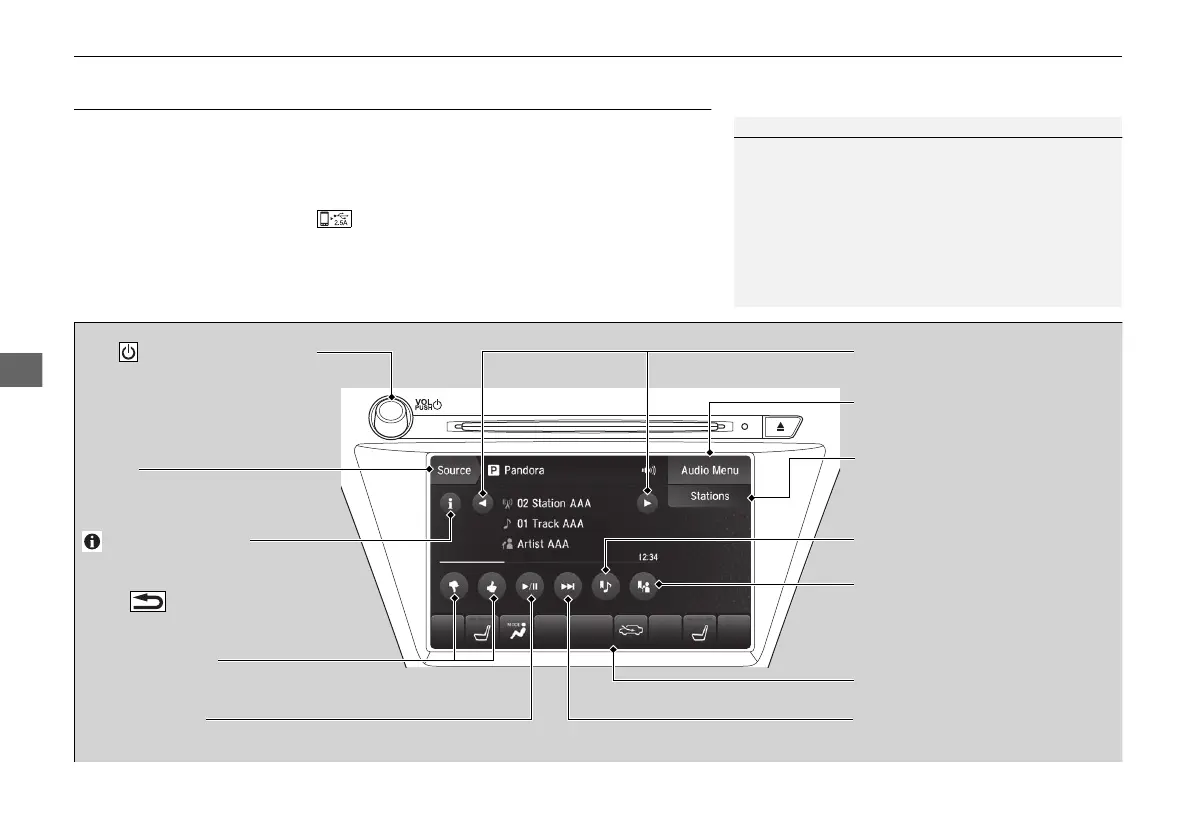
VOL/ (Volume/Power) Knob
Press to turn the audio system on
and off.
Turn to adjust the volume.
Audio Menu
Select to display the menu items.
Source
Select to change an audio source.
(Information) Icon
Select to displays the current track
details.
Select to displays the previous
screen.
Stations
Select to displays the station list
screen.
On Demand Multi-Use Display
TM
Like/Dislike Icons
Select to evaluate a track.
Skip Icon
Select to skip a track.
Play/Pause Icon
Select to resume or play a track.
Station Up/Down Icons
Select to change a station.
Bookmark Track Icon
Bookmarks the current track.
Bookmark Artist Icon
Bookmarks the current artist.
18 ACURA MDX E-AWD-31TRX6100.book 298 ページ 2017年11月10日 金曜日 午前10時21分



 To Next Page
 Loading...