EasyManua.ls Logo

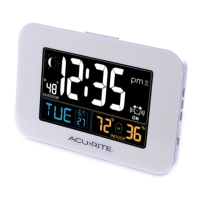
AcuRite 13041CAUDI - User Manual

AcuRite 13041CAUDI
16 pages
Print Icon
To Next Page IconTo Next Page
Loading...
Instruction Manual
SAVE THIS MANUAL FOR FUTURE REFERENCE.
Questions? Contact Customer Support at
(877) 221-1252 or visit www.AcuRite.com.
CONTENTS
Unpacking Instructions ........... 2
Package Contents .................. 2
Features & Benets: Sensor ..... 2
Features & Benets: Clock ...... 3
Setup .................................... 4
Sensor Setup ......................... 4
Clock Setup ........................... 5
Intelli-Time
®
Clock .................. 6
Set the Time, Date & Units ...... 6
Placement Guidelines ............. 7
Using the Alarm Clock ............ 8
Backlight Settings ................... 8
USB Charging ........................ 9
Troubleshooting ....................10
Care & Maintenance .............11
Replace Intelli-Time
®
Battery ..11
Specications ........................12
FCC Information ...................12
Customer Support .................13
Intelli-Time Alarm Clock
model 13041CAUDI

Questions and Answers

  • M
    Matthew HubbardAug 2, 2025
    What to do if AcuRite 13041CAUDI is too dark?
    • C
      Christina DukeAug 3, 2025
      If your AcuRite Alarm Clock display is too dark, try these steps: First, verify the power adapter is properly plugged in. Next, check that the batteries are correctly installed or need replacement. You can also adjust the brightness using the “ ”/ “ ” buttons on the side of the clock. Keep in mind that the optimal viewing angle for this product is from slightly above it.
  • B
    Barbara DavisAug 10, 2025
    What to do if outdoor temperature is flashing on AcuRite 13041CAUDI Alarm Clock?
    • J
      Jessica AdamsAug 10, 2025
      If the outdoor temperature on your AcuRite Alarm Clock is flashing or showing dashes, it may be due to wireless interference. Try the following steps: Bring both the sensor and clock indoors, side by side, and remove the batteries from each. Ensure that the A-B-C switch on both units matches. Reinstall the batteries in the outdoor sensor, then reinstall the batteries in the clock. Let the units sit within a couple of feet of each other for a few minutes to establish a strong connection.
  • R
    Ryan CunninghamAug 18, 2025
    Why does my AcuRite Alarm Clock have no outdoor sensor reception?
    • M
      Michael SandersAug 18, 2025
      If your AcuRite Alarm Clock shows no outdoor sensor reception, relocate the clock and/or the outdoor sensor, ensuring they are within 100 m (330 ft) of each other. Also, keep both units at least .9 m (3 feet) away from electronics that may cause interference, such as TVs, microwaves, or computers. Use standard alkaline batteries (or lithium batteries in the sensor when the temperature is below -20ºC/-4ºF), avoiding heavy-duty or rechargeable batteries. Allow up to 20 minutes for the clock and sensor to synchronize after replacing the batteries.
  • B
    Brian WhiteAug 25, 2025
    How to fix inaccurate temperature on AcuRite 13041CAUDI?
    • K
      Kaitlyn KerrAug 25, 2025
      To correct inaccurate temperature readings on your AcuRite Alarm Clock, ensure that both the clock and sensor are placed out of direct sunlight and away from any heat sources or vents.

Summary

Unpacking and Package Contents

Package Contents

Lists the items included in the product package.

Features & Benefits: Sensor

Details the features and benefits of the outdoor sensor unit.

Features & Benefits: Clock

Details the features and benefits of the main alarm clock unit.

Sensor Setup

Clock Setup and Power

Clock Setup

Instructions for setting up the main alarm clock, including A-B-C switch and power.

Backup Batteries

Guide for installing or replacing backup batteries for the clock.

Intelli-Time Clock Configuration

Set Time, Date, and Units

Steps to set the time zone, DST, time, date, and temperature units.

Placement Guidelines

Alarm Clock Placement

Guidance on where to place the alarm clock for optimal performance.

Outdoor Sensor Placement

Recommendations for placing the outdoor sensor for accurate readings.

Important Placement Guidelines

Key guidelines for unit placement to ensure accuracy and wireless range.

Alarm Clock Operation

Set Alarm Time

Instructions on how to set and manage the alarm function.

Alarm ON;OFF and Snooze

Steps to turn the alarm on/off and activate the snooze function.

Backlight Settings

Details on adjusting backlight brightness and auto dim mode.

Additional Features

Humidity Level Icon

Explains the meaning of the indoor humidity level indicator icon.

Moon Phase Icons

Describes the lunar phase icons displayed on the clock.

USB Charging

Information on how to use the USB port for charging mobile devices.

Troubleshooting

No Outdoor Sensor Reception

Solutions for when the outdoor sensor signal is not received.

Display Issues

Steps to resolve issues with the clock display or functionality.

Inaccurate Temperature Readings

Causes and solutions for inaccurate temperature readings.

Outdoor Temp Flashing;Dashes

Troubleshooting steps for issues with outdoor temperature display.

Care & Maintenance

Unit Cleaning

Guidelines for cleaning both the clock and outdoor sensor units.

Replace Intelli-Time Battery

Instructions for replacing the internal battery for time/date settings.

Specifications and Compliance

Specifications

Technical details and operating parameters of the device.

FCC Information

Regulatory compliance information, including FCC and IC statements.

Customer Support and Warranty

Customer Support

Contact information and resources for customer assistance.

Warranty Policy

Details of the product's warranty terms and conditions.

AcuRite 13041CAUDI Specifications

General IconGeneral
BrandAcuRite
Model13041CAUDI
CategoryAlarm Clock
LanguageEnglish

Related product manuals