3
Features & Benets
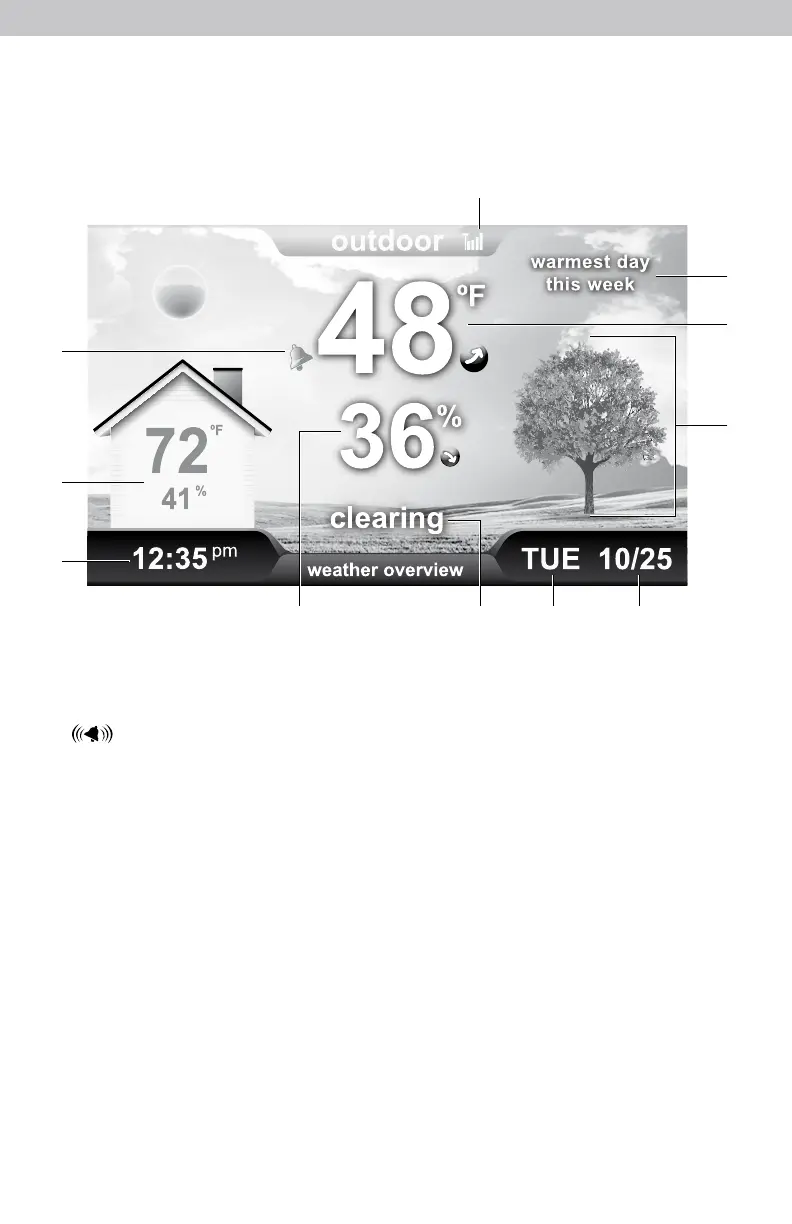
Weather Overview Dashboard
1. Alarm ON Indicator
Indicates alarm is activated to emit an
audible alert when conditions exceed
your presets (see page 10).
2. Indoor Conditions or
How-to-Dress Character
Select viewing preference during setup
(see page 12).
3. Clock
4. Current Outdoor Humidity
Arrow icon indicates direction
humidity is trending.
5. Weather Forecast and Indoor
Humidity Messages
Text readout of weather forecast.
Displays humidity alerts when indoor
conditions are too high or low
(see page 13).
6. Day Of The Week
7. Date
8. Weather Forecast and
Current Conditions
Self-Calibrating Forecasting pulls data
from your sensor to generate your
personal forecast. Illustrates current
conditions and automatically adjusts
based on time of day and season.
9. Current Indoor Temperature
Arrow indicates direction
temperature is trending.
10. Messages
Weather information and alert
messages
(see page 13).
11. Outdoor Sensor Signal Strength
11
1
10
9
8
2
3
65 74


 To Next Page