Chapter 5: Installing the Controller and Disk Drives ● 40
3 When all internal disk drives have been installed and connected, close your computer
cabinet, reattach the power cord, then continue with
Connecting External Devices
on page 42
.
Connecting MaxIQ Solid State Drives and other SSDs
To connect an Adaptec MaxIQ Solid State Drive or other SSD to your controller, use a direct-
attached connection or a backplane connection. If your server does not have a standard 2.5-
inch drive tray, you must use a bracket/SLED which enables the SSD to fit properly (not
included with MaxIQ SSD kit).
Note:
For MaxIQ caching applications, you can use any Solid State Drive on the compatibility
list, including Adaptec MaxIQ-branded SSDs and, with Adaptec Q-series controllers, select
SSDs from other manufacturers. For RAID arrays, you can use any Solid State Drive on the
compatibility list. See www.adaptec.com/compatibility for a list of MaxIQ-compatible Solid
State Drives.
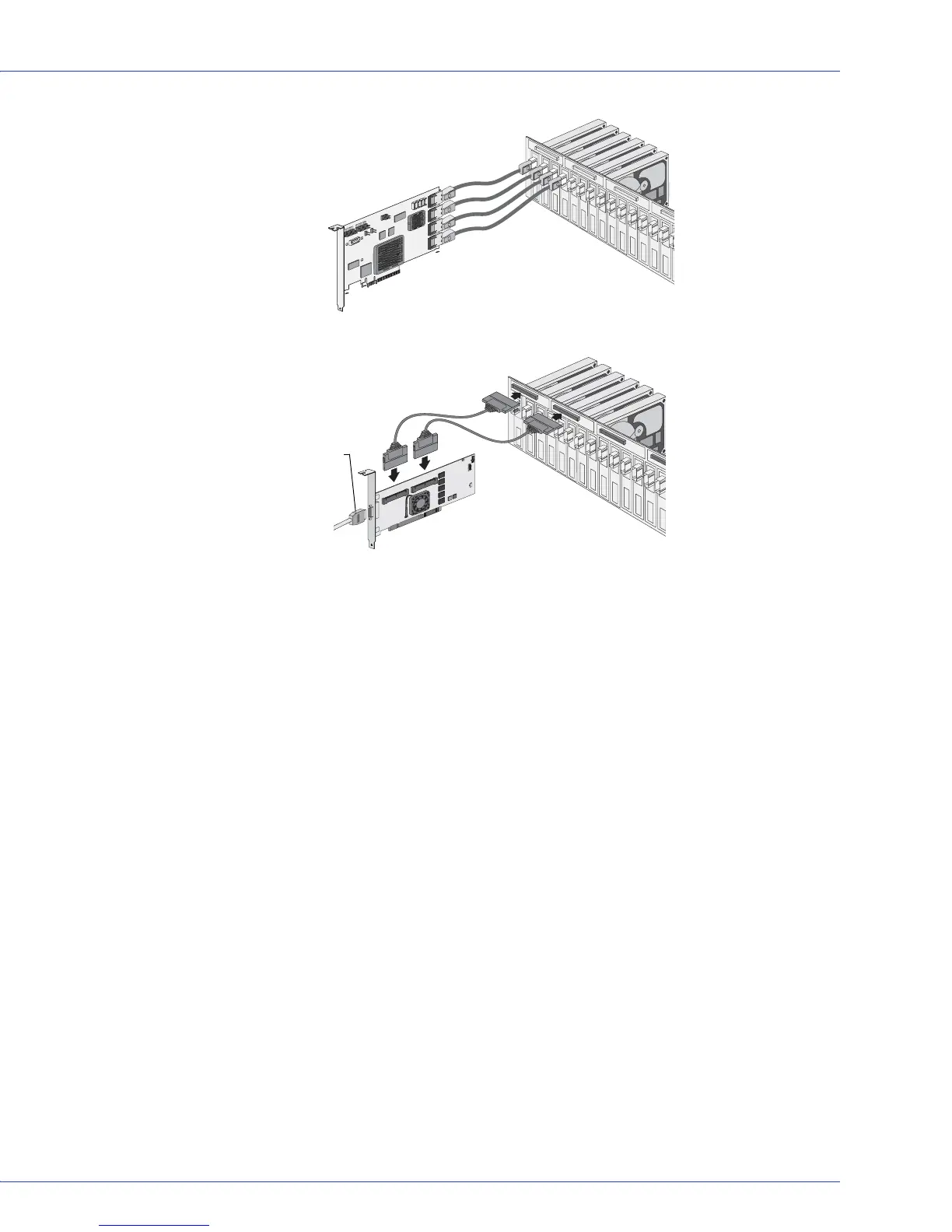
Disk drives or
SSDs on
backplane
Controller connected to backplane
with Internal mini-SAS to mini-SAS
(SFF-8087 to SFF-8087)
Controller connected to backplane
with multi-lane cable (SFF-8484)
Disk drives or
SSDs on
backplane
External SAS cable
connecting to a
drive bay



 To Next Page