Remote Control Programming Manual
26 Advanced text messaging: Example 10 — International characters
Example 10 — International characters
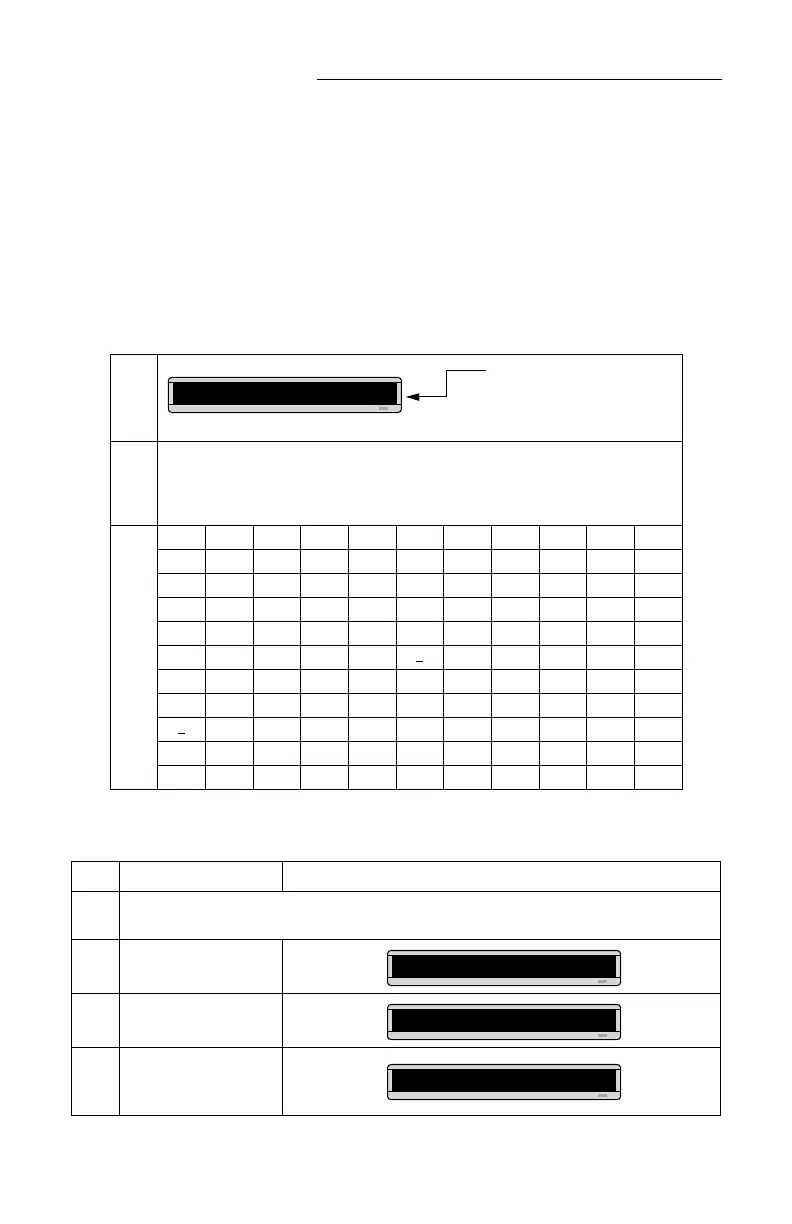
International characters — like ü and é — can be included in
messages.
NOTE: International characters can not be used with the small [SS5]
font.
The following table summarizes all the international characters that
can be used:
The following example shows how to use international characters in
a message:
Base
Characters
(Use the CAPS button on the Remote Control for the lowercase letters.)
ACE INOUY? !$
International
Characters
âÇéïñôüÿ¿¡¢
äçêîÑöûY?!£
å C ëìN òÜy ¥
Ä c è InÖú ƒ
ÅÉi ó U$
æ Eo
u
Æ eO
á o
a
A
a
Step When you do this... You see this...
1
Delete all the messages currently stored in the sign.
(See “Clearing a sign’s memory” on page 5 or “Example 5 — Deleting messages” on page 16.)
2 Press PROGRAM.
3 Press ADV.
4
Using CAPS and SHIFT
when needed, type Submit
your re
Type a Base Character, like A.
Then press SELECT to choose
an international character.
A] A
PROG TEXT A
A]
A]ubmit your re



 To Next Page