Voice Messages (Cont'd)
44
SCREEN ACTION
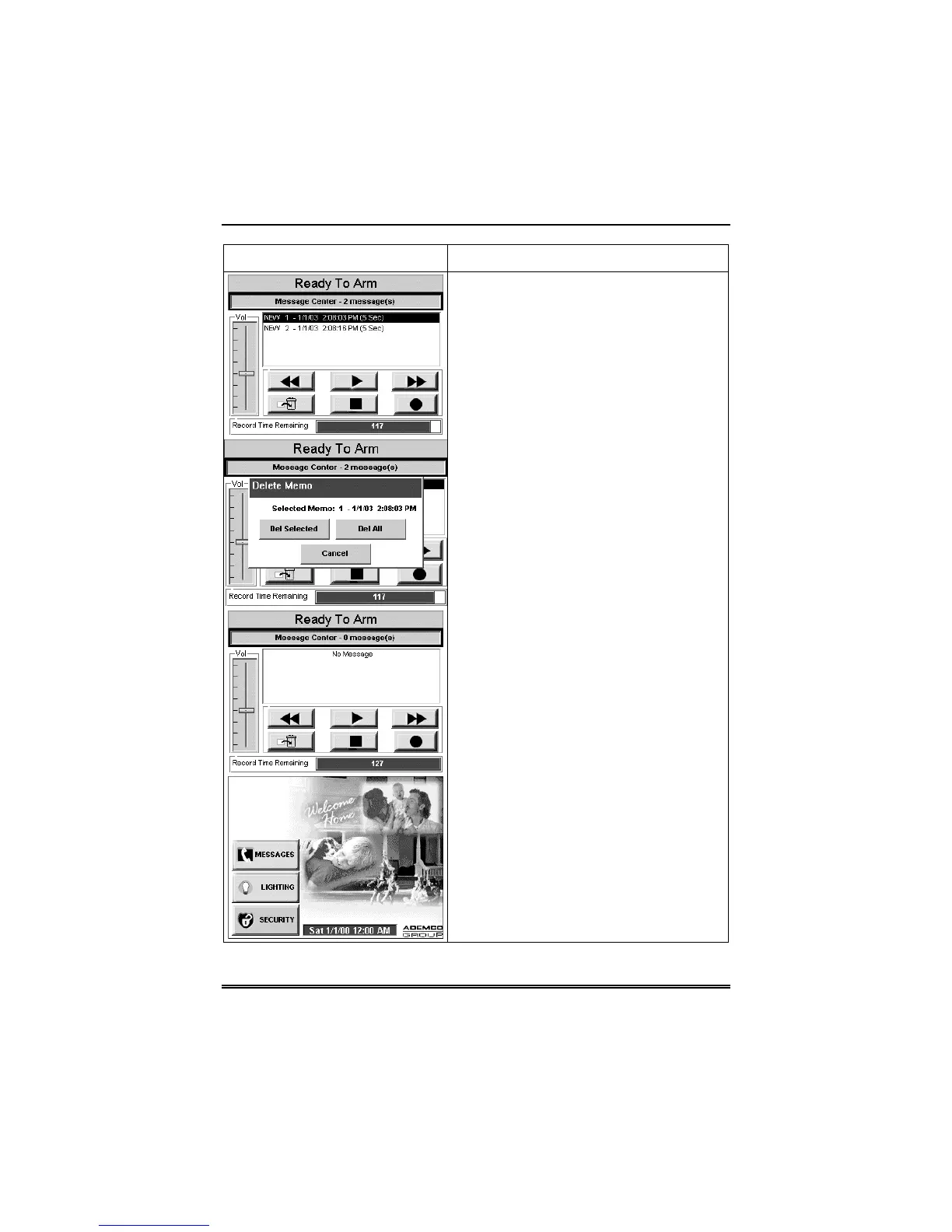
2. Select the message you wish to listen
to by touching it in the message list and
then pressing the
Play Message
button.
As the message is being played, a “Play
(x): Voice Message…” message is
displayed above the message list window.
When the end of the message is reached,
the playback will stop.
3. To listen to the next message, press
the
Advance One Message and Play
button.
4. If you wish to delete messages, press
the
Delete
button. The “Delete Memo”
screen will be displayed. You can press
the
Del Selected
button to delete only the
currently selected message and return to
the “Message Center” screen,
Del All
button to delete all messages and return
to the “Message Center” screen,
or the
Cancel
button to return to the
“Message Center” screen without deleting
any messages.
5. To exit, depress the
BACK
or
HOME
button and the “Home” screen will be
displayed.


 To Next Page