Industrial Electronic Devices
ADFweb.com S.r.l.
Document code: MN67044_ENG Revision 2.100 Page 20 of 37
SECTION VARIABLES (BY POSITION):
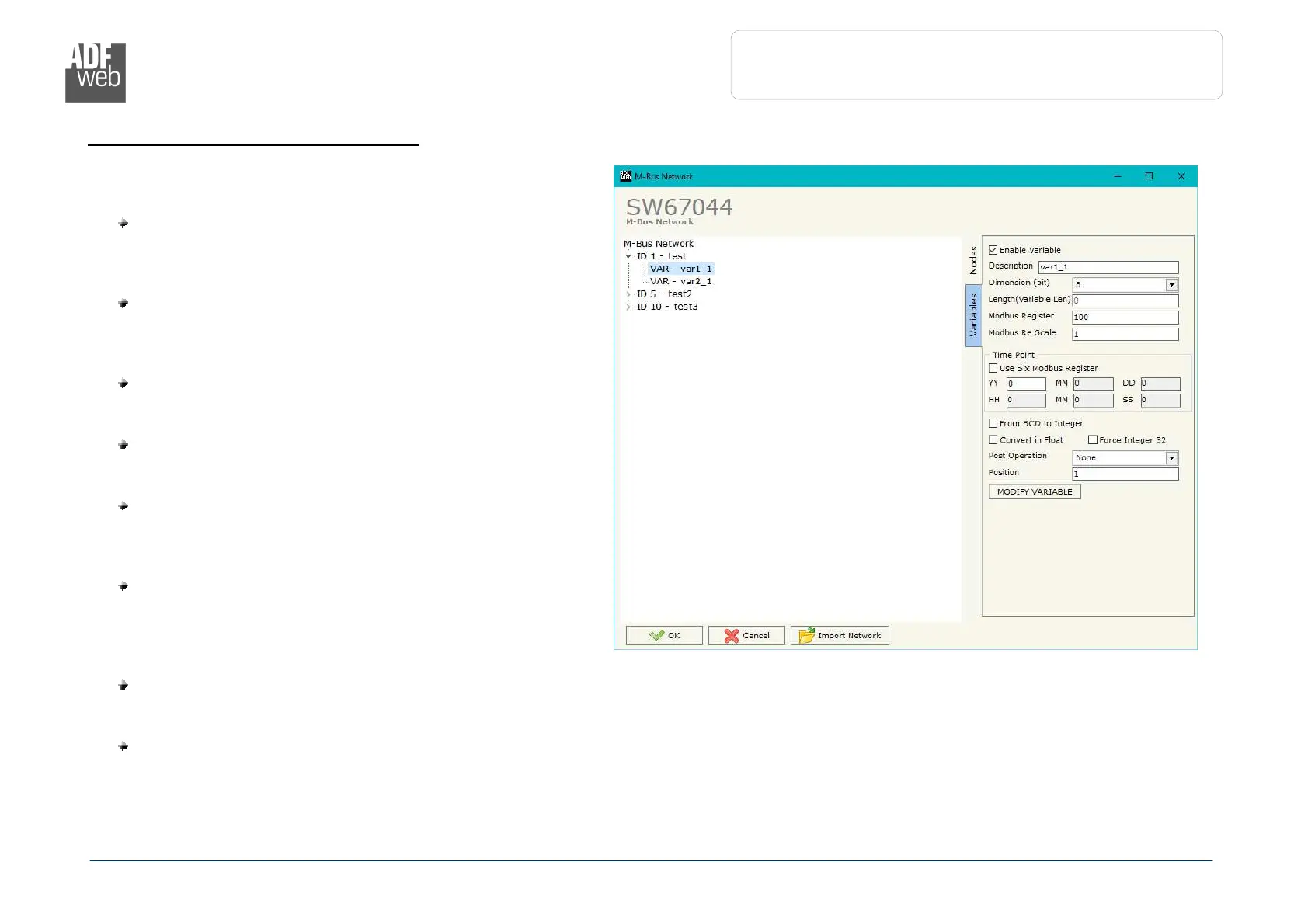
Selecting the desired node it is possible to add a variable. In
order to create a new variable it is necessary to fill these items:
To use the created variable the field “Enable Variable”
must be checked. If you have created a variable but for
the moment it is unused it is possible to uncheck the field
“Enable Variable” without delete it;
In the field “Description” it is possible to write a
description of the variable (it isn’t a necessary
information, it helps the readability of the tree of
network);
The field “Dimension” is used to select the dimension of
the variable (8, 16, 24, 32, 32 real, 48, 64 bit, Variable
Length);
In the field “Length(Variable Len)” insert the length of
the data in the case of the dimension is “Variable
Length”;
In the field “Modbus Register” it is necessary to insert
the value of Modbus Register that contains the data of
the M-Bus device. It is possible to insert from Modbus
Register “1” to “60000”;
In the field “Modbus Re Scale” it is necessary to insert
the value of Modbus Register that contains the value of
measure scale. If the scale is not necessary, you have to
insert the number “0” in this field. It is possible to insert
from Modbus Register “1” to “60000”;
If the field “Use Six Modbus Register” and the “Type of Data” is “Time Point” it is possible to read the information of Year, Month,
Day, Hour, Minutes, Seconds on six consecutive Modbus registers without decoding the data (if not selected the values are the same
of the reply of the slave device, so coded with a determinate structure). You have to insert the first Modbus Register;
If the field “From BCD to Integer” is checked the Converter converts the BCD value of variable in Integer format. This happens only
if the variable is in BCD format; if it isn’t nothing changes;


 To Next Page