Home
ADIMLab
3D Printers
Gantry
Page 30 (Getting Print Models)
ADIMLab Gantry - Getting Print Models; Model Slicing Process
49 pages
Manual
Save Page as PDF
To Next Page
To Next Page
To Previous Page
To Previous Page
Loading...
30
6.1
Get print model (common ways to download online and
their own modeling, file
formats, such as STL, AMF, etc.)
6.2
Model slice
:
(
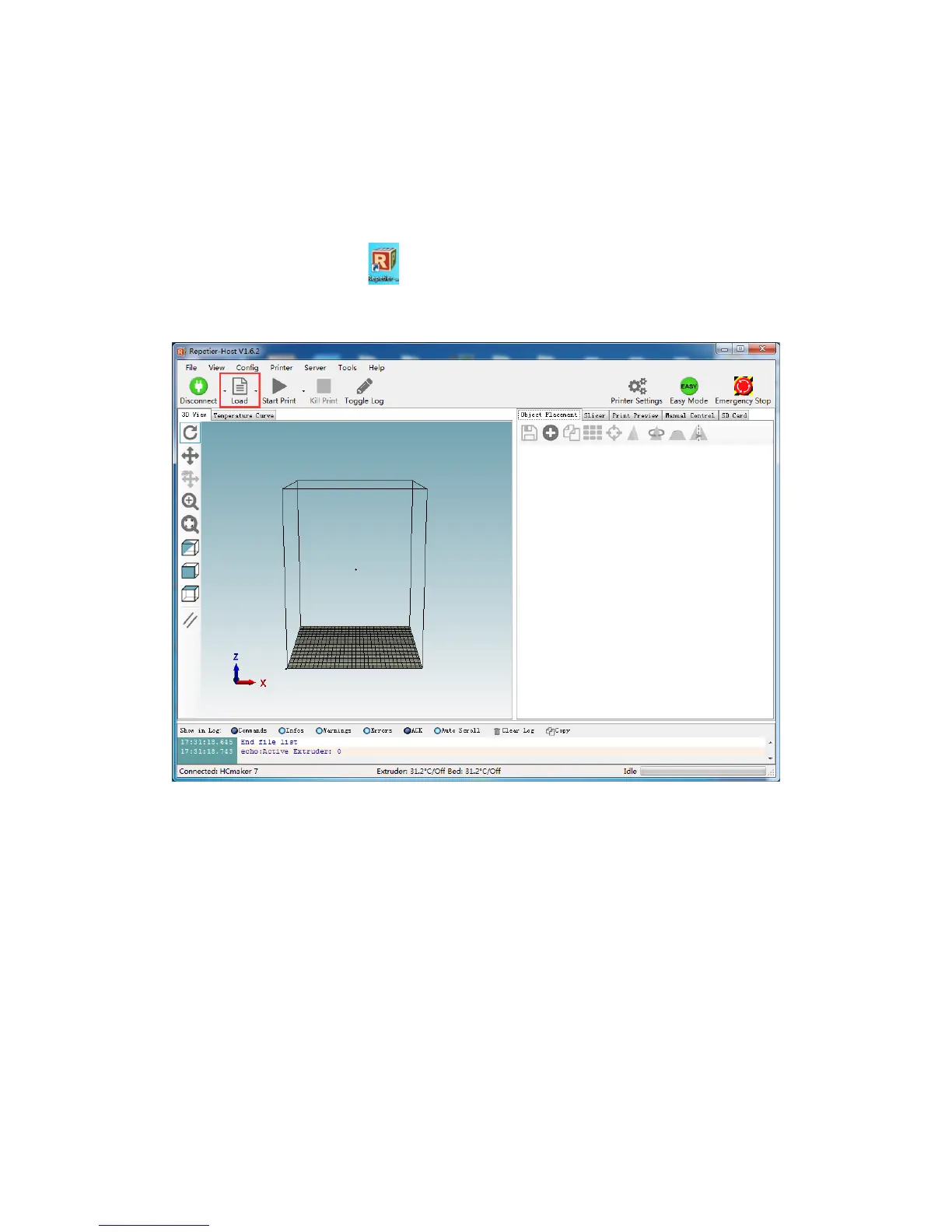
1)
Open the software
,
cli
ck
“
L
oad
”,
select
ion model
,
cli
ck
“
Open
”,
The model appe
ars in the 3D window
:
29
31
Table of Contents
Main Page
Default Chapter
2
Table of Contents
2
一、Overview
4
二、Thanks and Commitment
6
三、What Is 3D Printer
7
Printing Steps
7
Modeling
7
Slice Output 3D Model
8
四、Prepare Printing
9
Adimlab-Gantry Printer Architecture
10
Assembly and Wiring
11
First Time Test the Adimlab
11
First Time Prepare Printing
13
五、Slice Software Installation and Configuration
17
Software Copy
17
Install Software
17
Setting Software
23
Slicing Software Setting
23
六、Start Printing
29
Model Slice
30
Select Printing Model
31
Install Filament
33
Select Printing Way
34
Printing Finish
39
7、Printer Operating
39
Replace Filament
41
Replace Filament During Printing
41
Pause and Resume Printing
43
Stop Printing
45
Filament Detector
45
Adjust Printing Temperature
47
Adjust Printing Speed
47
8、Problem Solutions
48
Analysis Common Problem
48
Protect Heating
48
9、Support and Service
49
Other manuals for ADIMLab Gantry
Pre-Installation Instructions
6 pages
Assembly Specifications
23 pages


 To Next Page