29
REMOTE CONTROL GUIDELINES
REMOTE FUNCTIONS
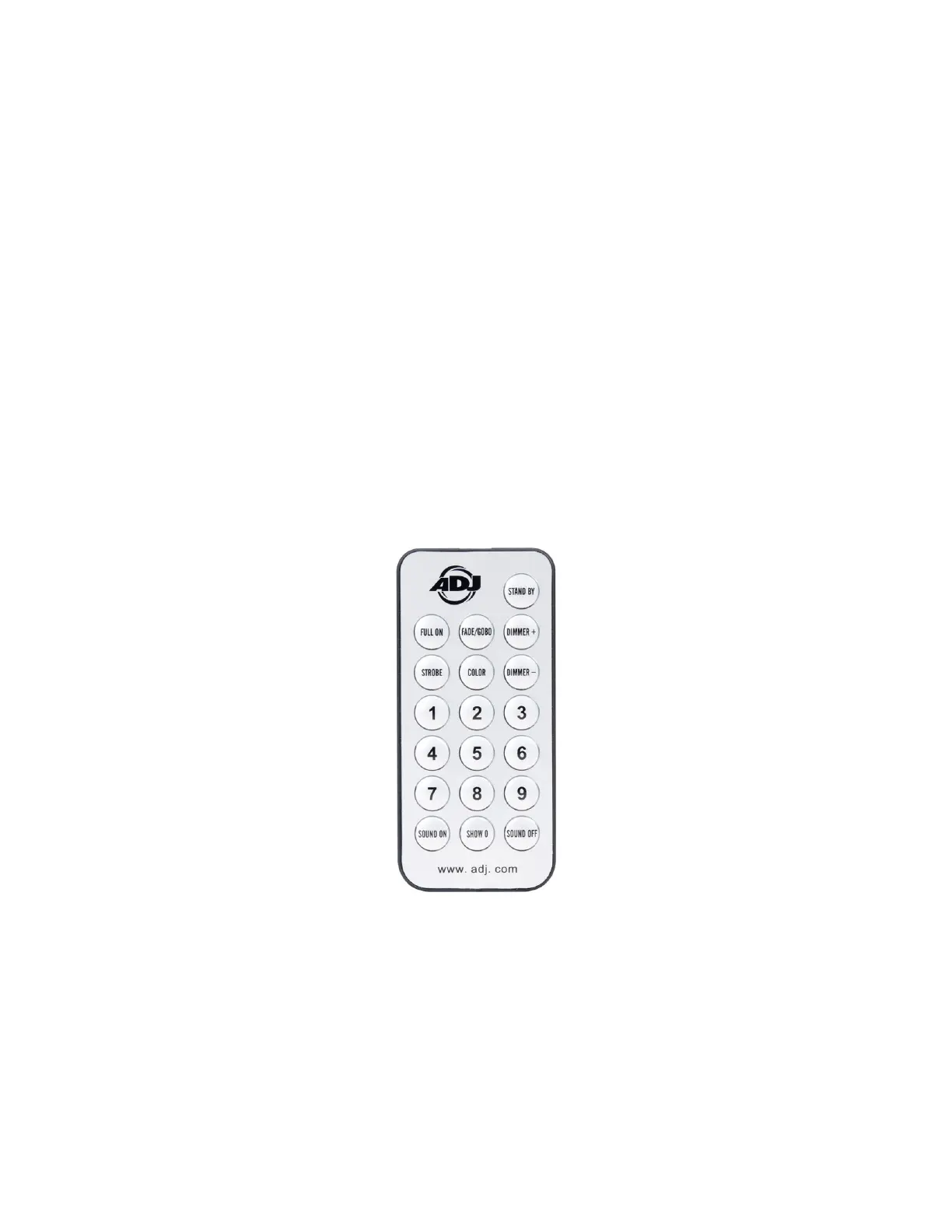
The functions available on the ADJ UC IR remote unit are detailed below:
• Standby - Press once to black out the fixture, and press again to return the fixture to the original
state.
• Full On - Press to fully illuminate the device.
• Fade/Gobo - Press to cycle between Color Fade, Color Change, and Auto Run Mode.
• “Dimmer+” and “Dimmer-” - Use to adjust color output intensity when running in Color Mode.
• Strobe - Press to activate the strobing function, then use the number keys 1-4 to select strobe
speed. 1 is the slowest speed, and 4 is the fastest.
• Color - Press to activate Color Mode, then use buttons 1-9 to select the desired color.
• Number Keys (1-9) - In Strobe Mode, buttons 1-4 are used to select strobe speed. In Color
Mode, buttons 1-9 are used to select the desired color. In Show Mode, buttons 1-9 are used to
select the desired show.
• Sound On and Sound Off - Activate or deactivate sound active mode.
• Show 0 - Press to activate Show Mode, then use the number keys to select the desired show.
Shows 1-9 are selected by pressing buttons 1-9, Show 10 by pressing the Show 0 button twice,
and Show 11 by pressing button 1 twice.



 To Next Page