ADJ Products, LLC - www.adj.com - Entourage Instruction Manual Page 8 ADJ Products, LLC - www.adj.com - Entourage Instruction Manual Page 9
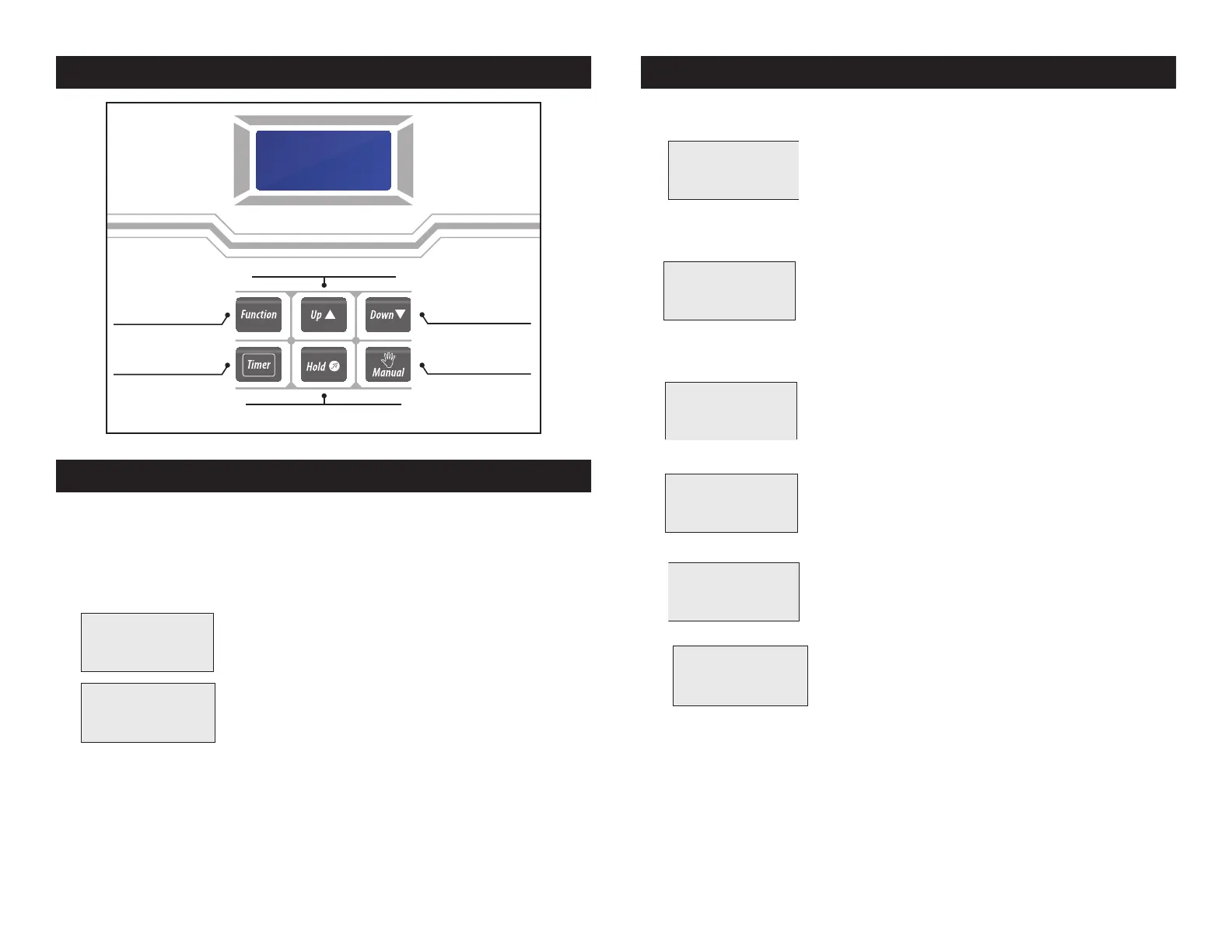
Entourage Control Panel
Fan Speed
& Volume Adjustment
Increasing numerical value for Function
Decreasing numerical value
for Function
Timer Fog,
adjustable by Function Button
Constant Fog, adjustable by Function Button
Manual Fog,
Max. Fan Speed & Volume
Version:
1.0
Warming
Up……
DMX set
Addr- xxx
DUR. xxx
INT. xxx
--> Dura xxx
Intv xxx
Dura xxx
--> Intv xxx
DUR. xxx
INT. xxx
(Stop)
Cleaning
DMX set
Addr- xxx
--> Vol xxx
Fan xxx
--> Vol xxx
Fan xxx
Vol xxx
--> Fan xxx
(Stop)
Cleaning
DMX set
Addr- xxx
Manual
V100 F100
DMX set
Addr- xxx
*Hold
TimeSet
DMX set
Addr- xxx
1ch.Axxx
VxxxFxxx
2ch.Axxx
VxxxFxxx
4ch.Axxx
VxxxFxxx
VxxxFxxx
DxxxIxxx
4ch.Axxx
VxxxFxxx
Warming
Up……
DMX set
Addr- xxx
DUR. xxx
INT. xxx
--> Dura xxx
Intv xxx
Dura xxx
--> Intv xxx
DUR. xxx
INT. xxx
(Stop)
Cleaning
DMX set
Addr- xxx
--> Vol xxx
Fan xxx
--> Vol xxx
Fan xxx
Vol xxx
--> Fan xxx
(Stop)
Cleaning
DMX set
Addr- xxx
Manual
V100 F100
DMX set
Addr- xxx
*Hold
TimeSet
DMX set
Addr- xxx
1ch.Axxx
VxxxFxxx
2ch.Axxx
VxxxFxxx
4ch.Axxx
VxxxFxxx
VxxxFxxx
DxxxIxxx
4ch.Axxx
VxxxFxxx
Entourage Start Up
START UP:
1. Connect the provided PowerCon cable to the fog machine
input. Then plug the power cord into a matching power
source. There is no ON/OFF switch.
2. Primary power is now “On”.
3. 2 Seconds after power is applied the unit
will begin to warm up.
4. After the unit has warmed up, the last function that was oper-
ating before power was shut o will be displayed again. Exam-
ple: If the Timer function was active that will be displayed.
TIMER OPERATION:
1. Press the TIMER button to enter the fog
timer operation.
2. Press the FUNCTION button to enter the timer settings menu.
3. Use the UP or DOWN buttons to adjust
duration (output) time, 3s-250s.
4. Press the FUNCTION button to switch to interval adjustment.
5. Use the UP or DOWN buttons to adjust
interval (pause) time, 5s-250s.
6. Press the TIMER button again to activate the
timer function. Press the TIMER button
again to deactivate the timer function.
7. When you stop Timer operation the display
will read (Stop) Cleaning. This will take
about 15 seconds.
8. After cleaning is done, the DMX setting
display will show.
Entourage Operation
Version:
1.0
Warming
Up……
DMX set
Addr- xxx
DUR. xxx
INT. xxx
--> Dura xxx
Intv xxx
Dura xxx
--> Intv xxx
DUR. xxx
INT. xxx
(Stop)
Cleaning
DMX set
Addr- xxx
--> Vol xxx
Fan xxx
--> Vol xxx
Fan xxx
Vol xxx
--> Fan xxx
(Stop)
Cleaning
DMX set
Addr- xxx
Manual
V100 F100
DMX set
Addr- xxx
*Hold
TimeSet
DMX set
Addr- xxx
1ch.Axxx
VxxxFxxx
2ch.Axxx
VxxxFxxx
4ch.Axxx
VxxxFxxx
VxxxFxxx
DxxxIxxx
4ch.Axxx
VxxxFxxx
Version:
1.0
Warming
Up……
DMX set
Addr- xxx
DUR. xxx
INT. xxx
--> Dura xxx
Intv xxx
Dura xxx
--> Intv xxx
DUR. xxx
INT. xxx
(Stop)
Cleaning
DMX set
Addr- xxx
--> Vol xxx
Fan xxx
--> Vol xxx
Fan xxx
Vol xxx
--> Fan xxx
(Stop)
Cleaning
DMX set
Addr- xxx
Manual
V100 F100
DMX set
Addr- xxx
*Hold
TimeSet
DMX set
Addr- xxx
1ch.Axxx
VxxxFxxx
2ch.Axxx
VxxxFxxx
4ch.Axxx
VxxxFxxx
VxxxFxxx
DxxxIxxx
4ch.Axxx
VxxxFxxx
Version:
1.0
Warming
Up……
DMX set
Addr- xxx
DUR. xxx
INT. xxx
--> Dura xxx
Intv xxx
Dura xxx
--> Intv xxx
DUR. xxx
INT. xxx
(Stop)
Cleaning
DMX set
Addr- xxx
--> Vol xxx
Fan xxx
--> Vol xxx
Fan xxx
Vol xxx
--> Fan xxx
(Stop)
Cleaning
DMX set
Addr- xxx
Manual
V100 F100
DMX set
Addr- xxx
*Hold
TimeSet
DMX set
Addr- xxx
1ch.Axxx
VxxxFxxx
2ch.Axxx
VxxxFxxx
4ch.Axxx
VxxxFxxx
VxxxFxxx
DxxxIxxx
4ch.Axxx
VxxxFxxx
Version:
1.0
Warming
Up……
DMX set
Addr- xxx
DUR. xxx
INT. xxx
--> Dura xxx
Intv xxx
Dura xxx
--> Intv xxx
DUR. xxx
INT. xxx
(Stop)
Cleaning
DMX set
Addr- xxx
--> Vol xxx
Fan xxx
--> Vol xxx
Fan xxx
Vol xxx
--> Fan xxx
(Stop)
Cleaning
DMX set
Addr- xxx
Manual
V100 F100
DMX set
Addr- xxx
*Hold
TimeSet
DMX set
Addr- xxx
1ch.Axxx
VxxxFxxx
2ch.Axxx
VxxxFxxx
4ch.Axxx
VxxxFxxx
VxxxFxxx
DxxxIxxx
4ch.Axxx
VxxxFxxx
Version:
1.0
Warming
Up……
DMX set
Addr- xxx
DUR. xxx
INT. xxx
--> Dura xxx
Intv xxx
Dura xxx
--> Intv xxx
DUR. xxx
INT. xxx
(Stop)
Cleaning
DMX set
Addr- xxx
--> Vol xxx
Fan xxx
--> Vol xxx
Fan xxx
Vol xxx
--> Fan xxx
(Stop)
Cleaning
DMX set
Addr- xxx
Manual
V100 F100
DMX set
Addr- xxx
*Hold
TimeSet
DMX set
Addr- xxx
1ch.Axxx
VxxxFxxx
2ch.Axxx
VxxxFxxx
4ch.Axxx
VxxxFxxx
VxxxFxxx
DxxxIxxx
4ch.Axxx
VxxxFxxx
DMX set
Addr- xxx
DUR. xxx
INT. xxx
--> Dura xxx
Intv xxx
Dura xxx
--> Intv xxx
DUR. xxx
INT. xxx
(Stop)
Cleaning
DMX set
Addr- xxx
--> Vol xxx
Fan xxx
--> Vol xxx
Fan xxx
Vol xxx
--> Fan xxx
(Stop)
Cleaning
DMX set
Addr- xxx
Manual
V100 F100
DMX set
Addr- xxx
*Hold
TimeSet
DMX set
Addr- xxx
1ch.Axxx
VxxxFxxx
2ch.Axxx
VxxxFxxx
4ch.Axxx
VxxxFxxx
VxxxFxxx
DxxxIxxx
4ch.Axxx
VxxxFxxx


 To Next Page
 Loading...