ADJ Products, LLC - www.adj.com - Ikon Prole User Manual Page 4 ADJ Products, LLC - www.adj.com - Ikon Prole User Manual Page 5
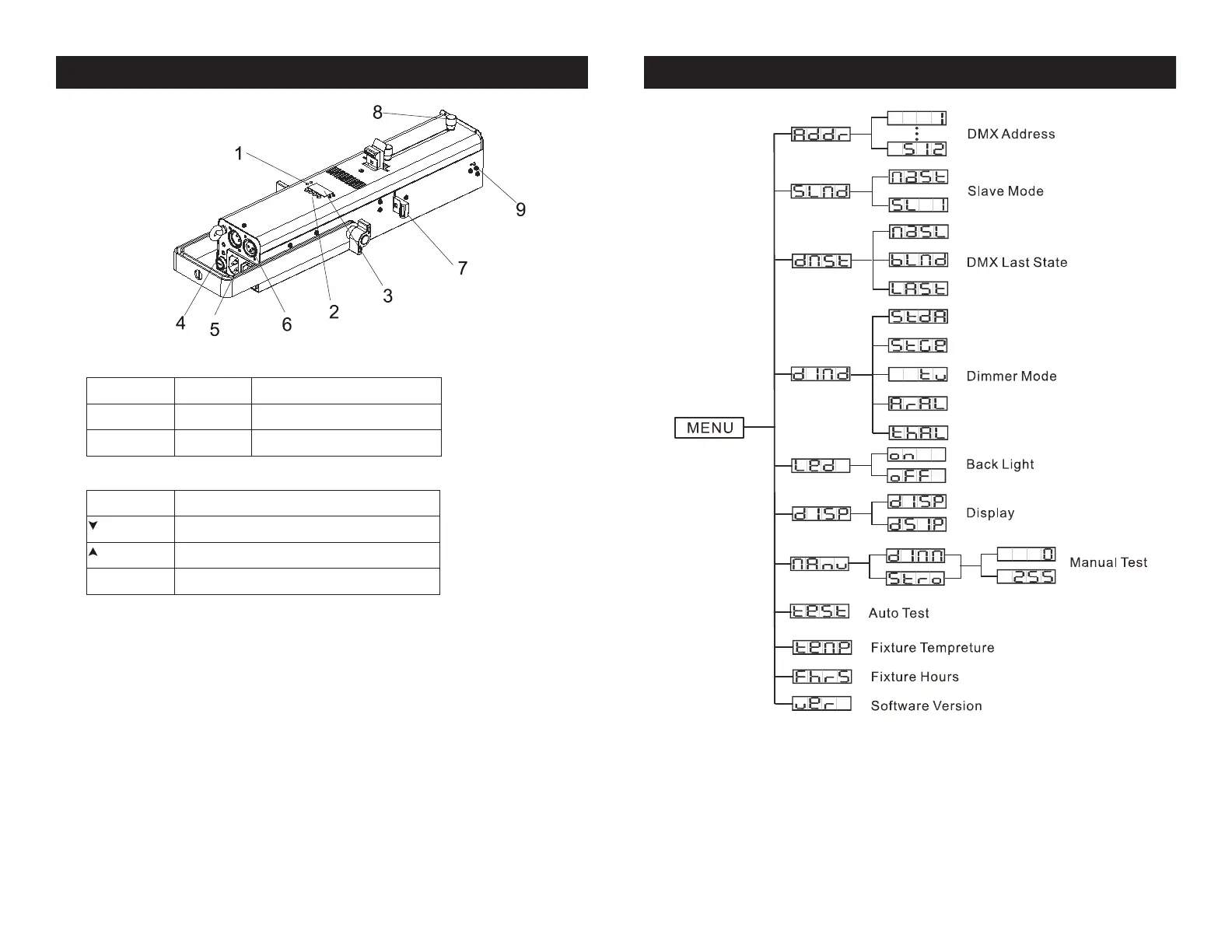
Ikon Profile System Menu Ikon Profile Fixture Layout
1. LED:
DMX On DMX input present
MASTER On Master Mode
SLAVE ON Slave Mode
2. Button:
MENU To select the programming functions
UP To go forward in the selected functions
DOWN To go backward in the selected functions
ENTER To conrm the selected functions
3. Fuse (T 2A): Protect the unit from damage of over current
4. Display: To show the various menus and the selected function
5. Power In/Out: Power cable input/output connections
6. DMX In/Out: 3-pin XLR connections for DMX 512 operation
7. Flags: Use these to adjust the framing of your gobo
8. Knobs: Move to adjust the beam angle from 15 to 4 0 degree and to focus the gobo
9. Spring: To lock the color gel frame into place







 To Next Page